













Manage Your Background Information
Overview
The Background tab of your Personal Profile contains key details about your education, work history, certifications, job skills, and more, allowing the system to personalize your career support. This information helps to match you with the most relevant jobs, recommend training, and build a strong résumé on your behalf. Including items like your driver’s license information, tools and technologies you use, languages spoken, and preferred job type ensures better results and a smoother job search experience. The more complete your background, the more accurately the system supports your career goals.
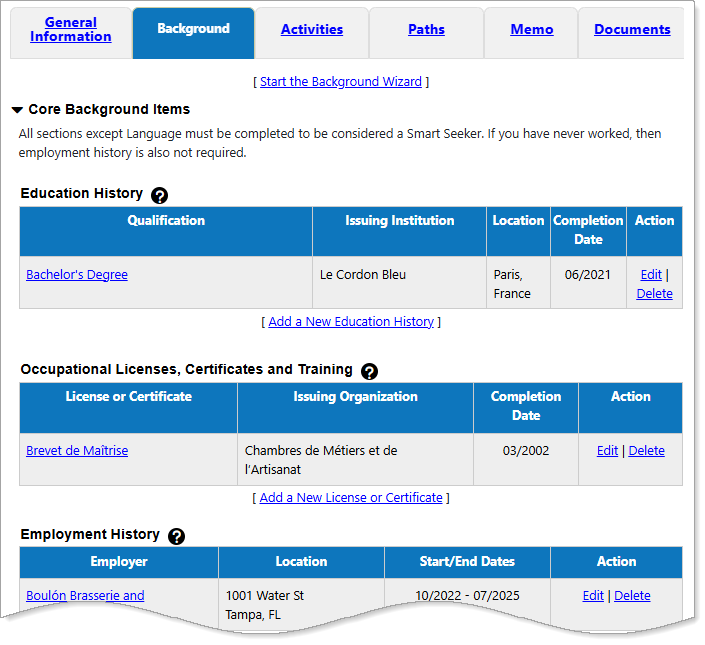
Personal Profile – Background Tab
Where to Find This Feature
-
Header bar > Profile icon > Background tab
-
Left navigation menu > Quick Menu > My Portfolio > My Individual Profiles > Personal Profile > Background
-
My Dashboard > Welcome statement [your name] link > Background tab
-
My Dashboard > Widgets > My Personal Profile widget > My Background
-
Directory of Services tab > Quick Menu > My Portfolio > My Individual Profiles > Personal Profile > Background tab
Review and Manage Your Background Information
The Background tab of your Personal Profile allows you to view, add, edit, and delete your information in two ways:
-
The first way is on the on Background tab itself. You can review your information as you scroll down the page and directly access sections with information to be added or corrected by using the Add a New..., Edit, and Delete links.
-
The second option is to use the Background Wizard, which guides you step-by-step through each section of your background information. You can launch the wizard from either the top or bottom of the Background tab by selecting the Start the Background Wizard link. As you progress through the wizard, certain pages contain information previously entered during registration, which you can edit or remove.
The following table provides details on managing each section of your Background tab.
|
Section |
Description |
|---|---|
| Education History |
This section lets you document your academic and training background as part of your profile-building process. You can efficiently enter education programs, relevant dates, and additional comments—all of which contribute to a polished and informative résumé. Displaying completion dates for education programs on your résumé is optional, and can be helpful—or harmful—depending on your situation:
Tip: Include all of your education programs, even those you did not finish or have yet to complete.
See Add or Edit Education History for details. |
| Occupational Licenses, Certificates and Training |
This section lets you document important professional credentials that enhance your qualifications, supporting a complete and well-organized presentation of your professional achievements. See Add or Edit Occupational Licenses, Certifications, and Training for details. |
| Employment History |
This section enables you to record your previous work experiences, including employer information, job titles, occupations, and position details. You can also incorporate related technical skills and tools into your profile, enhancing the overall quality of your employment history.
Tip: A good rule of thumb is to list your last 10–15 years of work experience, focusing on the roles most relevant to the job you want. You don’t need to include every position you ever held — highlight the jobs and achievements that best show your skills, experience, and career growth.
If you have no prior work experience, the Employment History section is optional for use on your résumés. See Add or Edit Employment History for details. |
| Job Skills |
This section lets you showcase the specific skills you acquired through work experience, training, and education. The Select Your Job Skills page provides an organized way to review, add, or update job-related skills across multiple categories, ensuring a comprehensive and accurate skill set that enhances your résumé and professional profile. See Add or Edit Job Skills for details. |
| Tools and Technology |
This section lets you list your experience with a wide variety of software applications and tools based on your selected occupation. By adding tools and technology experience to your profile, you can then search for jobs based on the saved skill sets and employers can easily find your résumé when your skills match their hiring criteria. See Add or Edit Tools and Technology for details. |
| Résumé Objective |
This section lets you create a short, focused statement that appears at the top of your résumés, outlining your career goals and what you aim to bring to an employer. A well-crafted objective works in your favor—especially if you are changing careers, entering the workforce, or targeting a very specific role. The Objective statement shows employers that your skills and talents align with the requirements of the position you are applying for. By completing this Objective section of your Background tab, the information automatically appears in any résumé you create that includes this section. You can still customize the Objective on each individual résumé, as desired. See Add or Edit Résumé Objective for details. |
| Résumé Ability Summary |
A résumé Ability Summary is crucial because it acts as a concise and impactful introduction to your résumé, immediately highlighting your most relevant skills and experiences to the hiring manager. This helps your résumé stand out, especially when recruiters are reviewing numerous applications, and allows you to control the initial impression you make. By showcasing your top qualifications and accomplishments, it provides context for the rest of your résumé and demonstrates your value to the employer. After completing the Ability Summary section of your Background tab, the information automatically appears in any résumé you create that includes this section. You can still customize the Ability Summary on each résumé, as desired. See Add or Edit Résumé Ability Summary for details. |
| Résumé Honors and Activities |
Including Honors and Activities on your résumé is important because it demonstrates your skills, work ethic, and achievements beyond just your academic or professional experience. This section of your résumé highlights your leadership, teamwork, communication, and other valuable soft skills, making you a more well-rounded and competitive candidate. After completing the Honors and Activities section of your Background tab, the information automatically appears in any résumé you create that includes this section. You can still customize the Honors and Activities on each résumé, as desired. See Add or Edit Résumé Honors and Activities for details. |
| Résumé Additional Information |
An Additional Information section on your résumé is valuable when you have qualifications, experiences, or achievements that do not quite fit under traditional sections like Work Experience or Education. Employers often want more than just technical ability—they are also looking for leadership, initiative, and character. Listing things like community involvement, professional affiliations, or special projects presents valuable details that enhance your candidacy and show the employer a more complete picture of your qualifications. By completing the Additional Information section of your Background tab, the information automatically appears in any résumé you create that includes this section. You can still customize the Additional Information on each résumé, as desired. See Add or Edit Résumé Additional Information for details. |
| Résumé Detailed References |
References act as social proof of your skills, work ethic, and professional character. When a recruiter or hiring manager sees endorsements from colleagues, supervisors, or clients, it reassures them that your accomplishments are genuine. Hiring managers often verify references later in the hiring process. If you already include them, you save them a step and demonstrate transparency, which can accelerate trust and possibly the hiring timeline. Best Practices:
See Add or Edit Résumé Detailed References for details. |
| Desired Occupation(s) |
Recruiters often scan hundreds of profiles. If your desired occupation is clear, they can instantly see whether you are a match for the role they are trying to fill. It helps you show up in the right searches. A clear desired occupation signals that you are intentional about your career, not just applying to anything available. Desired Occupation must be completed in order for résumés to be set to 'Online,' so employers and recruiters can search for and view them.  How Desired Occupation is Determined: How Desired Occupation is Determined:
The system uses a series of checks and rules to automatically set your Desired Occupation; however, you can change your Desired Occupation at any time through the Background tab. There are many areas in the system where you can select an occupation. For example, when searching for a job, when creating an employment history on your résumé, or when researching labor market information. The system makes the selected occupation your Desired Occupation based on a hierarchy, or priority, listing of activities that require choosing an occupation. The priority order for setting a selected occupation as the Desired Occupation is as follows, from the highest priority to the lowest:
Selecting an occupation during an activity with a higher priority overwrites any Desired Occupation set through a lower priority. For example, an individual with no set Desired Occupation enters the system and begins looking for labor market information:
See Specify Your Desired Occupation for details. |
| Desired Job Type |
Your desired job type is a profile of days and hours you can work and other important details. When you state your availability up front, recruiters immediately know if your schedule aligns with the role. This avoids wasted interviews for jobs that do not fit your needs. If you prefer remote, hybrid, or specific shifts, saying so filters out mismatched positions and increases the chance that you are contacted for jobs that truly fit your lifestyle. Best Practices:
See Specify Your Desired Job Type for details. |
| Desired Location(s) |
Recruiters often search by location or filter candidates according to where the role is based. If your desired location is clear, your profile is more likely to show up in searches for jobs that match where you actually want to work. Without a location preference, employers may assume you are not serious about relocating or that you are tied only to your current area. A specified desired location shows you thought about where you want your career to grow. Desired Location must be completed in order for résumés to be set to 'Online,' so employers and recruiters can search for and view them. See Specify Your Desired Job Location for details. |
| Desired Salary |
When recruiters and hiring managers filter candidates, they often look at salary expectations to ensure alignment with their budget. By listing your target salary range, you are more likely to be approached by employers who can actually meet your expectations—saving you from wasting time on roles that do not pay what you need. Stating your salary range demonstrates that you know your worth and are confident in your value. Employers often view this positively, as it signals clarity and professionalism. It also helps reduce awkwardness or tension later in the interview process. Desired Salary must be completed in order for résumés to be set to 'Online,' so employers and recruiters can search for and view them. See Specify Your Desired Salary for details. |
| Driver's License Information |
Some jobs—such as delivery drivers, field technicians, sales representatives, or roles requiring travel—require a valid driver’s license. By including this information, you show employers up front that you meet a basic qualification. If a license is required but missing from your profile, employers must verify this later, slowing down the hiring process. Having it up front removes doubt and accelerates screening.
Tip: Only include your license information if it is relevant to the roles you are targeting. For positions that do not require driving, it does not add value to your profile.
See Add or Edit Driver's License Information for details. |
| Languages & Proficiency |
Many roles—especially in global companies, customer service, translation, teaching, or international business—require specific language skills. Listing your proficiency lets employers know you meet those qualifications. Strong language skills highlight your ability to collaborate across teams, interact with diverse clients, or work in multilingual environments. Employers see this as a valuable professional asset. See Indicate Your Languages and Proficiency for details. |
| Security Clearance |
Including your security clearance in your job-hunting profile is especially important if you are pursuing opportunities in government, defense, aerospace, intelligence, or other regulated industries. Many positions require a specific level of clearance (e.g., Confidential, Secret, Top Secret). By listing yours, you immediately show employers you are eligible to access classified or sensitive information, which is often a non-negotiable requirement. See Specify Security Clearance for details. |
| Typing Speed |
Including your typing speed in your job-hunting profile can make a real difference, especially for roles where fast and accurate keyboard skills are essential. Jobs in data entry, transcription, administrative support, customer service, and virtual assistance often require a minimum typing speed. By listing yours, you immediately show you meet baseline requirements. See Indicate Typing Speed for details. |
| Your Websites |
Listing your personal websites and social media platforms, like LinkedIn, GitHub, or Behance, allows you to highlight your skills, experience, and achievements beyond a résumé. Sharing these links gives employers a more complete view of your professional brand. Creative professionals, developers, marketers, and writers often use personal websites and social platforms to showcase professional portfolios, projects, or thought leadership. Including these links can validate your expertise with real-world examples. When you add websites to your profile, they can be included in specific résumés as part of your Contact Information. Best practices:
See Add or Edit Your Website Links for details. |