
 Left Navigation Menu












Add or Edit Job Skills
Overview
The Select Your Job Skills page allows you to add and modify the specific skills you have acquired through work experience, training, and education. This interactive page provides an organized way to review, add, or update job-related skills across multiple categories, ensuring a comprehensive and accurate skills profile that enhances your résumé and professional profile.
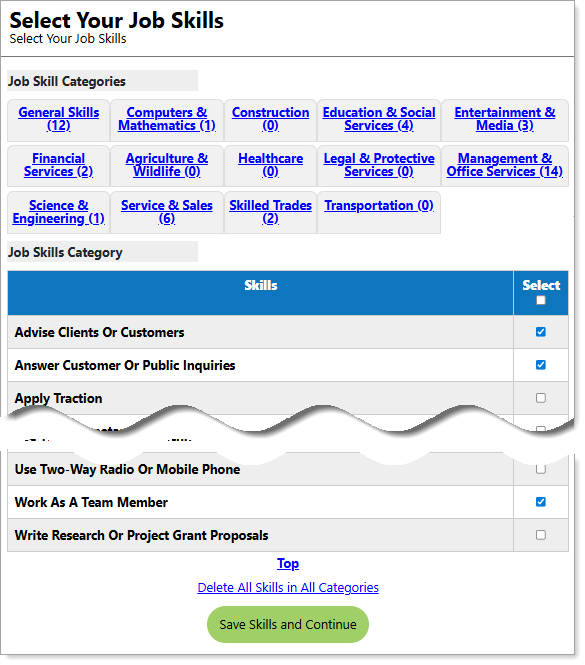
Select Your Job Skills Page
Where to Find This Feature
-
Header bar > Profile icon > Background tab > Core Background Items > Job Skills section > Edit Job Skills link
-
Left navigation menu > Quick Menu > My Portfolio > My Individual Profiles > Personal Profile > Background tab > Core Background Items > Job Skills section > Edit Job Skills link
-
The your name link in the Welcome statement on the dashboard > Background tab > Core Background Items > Job Skills section > Edit Job Skills link
Steps to Complete the Select Your Job Skills Page
Your site may display different options from those shown here.
The steps below guide you through the process of effectively modifying and managing your job skills.
-
To clear any currently saved skills, scroll to the bottom of the page and select the Delete All Skills in All Categories link.
-
Select a Job Skills Category from the tabs at the top of the page. Skills for the selected category display.
-
Check or uncheck your applicable skills for the category.
-
Repeat the above steps for each job skills category tab – saving each tab as you complete it is not required. As you continue adding skills, the number of skills selected is reflected in the Job Skills Category tab labels.
-
When satisfied with your identified skills, select the Save Skills and Continue button to display the Skill List page. All the skills you selected display for you to review.
-
If the list is correct, select the Continue button; otherwise, click the Modify Skills button to repeat the above steps.
-
The Job Skills tab of your self assessment profile displays with all of your skills listed by job skill category. To modify your skills, select the Edit Job Skills link.
-
To view occupations and jobs that align with your skill set, select the Find Matching Occupations and Jobs button.
-
Use the option buttons to Please select the desired occupation match level for your selected assessments (Closely, Moderately, Loosely, or Show All), and select the Continue button to display your matching occupations.
-
-
To return to the Background tab of your personal profile, select the Background button.
Tips
-
Review job postings in your target field and note which skills are repeatedly listed. Identify those skills in your profile.
-
Use the exact wording from job descriptions to improve your chances in Applicant Tracking System (ATS) searches.
-
Avoid cramming in every skill you ever learned — stick to your strongest, most relevant skills.