
 Left Navigation Menu












Find Other Kinds of Assistance
Overview
The Assistance Center offers a variety of helpful information, including a site map, site search, quick reference card, one-stop office listings, and email addresses (see figure below).
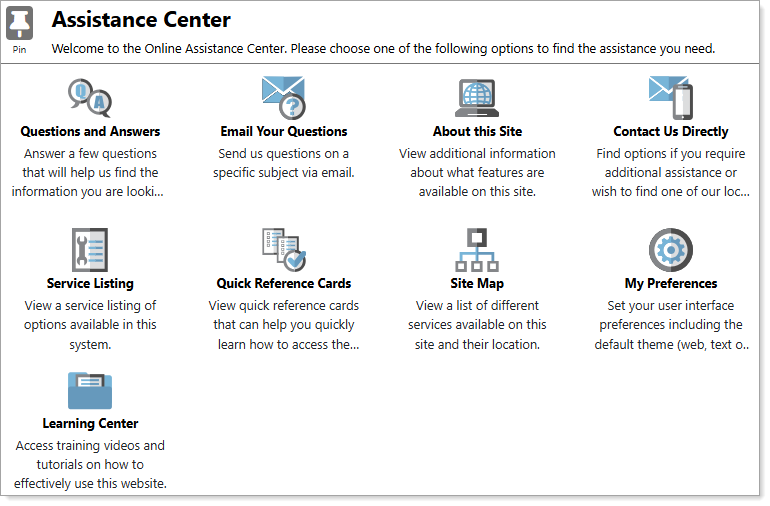
Assistance Center Page
Where to Find This Feature
-
Left Navigation Menu > Other Services > Assistance Center
-
Header bar > Assistance icon
-
Footer bar > Assistance link
-
My Dashboard > Directory of Services tab > Other Services > Assistance Center
Available Resources
The Assistance Center offers several options to help you find the assistance you need. Options available include the following:
-
Questions and Answers – Steps you through a questionnaire to determine what you need help with. Based on your responses, the system produces an "Activity List" of recommended areas to visit.
-
Email Your Questions – Opens a form that sends an email to a staff member, to alert them to problems or issues you are having in using this system. A member of your local office contacts you to assist.
-
Contact Us Directly – View options to locate and contact your nearest OneStop office.
-
About This Site – View additional information about the system, including main features for job seekers and students, accessibility features, descriptions of tools, and more.
-
Service Listing – View a list of links to all available services.
-
Quick Reference Cards – Quick reference cards can be used to help you easily navigate through the main functions available in the system.
-
Site Map – Provides a list of links to system services organized by function for easy identification and access.
-
Site Search – Search for information of interest using criteria such as keywords, specific search areas, of the system, and time frame.
-
My Preferences – Customize your user interface for speed, accessibility, menu presentation, and folder management.
-
Learning Center – Access training videos and tutorials on a variety of system functions, such as creating a résumé, researching an industry, finding a job, and more.