













Directory of Services
Overview
The Directory of Services page is an alternative way to see all the system features and menu options from a full page, rather than selecting them from the Left Navigation Menu.

Directory of Services Page – Services for Individuals
Your site may display different options from those shown here.
Where to Find This Feature
-
Left navigation menu > My Individual Workspace > Directory of Services
-
My Dashboard > Directory of Services tab
-
Footer bar > Services > Individual
About the Directory of Services
The Directory of Services page displays with the Services for Individuals menu group expanded on the page (see figure above). On this page, each menu group is shown as a panel. You can expand each panel by selecting it to see descriptions of the menu choices, and options to access that area of the system. The Directory of Services includes the following panels:
 Services for Individuals
The Services for Individuals panel offers a comprehensive suite of resources designed to support every stage of your employment and personal development. From career exploration and job search assistance to financial planning, education, and community support, these services are tailored to meet a wide range of needs.
-
Career Services – Research occupations and careers, or analyze your skills to identify a suitable occupation. See Explore Careers and Occupations for details.
-
Job Seeker Services – Find assistance in locating a job and getting employed and learn how to develop effective résumés and cover letters.
-
Community Services – Find community services and benefits for which you may be eligible, such as health, welfare, nutrition, and financial assistance. See Find Community Support Services for details.
-
Financial Services – Prepare a basic budget analysis, create financial plans, and find financial aid for your training and education. See Explore Financial Resources for details.
-
Unemployment Services – View information on what benefits you are eligible for and how to file for them.
-
View Employers and Jobs – Find hiring employers and research the company before applying to openings. See Employer Profile for details.
-
Veteran Services – Find out what benefits are available for veterans and their dependents, such as health, pension, education, and vocational rehabilitation.
-
Youth Services – Access information about finding a job or career and explore alternative paths for youth after high school.
-
Senior Services – Find information on topics of interest to seniors, such as health care, employment and federal benefit programs.
-
Disability Services – Find information about services in your area for people with disabilities, including employment, health, and financial resources.
-
Education Services – Find a suitable training or education program, and view information on training providers and schools.
-
Farmworker Services – View information on seasonal and migrant farmworkers (MSFWs).
-
Labor Market Services – Access information about labor market trends, statistics, economics, demographics, and more.
-
Workplace Training – Find information on workplace training, such as on-the-job training, internships, and apprenticeships. See Research Training/Education Programs for details.
-
Common Application – Fill out a pre-application to determine potential eligibility for common programs, such as WIOA, Wagner-Peyser, and others.
-
Staff Provided Services – Discover what services are available when you visit your local One-Stop Career Center. See Staff-Assisted Services and Benefits Programs for details.
-
More Resources – View more information about statistics, college and university career centers, and state and local partners.
Quick Menu
The Quick Menu contains essential career tools that are used by individuals most frequently. Whether fine-tuning your résumé, detailing your profiles, or searching for your next big opportunity, the Quick Menu puts everything you need right at your fingertips.
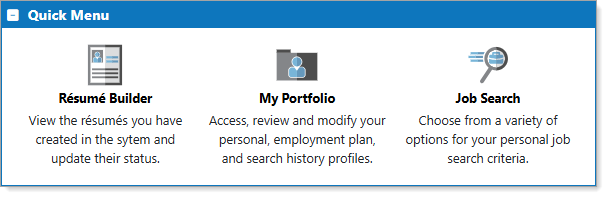
Directory of Services – Quick Menu
-
Résumé Builder – Create, upload, and manage your résumés using a variety of tools to help you design an effective introduction to employers and recruiters. See Manage Your Résumés for details.
-
My Portfolio – Review and manage your profiles, including Personal, Search History, Employment Plan, and more. See Manage Your Background Information for details.
-
Job Search – Perform a variety of job searches to find your next opportunity. See Find a Job for details.
Other Services
The Other Services panel provides helpful tools to enhance your experience and support your use of the system. From managing appointments and communications to accessing tutorials and submitting feedback, these features are designed to keep you informed, organized, and up to date.
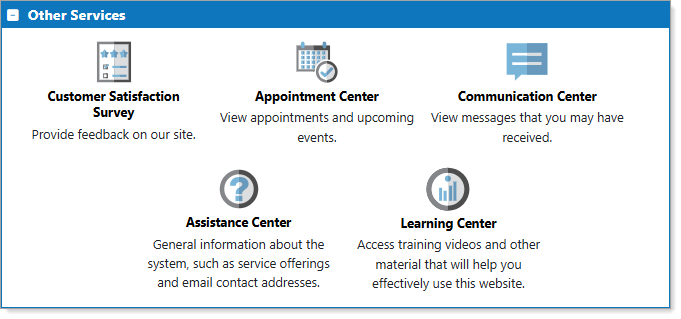
Directory of Services – Other Services
-
Customer Satisfaction Survey – Submit feedback on the system with an easy-to-use form that includes an opportunity to provide comments.
-
Appointment Center – View your appointment and event calendars, and make appointment requests to staff. See Manage Your Appointment and Event Calendars for details.
-
Communication Center – Displays the Communication Center menu page where you can select options to view messages, manage your correspondence, set up communications templates, and more. See Manage Your Messages and Letters for details.
-
Learning Center – Access training videos and other material to help you effectively use the system, including the Individual Services User Guide. See Find Tutorials and Training Videos for details.
-
Assistance Center – Contains general information about the system, such as service offerings, quick reference cards, site search, and more. See Find Other Kinds of Assistance for details.
Document Management
For sites that include this module, the Document Management panel provides quick access to tools for organizing and submitting your personal documents. Whether you are uploading, scanning, or viewing existing documents, this panel helps you keep all your important items—like employment records, certifications, and identification—in one secure, easy-to-manage location.
Your site may display different options from those shown here.
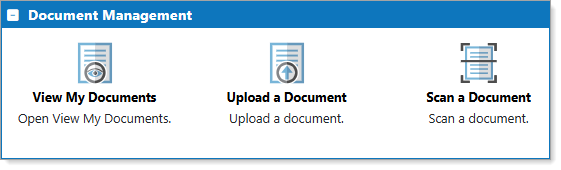
Directory of Services – Document Management
-
View My Documents – Display the Documents tab of your personal profile. See Manage Your Documents for details.
-
Upload a Document – Upload a document. See Upload a Document for details.
-
Scan a Document – Scan and upload a document. See Scan a Document for details.
If a selected option opens a lower-level menu page with additional choices, such as with Job Seeker Services, those menu pages have a Return to Directory of Services button at the bottom.