
 Left Navigation Menu












Indicate Your Languages and Proficiency
Overview
Many roles—especially in global companies, customer service, translation, teaching, or international business—require specific language skills. Listing your proficiency ensures employers know you meet those qualifications. Strong language skills highlight your ability to collaborate across teams, interact with diverse clients, or work in multilingual environments. Employers see this as a valuable professional asset.
Add your language proficiency to help recruiters match you with roles that require specific communication skills. Clear proficiency levels increase your visibility in searches and ensure you are considered for suitable positions.
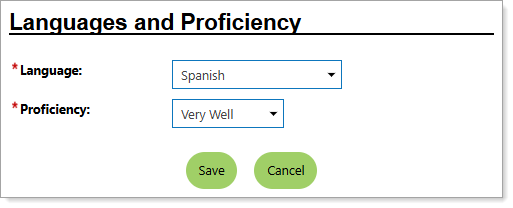
Personal Profile – Background Tab – Additional Employer Searchable Items – Indicating Languages & Proficiency
Where to Find This Feature
-
Header bar > Profile icon > Background tab > Additional Employer Searchable Items > Languages & Proficiency section > Add a New Language link
-
Left navigation menu > Quick Menu > My Portfolio > My Individual Profiles > Personal Profile > Background tab > Additional Employer Searchable Items > Languages & Proficiency section > Add a New Language link
-
The [your name] link in the Welcome statement on the dashboard > Background tab > Additional Employer Searchable Items > Languages & Proficiency section > Add a New Language link
Steps to Manage Your Languages & Proficiency
-
Select your Language from the drop-down list.
-
Select your Proficiency from the drop-down list.
- Select the Save button to save the language to the list.
Tips
-
Start with the languages in which you are most proficient, especially those likely to matter for your target roles.
-
Don’t overstate your skills. If you list a language proficiency as 'Very Well,' be prepared to demonstrate that in interviews or assessments.
-
Focus on languages that add value for employers. Mentioning languages at a very basic level (e.g., 'Not Well' for Tagalog) clutters your profile.