
 Left Navigation Menu












Specify Your Desired Occupation
Overview
Recruiters often scan hundreds of profiles. If your desired occupation is clear, they instantly see whether you’re a match for the role they’re trying to fill. It helps you show up in the right searches. A clear desired occupation signals that you are intentional about your career, not just applying to anything available.
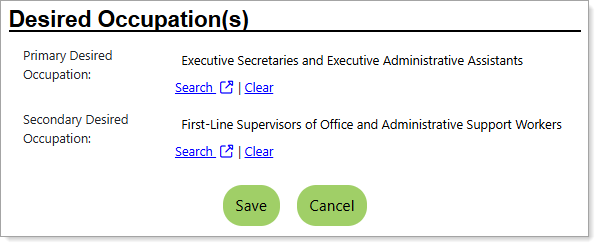
Personal Profile – Background Tab – Additional Employer Searchable Items – Selecting Desired Occupation(s)
Where to Find This Feature
-
Header bar > Profile icon > Background tab > Additional Employer Searchable Items > Additional Information > Desired Occupation(s) section > Edit Desired Occupation link
-
Left navigation menu > Quick Menu > My Portfolio > My Individual Profiles > Personal Profile > Background tab > Additional Employer Searchable Items > Additional Information > Desired Occupation(s) section > Edit Desired Occupation link
-
The [your name] link in the Welcome statement on the dashboard > Background tab > Additional Employer Searchable Items > Additional Information > Desired Occupation(s) section > Edit Desired Occupation link
Steps to Specify Your Desired Occupation
Your site may display different options from those shown here.
-
Select the Search link for your Primary Desired Occupation to open the Select an Occupation page in a new window on the Occupation Quick Search tab, where you can search for and select your occupation. See Search for an Occupation for details.
-
To remove your selection, select the Clear link.
-
To add a Secondary Desired Occupation, repeat the above step.
-
Select the Save button to return to the Background tab or the Next button in the background wizard to save and proceed to the next page.