













Search for an Occupation
Overview
For all Occupation Profile sessions, you must first identify an occupation (or multiple occupations when using the comparison feature). The system offers eight methods to locate an occupation. Virtual LMI includes all the standard occupational titles and code numbers issued by the Occupational Information Network, or O*NET. When you select an O*NET occupation title, the unique O*NET code number is also selected.
Where to Find This Feature
-
Left navigation menu > Services for Individuals > Labor Market Services > Occupation Profile > Occupation Quick Search
-
My Dashboard > Widgets > Labor Market Services widget > Occupation Profile link > Occupation Quick Search
-
Footer bar > Services > Labor Market > Labor Market Services > Occupation Quick Search
If you are logged into the system, this option requires you to log out first before taking you to the Labor Market Services page.
Steps to Search for an Occupation
The system provides a comprehensive set of tools to help you locate occupations quickly and accurately, offering eight different search methods organized into easy-to-navigate tabs, and described below.
 Occupation Quick Search

Occupation Quick Search Tab
Search functions on this page are described in the following table.
|
To... |
Do This: |
|---|---|
| Change the Area for the session |
Select the [area] link to display a Select New Area section where you can specify a different geographical locale. See Search for an Area for details. |
| Display only occupations with a Bright Outlook |
Select this checkbox to see only occupations identified by O*NET as having particularly strong future potential, such as Physician Assistants or Robotics Technicians. A job receives the Bright Outlook designation when information indicates that it is expected to:
|
| Display Green occupations only |
Select this checkbox to see only occupations identified by O*NET as connected to activities benefiting the environment or conserving natural resources, such as waste reduction and recycling or renewable energy (solar, wind, geothermal). These occupations support efforts to reduce pollution, increase energy efficiency, develop renewable energy, manage natural habitats, and help organizations meet environmental regulations. |
| Search by Keyword |
|
| Search Manually |
|
| Search for an Occupation |
Select this link to navigate to the Occupation Listing search tab, where you can choose from an alphabetical list of all occupations. |
| Search for an Occupation |
Select this link to navigate to the Occupations by Military Specialty search tab, where you search for and select an occupation based on your military occupational classification. |
Occupations by Keyword

Occupations by Keyword Search Tab
Search functions on this page are described in the following table.
|
To... |
Do This: |
|---|---|
| Change the Area for the session |
Select the [area] link to display a Select New Area section where you can specify a different geographical locale. See Search for an Area for details. |
| Display only occupations with a Bright Outlook |
Select this checkbox to see only occupations identified by O*NET as having particularly strong future potential, such as Physician Assistants or Robotics Technicians. A job receives the Bright Outlook designation when information indicates that it is expected to:
|
| Display Green occupations only |
Select this checkbox to see only occupations identified by O*NET as connected to activities benefiting the environment or conserving natural resources, such as waste reduction and recycling or renewable energy (solar, wind, geothermal). These occupations support efforts to reduce pollution, increase energy efficiency, develop renewable energy, manage natural habitats, and help organizations meet environmental regulations. |
| Keyword Search |
The search results also indicate with a green check whether the keyword appears in the title, related job titles, or description of each occupation.
If your results include occupation groups that are grayed out, this indicates that there is no information associated with that group. |
| Search for an Occupation | Select this link to navigate to the Occupation Listing search tab, where you can choose from an alphabetical list of all occupations. |
| Search for an Occupation |
Select this link to navigate to the Occupations by Military Specialty search tab, where you search for and select an occupation based on your military occupational classification. |
Occupations by Group
This tab allows you to find an occupation by first selecting a more general occupation group.
The occupation groups were developed from the Bureau of Labor Statistics Occupational Employment Statistics (OES) program, which has defined 23 major occupational groups that encompass over 800 different careers using the Standard Occupational Classification (SOC) system.
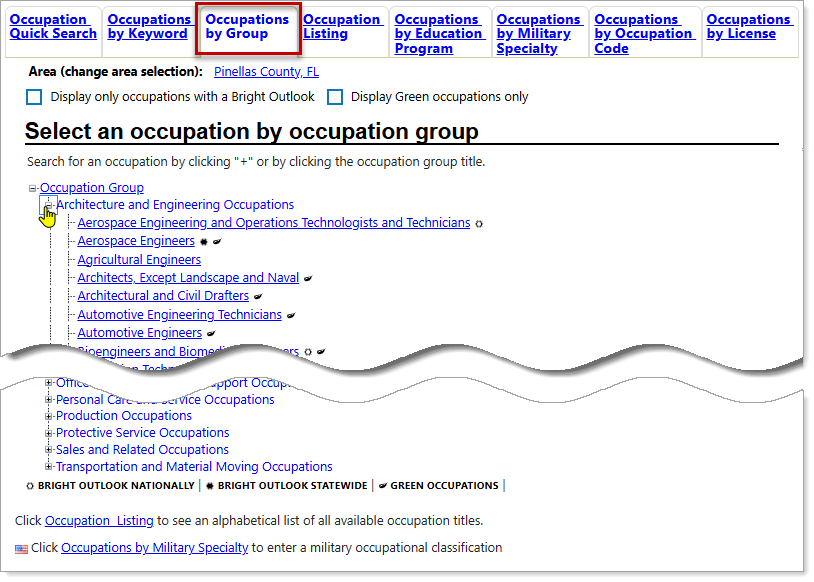
Occupations by Group Search Tab
Search functions on this page are described in the following table.
|
To... |
Do This: |
|---|---|
| Change the Area for the session |
Select the [area] link to display a Select New Area section where you can specify a different geographical locale. See Search for an Area for details. |
| Display only occupations with a Bright Outlook |
Select this checkbox to see only occupations identified by O*NET as having particularly strong future potential, such as Physician Assistants or Robotics Technicians. A job receives the Bright Outlook designation when information indicates that it is expected to:
|
| Display Green occupations only |
Select this checkbox to see only occupations identified by O*NET as connected to activities benefiting the environment or conserving natural resources, such as waste reduction and recycling or renewable energy (solar, wind, geothermal). These occupations support efforts to reduce pollution, increase energy efficiency, develop renewable energy, manage natural habitats, and help organizations meet environmental regulations. |
| Occupation Category Search |
|
| Search for an Occupation |
Select this link to navigate to the Occupation Listing search tab, where you can choose from an alphabetical list of all occupations. |
| Search for an Occupation |
Select this link to navigate to the Occupations by Military Specialty search tab, where you search for and select an occupation based on your military occupational classification. |
Occupation Listing
This tab allows you to select an occupation from a list of all available occupations, in alphabetical order.
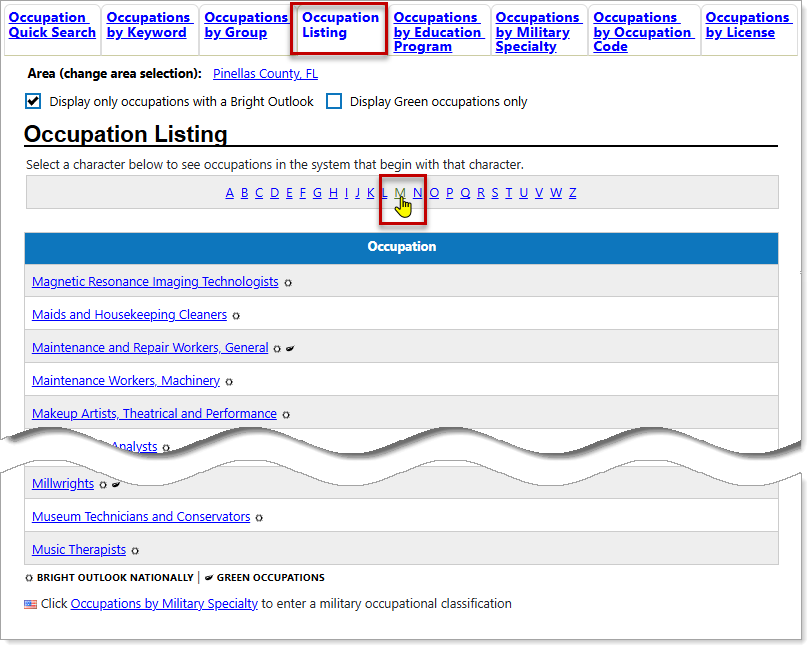
Occupation Listing Search Tab
Search functions on this page are described in the following table.
|
To... |
Do This: |
|---|---|
| Change the Area for the session |
Select the [area] link to display a Select New Area section where you can specify a different geographical locale. See Search for an Area for details. |
| Display only occupations with a Bright Outlook |
Select this checkbox to see only occupations identified by O*NET as having particularly strong future potential, such as Physician Assistants or Robotics Technicians. A job receives the Bright Outlook designation when information indicates that it is expected to:
|
| Display Green occupations only |
Select this checkbox to see only occupations identified by O*NET as connected to activities benefiting the environment or conserving natural resources, such as waste reduction and recycling or renewable energy (solar, wind, geothermal). These occupations support efforts to reduce pollution, increase energy efficiency, develop renewable energy, manage natural habitats, and help organizations meet environmental regulations. |
| Search Alphabetically by Occupation Title |
If your results include occupation groups that are grayed out, this indicates that there is no information associated with that group. |
| Search for an Occupation |
Select this link to navigate to the Occupations by Military Specialty search tab, where you search for and select an occupation based on your military occupational classification. |
Occupations by Education Program
Use this tab to search for Occupations by Education Program. Select any of the Education Program links to view the occupations associated with the selected program. Use the letter links at the top to navigate through the alphabet for programs beginning with a specific letter.
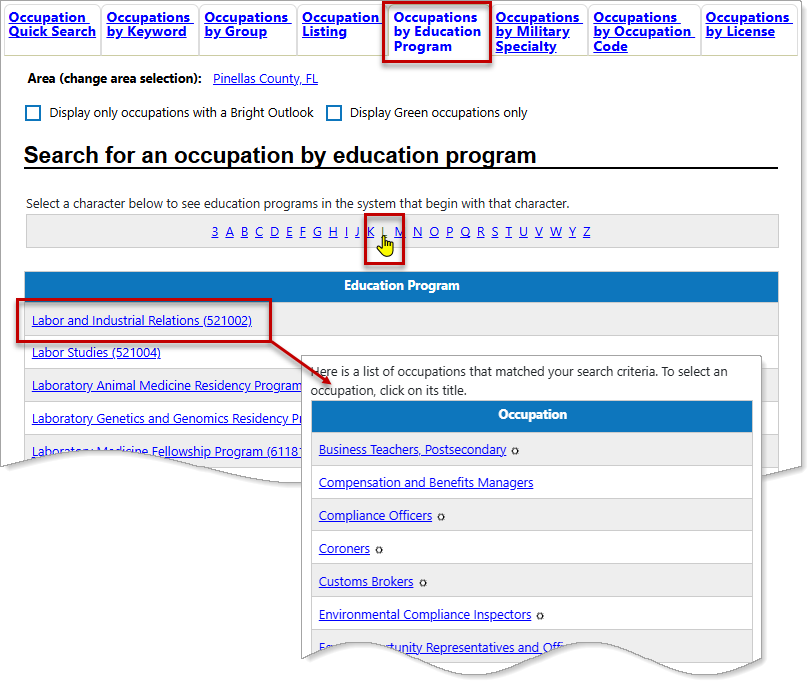
Occupations by Education Program Search Tab
Search functions on this page are described in the following table.
|
To... |
Do This: |
|---|---|
| Change the Area for the session |
Select the [area] link to display a Select New Area section where you can specify a different geographical locale. See Search for an Area for details. |
| Display only occupations with a Bright Outlook |
Select this checkbox to see only occupations identified by O*NET as having particularly strong future potential, such as Physician Assistants or Robotics Technicians. A job receives the Bright Outlook designation when information indicates that it is expected to:
|
| Display Green occupations only |
Select this checkbox to see only occupations identified by O*NET as connected to activities benefiting the environment or conserving natural resources, such as waste reduction and recycling or renewable energy (solar, wind, geothermal). These occupations support efforts to reduce pollution, increase energy efficiency, develop renewable energy, manage natural habitats, and help organizations meet environmental regulations. |
| Search Education Programs |
|
| Search for an Occupation |
Select this link to navigate to the Occupation Listing search tab, where you can choose from an alphabetical list of all occupations. |
| Search for an Occupation |
Select this link to navigate to the Occupations by Military Specialty search tab, where you search for and select an occupation based on your military occupational classification. |
Occupations by Military Specialty
Use this tab to search for an occupation by military occupational classification. The system offers three methods for searching for an occupation: keyword search, MOC code (Military Occupational Classification), or select from a series of drop-down lists to search by Branch, Category and MOC.
The search methods are mutually exclusive. When you choose one search method, the other search fields become grayed out. To reset the fields, simply refresh the page.
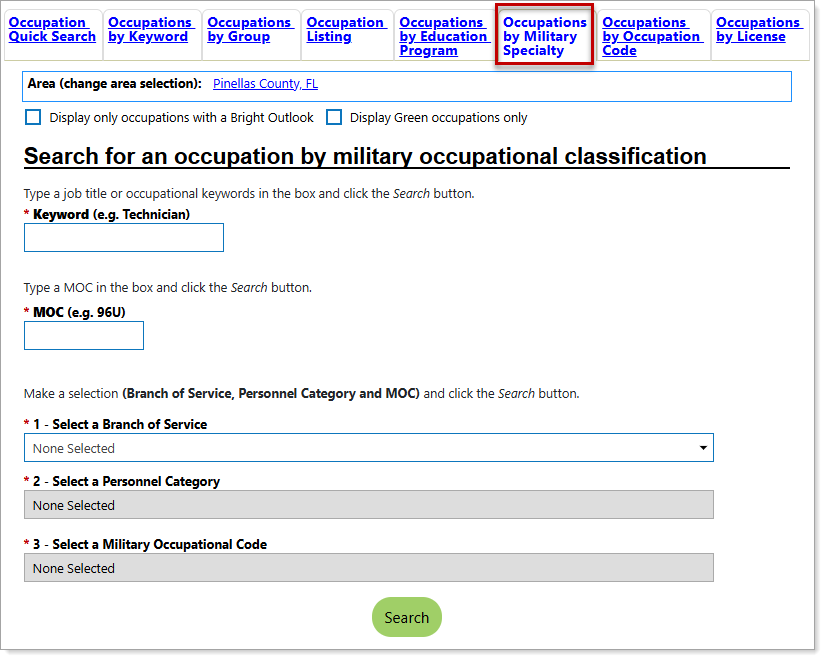
Occupations by Military Specialty Search Tab
Search functions on this page are described in the following table.
|
To... |
Do This: |
|---|---|
| Change the Area for the session |
Select the [area] link to display a Select New Area section where you can specify a different geographical locale. See Search for an Area for details. |
| Display only occupations with a Bright Outlook |
Select this checkbox to see only occupations identified by O*NET as having particularly strong future potential, such as Physician Assistants or Robotics Technicians. A job receives the Bright Outlook designation when information indicates that it is expected to:
|
| Display Green occupations only |
Select this checkbox to see only occupations identified by O*NET as connected to activities benefiting the environment or conserving natural resources, such as waste reduction and recycling or renewable energy (solar, wind, geothermal). These occupations support efforts to reduce pollution, increase energy efficiency, develop renewable energy, manage natural habitats, and help organizations meet environmental regulations. |
| Search by Keyword |
If your results include occupation groups that are grayed out, this indicates that there is no information associated with that group. |
| Search by MOC |
|
| Search by Branch of Service, Personnel Category, and MOC |
|
| Search for an Occupation |
Select this link to navigate to the Occupation Listing search tab, where you can choose from an alphabetical list of all occupations. |
Occupations by Occupation Code
This tab allows you to search for an occupation using an occupation code. The Occupational Information Network (O*NET) database gives every occupation a unique code number. You must know the complete or partial code number of the occupation you wish to search for.
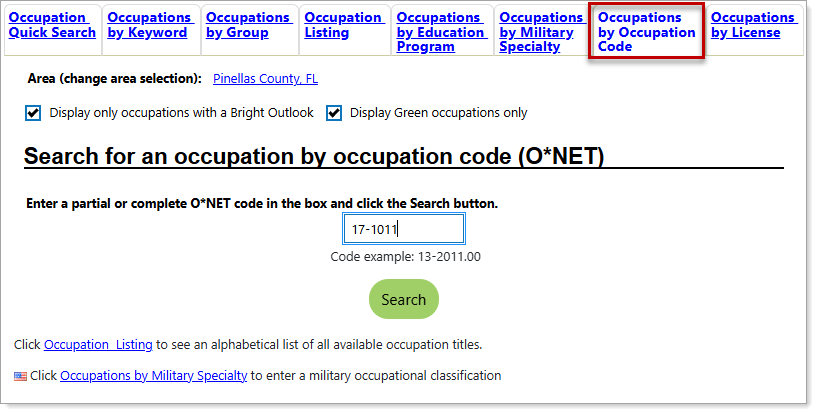
Occupations by Occupation Code Search Tab
Search functions on this page are described in the following table.
|
To... |
Do This: |
|---|---|
| Change the Area for the session |
Select the [area] link to display a Select New Area section where you can specify a different geographical locale. See Search for an Area for details. |
| Display only occupations with a Bright Outlook |
Select this checkbox to see only occupations identified by O*NET as having particularly strong future potential, such as Physician Assistants or Robotics Technicians. A job receives the Bright Outlook designation when information indicates that it is expected to:
|
| Display Green occupations only |
Select this checkbox to see only occupations identified by O*NET as connected to activities benefiting the environment or conserving natural resources, such as waste reduction and recycling or renewable energy (solar, wind, geothermal). These occupations support efforts to reduce pollution, increase energy efficiency, develop renewable energy, manage natural habitats, and help organizations meet environmental regulations. |
| Search by O*NET code |
|
| Search for an Occupation |
Select this link to navigate to the Occupation Listing search tab, where you can choose from an alphabetical list of all occupations. |
| Search for an Occupation |
Select this link to navigate to the Occupations by Military Specialty search tab, where you search for and select an occupation based on your military occupational classification. |
Occupations by License
Use this tab to search for occupations according to a license or certification, such as electrical contractor, registered nurse, or real estate appraiser.
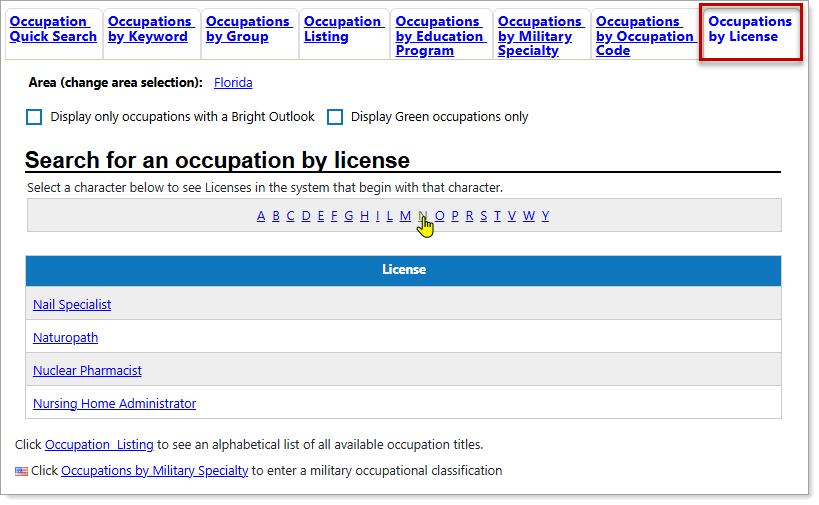
Occupations by License Search Tab
Search functions on this page are described in the following table.
|
To... |
Do This: |
|---|---|
| Change the Area for the session |
Select the [area] link to display a Select New Area section where you can specify a different geographical locale. See Search for an Area for details. |
| Display only occupations with a Bright Outlook |
Select this checkbox to see only occupations identified by O*NET as having particularly strong future potential, such as Physician Assistants or Robotics Technicians. A job receives the Bright Outlook designation when information indicates that it is expected to:
|
| Display Green occupations only |
Select this checkbox to see only occupations identified by O*NET as connected to activities benefiting the environment or conserving natural resources, such as waste reduction and recycling or renewable energy (solar, wind, geothermal). These occupations support efforts to reduce pollution, increase energy efficiency, develop renewable energy, manage natural habitats, and help organizations meet environmental regulations. |
| Search occupations based on licenses or certifications |
|
| Search for an Occupation |
Select this link to navigate to the Occupations by Military Specialty search tab, where you search for and select an occupation based on your military occupational classification. |