













Occupation Profile
Overview
The Occupation Profile summary page compiles information from multiple sources to provide complete information for a specific occupation. Each profile includes information on jobs, employers, supply and demand, career ladders, and more. You can explore occupation-specific information like duties, wages, projections, short-term growth forecasts, skills and tasks, training programs, licensing agencies, and job listings for the selected area.
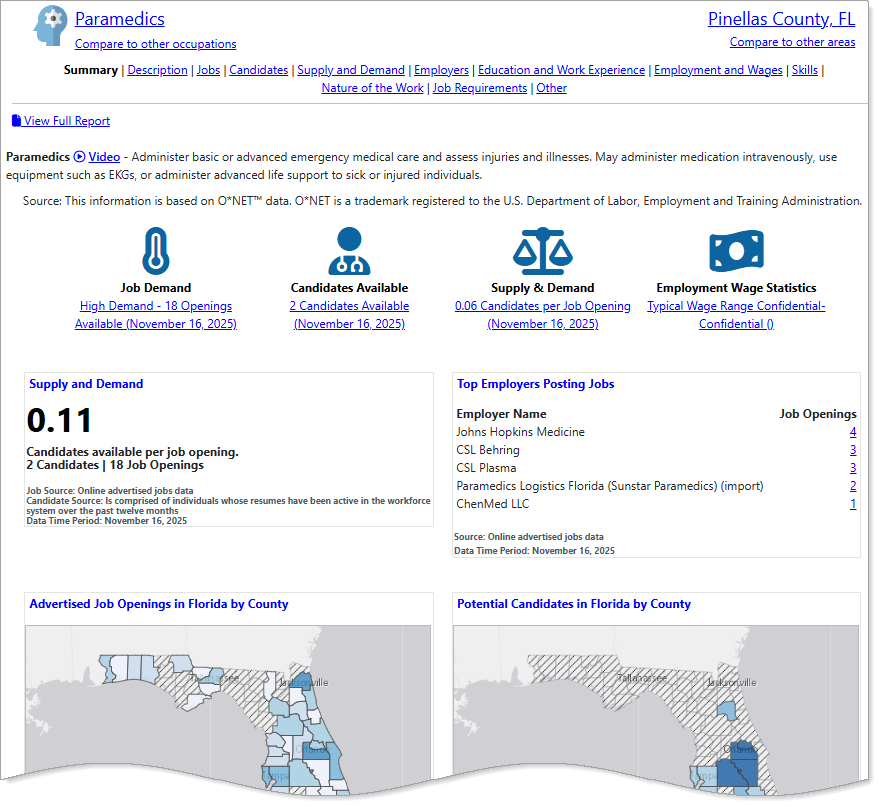
Occupation Profile page features
Where to Find This Feature
-
Left navigation menu > Services for Individuals > Labor Market Services > Occupation Profile
-
My Dashboard > Widgets > Labor Market Services widget > Occupation Profile
-
Footer bar > Services > Labor Market > Labor Market Services > Occupation Profile
If you are logged into the system, this option requires you to log out before taking you to the Labor Market Facts page.
Steps to Viewing the Occupation Profile
Your site may display different options from those shown here.
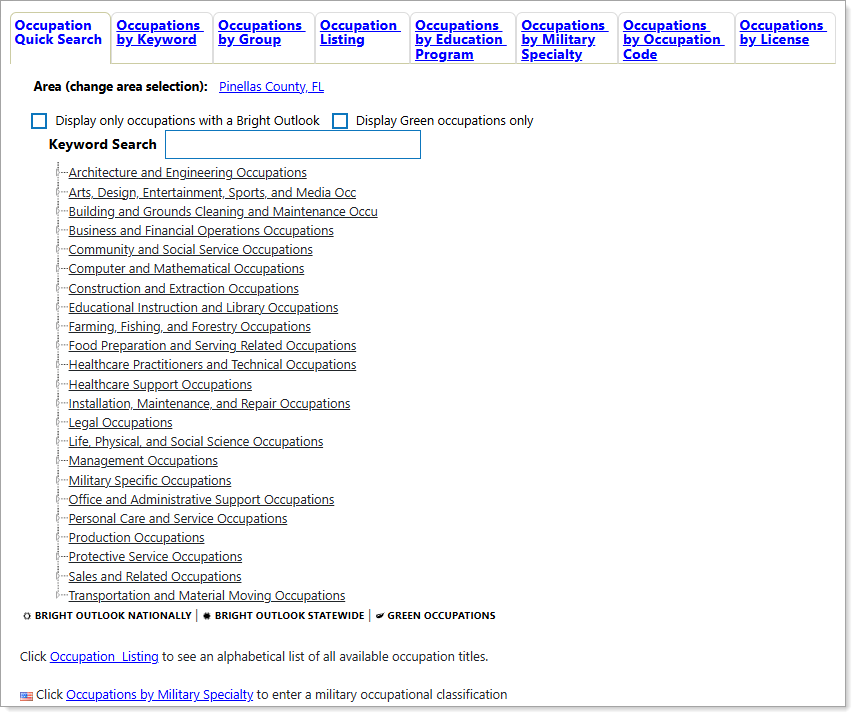
Occupation Quick Search
-
Use the Occupation Quick Search to find an industry by keyword, from the link tree, or by selecting a tab for a different search type. For best screen reader compatibility, use the Occupations By Keyword tab. See Search for an Occupation for details.
-
When you select an Occupation from either the link tree or from a set of search results, the Occupation Profile page displays.
Occupation Profile Features
-
The page displays the current occupation at the top. To change the occupation, select the [occupation] link.
-
The Compare to other occupations link allows you to compare multiple occupations. Select this link to add another occupation for direct comparison.
-
The current area is on the top right and applies to the information groups on the page ("Pinellas County, FL", above). Select this link to change the area for the profile.
-
The Compare to other areas link allows you to compare an occupation in multiple areas. Select this link to add additional areas for comparison.
-
Use the page links to view detailed information on: Description, Jobs, Candidates, Supply and Demand, Employers, Education and Work Experience, Employment and Wages, Skills, Nature of the Work, Job Requirements, and Other. See the Page Options table below for more information.
-
Select the View Full Report link to display all of the information categories on a single page that you can print or share in its entirety.
-
Quick Reference icons: Hover over these icons to see a preview and select them to view full reports on Projected Annual Openings, Job Demand, Candidates Available, Supply & Demand, Required Education, Work Experience, and Employment Wage Statistics. If a Quick Reference icon displays a warning exclamation point, it indicates results from an expanded geographic area. Hover your cursor over the icons for details.
-
Snapshots: The snapshot headings link to full details with expanded tables, charts, and job lists (Candidates by County, and Advertised Job Openings by County, above). See the Snapshots section below for more information.
 Page Options
See below for more details about the Linked Pages appearing at the top of the profile.
|
Select... |
To View: |
|---|---|
|
Description |
Detailed information about an occupation, including job duties, a description of the work, and required education, experience, and training. |
|
Jobs |
Information for a selected occupation, including jobs available, jobs area distribution, jobs in related occupations, etc. |
| Candidates |
Information on registered candidates in the system, including candidates available, candidate area distribution, and candidates in related occupations. |
| Supply and Demand | Detailed information about jobs and candidates available for an occupation, area distribution, and a national supply and demand summary from the U.S. Bureau of Labor Statistics. |
| Employers | A list of employers with job openings for a selected occupation. |
|
Education and Work Experience |
Information on the education level, training programs, required work experience, and more for an occupation. |
| Employment and Wages | Employment outlooks, wage rates, and major industries for an occupation. |
| Skills | A list of personal skills that are most useful for an occupation. |
| Nature of the Work | Information about an occupation's work environment, including the most commonly required work activities, tasks, tools used, and more. |
| Job Requirements | Information on job requirements, such as licensing, work abilities, interests, work styles, and more. |
| Other Information | Miscellaneous information about an occupation, including a list of related occupations and a career ladder. |
Snapshots
For each occupation, the Summary page includes several snapshots highlighting key indicators. Each snapshot heading links to the complete data category, display options and links. Some snapshots include links to open new profiles or access job lists. You can find the following snapshots on the Occupation Profile summary (depending on information availability):
|
Select... |
To View: |
|---|---|
| Abilities Required | A list of the most common work abilities required by the selected occupation. |
| Advertised Job Openings (Area Distribution) | The number of advertised job openings and potential candidates in the workforce system for the selected occupation and its related occupational group. |
|
Education Requirements on Advertised Jobs |
The minimum level of education requested by employers in advertised job openings, and the educational attainment of potential candidates looking for jobs in the selected occupation. |
| Employment and Unemployment |
Employment information for the selected area, compared with the state as a whole and the United States. |
| Potential Candidates (Area Distribution) | A list of potential candidates in the workforce system, by area, for the selected occupation. |
| Knowledge Required |
A list of the most common knowledge categories required by the selected occupation. |
| Projected Annual Openings |
The long-term projected annual openings for the selected occupation and its related occupational group. |
| Skills | A list of the job skills that are related to the selected occupation. |
|
Supply and Demand |
Specific information about the labor supply and market demand in the selected area from U.S. Department of Labor Statistics. |
|
Top Employers Posting Jobs |
The employers with the highest number of advertised job openings for the selected occupation. |
| Typical Wages | The estimated employment wage statistics for individuals employed in the selected occupation. |