













Industry Profile
Overview
The Industry Profile summary page presents information from multiple sources to create comprehensive profiles for an industry. This page includes labor market information on jobs, employers, occupations, industry projections, and more. You can explore details specific to an industry, including employment and wage data, projections, staffing patterns, and the number of employers and workers.
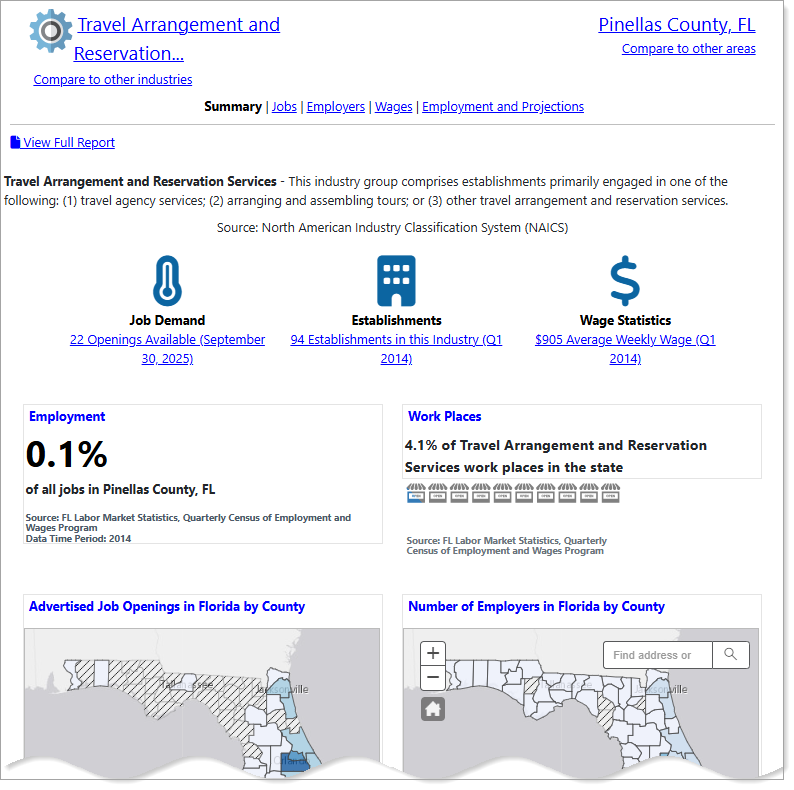
Industry Profile page features
Where to Find This Feature
-
Left navigation menu > Services for Individuals > Labor Market Services > Industry Profile
-
My Dashboard > Widgets > Labor Market Services widget > Industry Profile
-
Footer bar > Services > Labor Market > Labor Market Services > Industry Profile
If you are logged into the system, this option requires you to log out before displaying the Labor Market Services page.
Steps to Viewing the Industry Profile
Your site may display different options from those shown here.
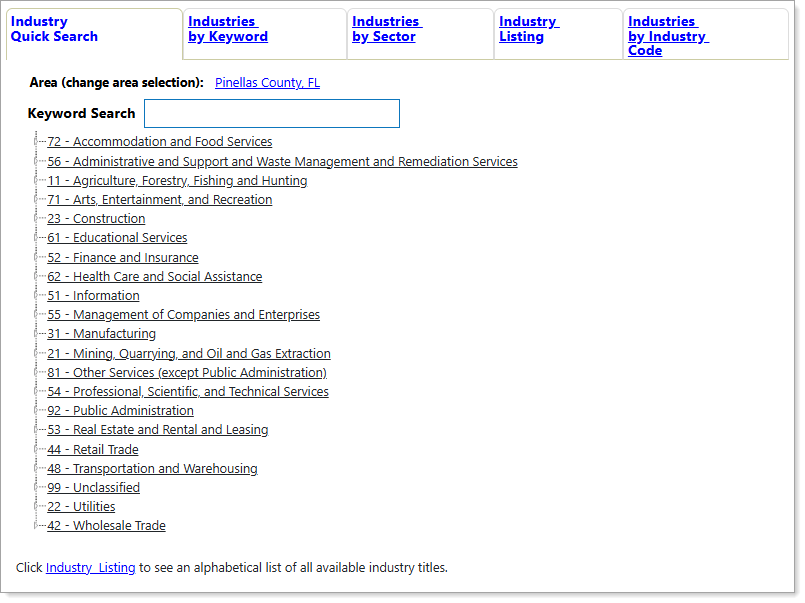
Industry Quick Search
Use the Industry Quick Search to find an industry by keyword, from the link tree, or by selecting a tab for a different search type. For best screen reader compatibility, use the Industries By Keyword tab. When you select an Industry from either the link tree or from a set of search results, the Industry Profile Summary page displays. See Search for an Industry for details.
Industry Profile Features
-
The page displays the current industry at the top ("Travel Arrangement and Reservation...", above). To change the industry, select the [industry] link.
-
The Compare to other industries link allows you to compare multiple industries. Select this link to add additional industries for direct comparison.
-
The current area displays in the top-right corner, ("Pinellas County, FL", above). Select the [area] link to change the area for the profile. Compare industry information for multiple areas by selecting the Compare to other areas link to add additional areas for comparison.
-
Use the page links to view detailed reports on Jobs, Employers, Wages, and Employment and Projections. See the Page Options table below for more information.
-
Select the View Full Report link to display all of the information categories on a single page that you can print or share in its entirety.
-
Quick Reference icons: Hover over these icons for a preview and select any of them to view full details on Job Demand, Establishments, or Wage Statistics.
-
Snapshots: The snapshot headings link to full details with expanded tables, charts, and job lists (Employment, Workplaces, Advertised Job Openings by County, and Number of Employers by County, above). See the Snapshots section below for more information.
 Page Options
See below for more details about the Linked Pages appearing at the top of the profile.
|
Select... |
To View |
|---|---|
|
Jobs |
Advertised jobs in the industry (daily or monthly counts). |
|
Employers |
Employers for both your selected industry and area. |
| Wages |
Average hourly, weekly and annual wages, including an area distribution that ranks areas by average weekly wage. |
| Employment and Projections | Long term industry projections and the area distribution for industry employment, including a breakdown by occupation for the selected area |
Snapshots
For each industry, the Summary page displays several snapshots highlighting key indicators. Each snapshot heading links to the full data category, display options, and related resources. Some snapshots include links to open new profiles or access job lists. You can find the following snapshots on the Summary page (depending on data availability):
|
Select... |
To View: |
|---|---|
| Advertised Job Certifications |
The top advertised certifications found in advertised job openings online for the selected industry. |
| Advertised Job Skills |
The top advertised job skills found in advertised job openings online for the selected industry. |
| Advertised Tools and Technology | Areas ranked by advertised job openings in occupations related to the selected education program. |
|
Employers |
The number of establishments and employees for the selected industry. |
| Jobs Available | The number of job openings advertised online for occupations related to the selected education program. |
| Monthly Job Count |
The top advertised certifications found in advertised job openings for the selected education program. |
|
Occupational Employment Distribution |
Total advertised job openings for the occupation. |
| Wages | A list of average wage information (weekly and annual) for the selected industry. |
| Wage Distribution | The distribution of average weekly wage by county for the selected industry. |
|
Work Places |
The number of establishments and employees for the selected industry. |
Key Concepts
What does the term "long-term projections" mean? LMI (Labor Market Information) long-term projections refers to estimates of future employment changes in specific industries, typically over a 10-year period. They forecast things like the number of jobs, job openings, and growth rates, but they do not account for major economic shocks.
What does "area distribution" mean in terms of industry employment? This refers to the distribution showing where jobs and workers are concentrated, providing insights into supply and demand, wages, and job growth in specific areas.