













Area Profile
Overview
The Area Profile page offers a comprehensive view of labor market and demographic information for a selected area. You can explore economic trends, job demand, candidate availability, wages, population statistics, and compare areas side by side. This page serves as the central hub for labor market insights across multiple categories.
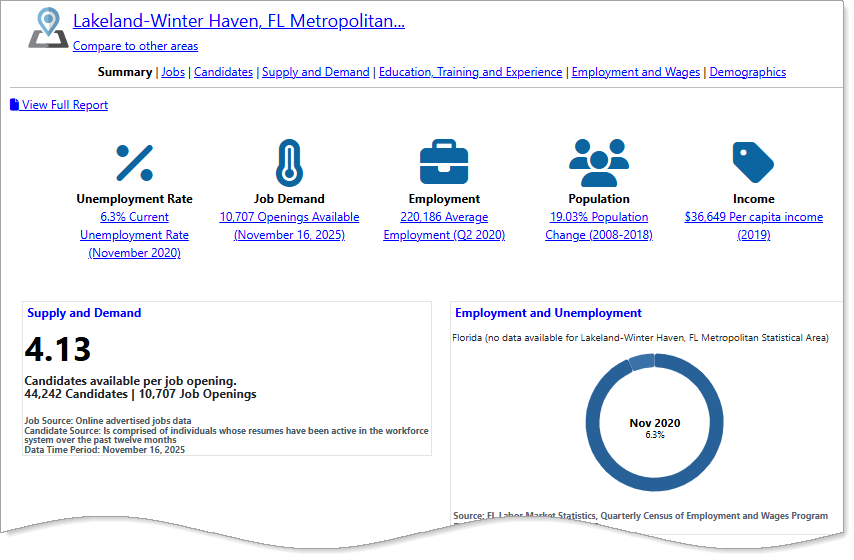
Area Profile page features
Where to Find This Feature
-
Left navigation menu > Services for Individuals > Labor Market Services > Area Profile
-
My Dashboard > Widgets > Labor Market Services widget > Area Profile
-
Footer bar > Services > Labor Market > Labor Market Services > Area Profile
If you are logged into the system, this option requires you to log out before displaying the Labor Market Services page.
Steps to Viewing the Area Profile
Your site may display different options from those shown here.
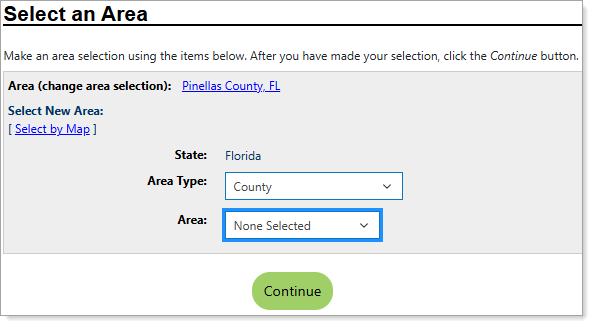
Select an Area tool
-
The page displays the current area as a link in the Area (change area selection) field. To use this area, skip the next steps and select the Continue button.
-
To change the area, select one from the Area Type drop-down list: County, Metropolitan Statistical Area, State, or Workforce Region.
-
Open the Area drop-down list, which shows options based on the Area Type you selected. After you choose an option, the page refreshes and your new area appears as the current area link.
-
Select the Continue button to go to the Area Profile summary page.
Area Profile Features
-
The page displays the current area at the top, which applies to all information groups (Lakeland-Winter Haven, FL Metropolitan, above). To change the area, select the [area] link.
-
The Compare to other areas link allows you to compare multiple areas. Select this link to add additional areas for direct comparison.
-
Use the page links to view detailed information on Jobs, Candidates, Supply and Demand, Education, Training and Experience; Employment and Wages; and, Demographics. See the Page Options table below for more information.
-
Select the View Full Report link to display all of the information categories on a single page that you can print or share in its entirety.
-
Quick Reference icons: Hover over these icons for a preview and select any of them to view full details on Unemployment, Job Demand, Employment, Population, and Income.
-
Snapshots: The snapshot headings also link to a full data category with expanded tables, charts, and job lists. See the Snapshots section below for more information.
 Page Options
Access detailed reports by selecting any of the page links at the top of the Area Profile Summary page.
|
Select... |
To View: |
|---|---|
|
Area Summary |
Economic indicators such as unemployment rate, job demand, population, and income for the selected area. |
|
Area Comparison |
Comparisons for jobs available, candidate availability, and unemployment rates between multiple areas. |
| Jobs |
Area-specific job information, including available jobs, distribution by industries, and occupations from advertised postings. |
| Candidates | Candidate availability information, including candidate distribution by area and occupation group. |
| Supply and Demand |
Job and candidate availability, including occupational and geographic distributions. |
|
Education, Training and Experience |
The education level, certifications, and work experience requirements for job openings in the selected area. |
| Employment and Wages |
Employment levels and wage information for the area. |
| Demographics |
Population and income totals and distributions for the area. |
Snapshots
For each area, the Summary page displays several snapshots that highlight key indicators. Each snapshot heading links to the full information category, display options, and related resources. Some snapshots include links to open new profiles or view job lists. The following snapshots appear on the Summary page, depending on information availability:
|
Select... |
To View: |
|---|---|
| Advertised Job Openings | Areas ranked by advertised job openings. |
| Average Wage Distribution |
Areas ranked by average weekly and annual wages. |
|
Employers by Number of Job Openings |
Total advertised job openings for the occupation. |
| Employment and Unemployment |
Employment information for the selected area, compared with the state as a whole and the United States. |
| Employment and Wages |
Estimated average wage information for the selected area, compared with the state as a whole and the United States. |
| Population Totals | Estimated population information for the selected area, compared with the state as a whole and the United States. |
|
Top Growing Occupations |
Occupations ranked by the highest median (annual) wages and the highest annual openings. |
|
Supply and Demand |
Specific information about the labor supply and market demand in the selected area from U.S. Department of Labor Statistics. |