













Manage Your Registration Information
Overview
When you register, you supply personal information, including your name, contact and login information, current employment status, demographic data, and other relevant details. This information is maintained on the General Information tab of your Personal Profile.
To ensure the accuracy of your records, it is important to update this information whenever changes occur—such as a change of name or address. This information is used in many places in the system, including to populate your résumés and federal program applications.
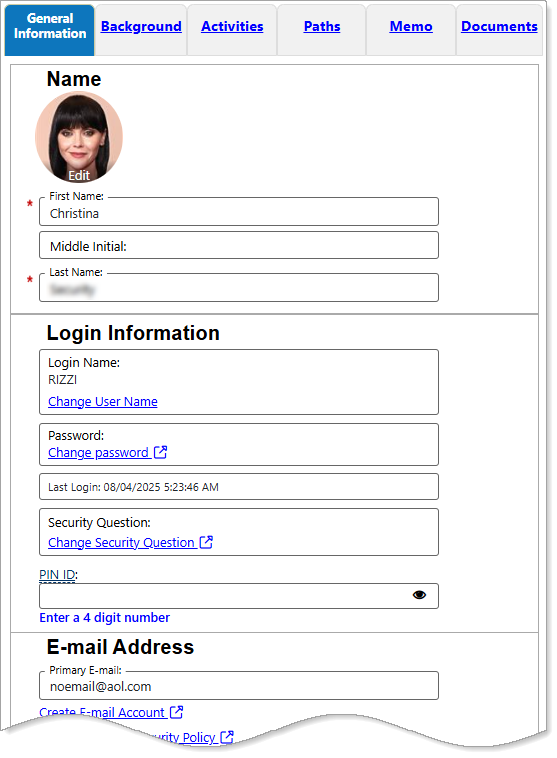
Personal Profile – General Information Tab
All fields marked with a red asterisk (*) are required. You cannot save changes to your registration information until all required fields have a response.
Where to Find This Feature
-
Header bar > Profile icon > General Information tab
-
My Dashboard > Widgets > My Personal Profile widget > Profile link > General Information tab
-
My Dashboard > [your name] link > Personal Profile > General Information tab
-
Left navigation menu > Quick Menu > My Portfolio > My Individual Profiles > Personal Profile > General Information tab
About the General Information Tab Sections
The General Information tab of your Personal Profile contains all of your basic registration information, divided into sections or categories, each of which is explained in the expandable sections below. After making changes to any of the information, be sure to select the Save button at the bottom of the page.
Your site may display different options from those shown here.
 Name
Name
If you legally changed your name (e.g., due to marriage, divorce, or a court order), updating your profile ensures your job documents match official records like background checks or payroll. This section lets you keep your name current. You can also add a profile picture, if desired.
|
Field |
Description |
|---|---|
|
First Name/Middle Initial |
Enter or modify the First Name. You can also enter a Middle Initial, if desired. |
|
Last Name |
Enter or modify the Last Name as required. |
| Profile Photo |
Upload a profile picture. To add a profile image:
Tips
|
Login Information
This section displays information that you entered when you registered. Managing your username, password, security question, and PIN ID (if offered on your site) ensures you can recover your account easily if you forget your password or if the site suspects suspicious activity.
|
Field |
Description |
|---|---|
|
Login Name |
To change your username, select the Change User Name link.
|
|
Password |
Your password is not shown for security purposes. If you would like to change it, select the Change password link.
|
| Security Question |
To change your security question and response, select the Change Security Question link.
|
| PIN ID |
To use a Personal Identification Number (PIN), enter it in the PIN ID field. |
Best Practices
-
Use a strong, unique password (mix of letters, numbers, symbols), and change it periodically.
-
Use a PIN that is difficult to guess. Do not use part of your Social Security Number.
-
Be sure to your record your login credentials in a safe place. Passwords are case-sensitive.
E-mail Address
This section includes your primary email account, links to free e-mail services to create an account if needed, and a link to view information and advice on email security.
-
Enter your Primary E-mail address in the field provided.
-
To create an e-mail address in the event you do not currently have one, select the Create E-mail Account link to display a pop-up window containing a list of links to free e-mail services.
-
To view information on e-mail security and recommendations, select the Read Our E-mail Security Policy link.
-
Residential Address
It is important to keep your residential address accurate and up to date. If you’re hired, your residential address is usually needed for background checks, identity verification, and tax and payroll setup. Keeping it updated ensures a smooth onboarding process.
|
Field |
Description |
|---|---|
| Country |
To change your Country from the default United States, select it from the drop-down list. |
| Address Lines 1 & 2 |
Enter the street address where you live in the Address Line 1 field.
|
| Zip Code |
Enter the Zip Code in the field provided.
Once a ZIP code is entered, the page refreshes and the City, State, and County fields are automatically populated. |
| City |
Enter your City in the field provided. |
| State |
Select your State from the drop-down list. |
| County / Borough / Parish |
Select your County / Borough / Parish from the drop-down list. |
Mailing Address
Even though most communication is digital now, some companies still use mail for official or legal documents, such as offer letters, employment contracts, and tax forms. If your mailing address is outdated, you can miss important mail that affects your hiring or onboarding.
-
If your mailing address is the same as your physical address, select the Check if mailing address is same as residential address box to duplicate the residential address information.
|
Field |
Description |
|---|---|
| Country |
To change your Country from the default United States, select it from the drop-down list. |
| Address Lines 1 & 2 |
Enter the address where you receive your mail in the Address Line 1 field.
|
| Zip Code |
Enter the Zip Code in the field provided.
Once a ZIP code is entered, the page refreshes and the City, State, and County fields are automatically populated. |
| City |
Enter your City in the field provided. |
| State |
Select your State from the drop-down list. |
| County / Borough / Parish |
Select your County / Borough / Parish from the drop-down list. |
Phone Numbers
Managing your primary, alternate, text, and fax numbers is very important for professional communication, accessibility, and credibility. Your primary number is the main contact employers and recruiters use to reach you. Some employers or recruiting systems use text messages for interview reminders and application updates.
|
Field |
Description |
|---|---|
| Primary Phone |
Enter your Primary Phone number and Extension, if any, in the fields provided. Your Primary Phone number is the phone number where the staff can most often reach you. |
| Primary Phone Type |
Select the Primary Phone Type from the drop-down list. |
| Alternate Phone |
Enter your Alternate Phone number and Extension, if any, in the fields provided. |
| Alternate Phone Type |
Select the Alternate Phone Type from the drop-down list. |
| Text Message Cell Phone Number |
Enter your Text Message Cell Phone Number and Extension, if any, in the fields provided. Only certain communications such as Virtual Recruiter® Alerts can be sent via text message. Normal text messaging rates apply. Other important notices, including some regarding unemployment benefits, are NOT sent via text message. |
| Fax |
Enter your Fax number in the fields provided. |
Preferred Notification Method and Welcome Notifications
The Preferred Notification Method section displays your account's notification preference setting, which determines how the system attempts to contact you.
-
Select how you wish to be contacted by selecting an option from the Please select a method in which you prefer to receive your notifications drop-down list.
The options to choose from in this section depend upon the contact information you provided. For example, if you have not provided an email address, the Email notification method is not available.
Potential options and descriptions are provided in the table below.
|
Field |
Description |
|---|---|
| Internal Message | Communications are delivered to your Message Center; you must be logged in to the system to access the Message Center. |
| Communications are sent to the email address you provided when registering in the system. | |
| Text Message | Communications are sent to the cell phone number you provided. This option requires that your cell phone have text messaging capability, and can display the full text of the communication. |
| Text Message Notification | Communications are sent to the cell phone number you provided. This option requires that your cell phone have text messaging capability; however, this option does not display the full text of the communication. Instead, the system sends a shorter notification text message to your phone, letting you know that you have a complete message in your Message Center. |
| Internal Message with Email Notification | An email notification alerts you when communications are delivered to your Message Center; you must be logged in to the system to access the Message Center. |
The Welcome Notifications section determines what items display in the Welcome Notification pop-up message that appears when you first log in to the system.
-
Select the checkboxes for the notification items you wish to see.
Available checkboxes and their descriptions are provided in the table below.
|
Field |
Description |
|---|---|
| Message Center | Select this box if you wish to see a count of new or unread messages in your Message Center. There is a link available to take you directly to the Message Center. |
| Paths Suggestions | Each day, a paths suggestion displays to help you discover various features within the site that help you in seeking employment. You can earn badges, which employers can see on your profile, signifying your mastery of an individual path. |
| Smart Seeker | These goals are essential to your job search, such as completing a profile, creating a résumé, or completing job searches. Links are available to take you directly to the area of the system where you can complete these actions. |
| Upcoming Events | Select this box to see a count of events you are registered for. A link is available to take you directly to your Events Calendar. |
| My Profile | Select this box to be notified of any issues with your profile, such as incomplete or missing information. A link is available to take you directly to your Personal Profile. |
Site Access
This section displays information about how you are accessing this website.
-
From where are you accessing this website? is a required field; select a response from the drop-down list.
-
To provide a response to How did you hear about this website?, select it from the drop-down list.
Demographic Information
This section collects information used to meet certain eligibility, reporting, and compliance rules tied to government programs such as the Workforce Innovation and Opportunity Act (WIOA), unemployment services, veteran services, or training grants.
|
Field |
Description |
|---|---|
| Date of Birth |
Enter the Date of Birth in the field provided, or use the calendar icon to select the date. |
| Age | The system calculates the Age based on the date entered. |
|
Sex |
If you select Male or I do not wish to answer, the selective service question below is active and requires a response. If you select Female, the question is disabled. |
| Have you registered with the Selective Service? |
|
Citizenship
Select your Citizenship status from the drop-down list using the following guidelines:
-
Citizen of U.S. or U.S. Territory – Someone who was born in the United States, or someone who completed the proper steps to become a naturalized citizen.
-
U.S. Permanent Resident – A non-citizen, granted permission from the United States government to live in the U.S. permanently without deportation, and who has a permanent resident card or stamp on their visa indicating their status. This selection displays additional fields requiring you to enter your USCIS (Alien Registration) Number and Expiration Date.
USCIS refers to U.S. Citizenship and Immigration Services.
-
Alien/Refugee Lawfully Admitted to U.S. – Someone granted protection by the United States government for a specific reason; for example, a Cuban resident given political asylum because his life would be in danger if he returned to Cuba. This person holds documents that state they are a refugee or asylee from a certain country. This selection displays additional fields requiring you to enter your USCIS (Alien Registration) Number and Expiration Date.
-
None of the above – Someone holding a visa type not listed above.
Disability
This section displays information about your disability status.
-
Select a response for Do you wish to disclose a disability?
Disclosing whether or not you have a disability is a personal choice, but there are several important reasons and benefits to consider. Employers collect disability information to comply with equal employment laws, such as: The Americans with Disabilities Act (ADA) and Section 503 of the Rehabilitation Act (for federal contractors). This helps employers demonstrate non-discriminatory hiring practices, meet diversity and inclusion goals, and report statistics to the U.S. Department of Labor (in total, not tied to your name).
Definition of Disability
Under the Americans with Disabilities Act (ADA), the term “disability” has a specific three-part definition. This definition focuses on the types of discrimination people with disabilities may experience. Because of this intent, it may differ from disability definitions used in other laws—such as state workers’ compensation programs or federal/state benefit programs for people with disabilities or disabled veterans.
Under the ADA, an individual with a disability is a person who:
-
Has a physical or mental impairment that substantially limits one or more major life activities
-
Has a record of such an impairment; or
-
Is regarded as having such an impairment
The ADA defines a physical impairment as any physiological disorder or condition, cosmetic disfigurement, or anatomical loss that affects one or more body systems, including:
-
Neurological
-
Musculoskeletal
-
Special sense organs
-
Respiratory (including speech organs)
-
Cardiovascular
-
Reproductive
-
Digestive
-
Genitourinary
-
Hemic and lymphatic
-
Skin
-
Endocrine
A mental impairment is defined by the ADA as any mental or psychological disorder, such as:
-
Post-Traumatic Stress Disorder (PTSD)
-
Organic brain syndrome
-
Emotional or mental illness
-
Specific learning disabilities
Interpretation
The first part of the definition makes clear that the ADA applies to persons who have impairments and that they must substantially limit major life activities such as seeing, hearing, speaking, walking, breathing, performing manual tasks, learning, caring for oneself, and working. An individual with epilepsy, paralysis, HIV infection, AIDS, a substantial hearing or visual impairment, mental retardation, or a specific learning disability is covered, but an individual with a minor, non-chronic condition of short duration, such as a sprain, broken limb, or the flu, generally is not covered.
The second part of the definition protects people with a history of a disability from discrimination, whether or not they are currently substantially limited in a major life activity. It protects people with a history of cancer, heart disease, or other debilitating illness, whose illnesses are either cured, controlled or in remission. It also protects people with a history of mental illness.
The third part of the definition protects individuals who may not actually have a substantially limiting impairment, but who are perceived or treated as if they do. For example, this provision protects a qualified individual with a severe facial disfigurement from being denied employment because an employer feared the "negative reactions" of customers or co-workers.
Substantial disability is more specifically defined by the requirement that significant functional limitations are identified in at least three of seven life areas:
-
Communication skills
-
Learning
-
Self-care
-
Mobility
-
Self-direction
-
Capacity for independent living
-
Economic self-sufficiency
Education Information
This section displays information about your educational background. Education level and current school attendance are required eligibility and reporting factors across many workforce-related programs (Unemployment Insurance, WP, WIOA, SNAP E&T, TANF, etc.).
-
Select responses for Your Highest Education Level Achieved and Are you attending school? from their respective drop-down lists.
Employment Information
This section helps the system and potential employers understand your current employment situation, eligibility for benefits, and job-seeking status. It also ensures you are matched with the right services, programs, and job opportunities.
| Field | Description |
|---|---|
| Current Employment Status |
Select the appropriate status from the drop-down list. Options include:
|
| Type of business worked in |
Select the type of business you work in, using one of the categories from the drop-down list:
|
| Unemployment Eligibility Status |
Select the appropriate status from the drop-down list. Options include:
If the Eligibility Status selected is either Claimant or Exhaustee, you are required to enter additional information (see next). |
| UI Referred by Status |
UI claimaints and exhaustees must indicate how they were referred to services. Options include:
|
| Claimant has been exempted from work search |
Indicate whether the claimant received an exemption from the work search requirement for collection of benefits.
|
| Are you currently looking for work? |
Select Yes if you are currently looking for work, such as looking at online job boards, or filling out applications at local businesses. Some systems are configured to display the following questions, in addition to currently looking for work:
|
| Within the last 12 months, have you received a notice of termination or layoff from your job or received documentation that you are separating from military service? |
Indicate whether you have within the last 12 months received a notice of termination or layoff from your job or received documentation that you are separating from military service. If Yes, the system displays a Date of Layoff, Termination or Military Separation field.
|
Farmworker Information
If you identify as a farmworker or migrant/seasonal farmworker, you may qualify for special employment and training programs funded by the government, such as:
-
National Farmworker Jobs Program (NFJP)
-
Migrant and Seasonal Farmworker Program (MSFW)
-
Job placement assistance, skills training, career counseling, or support services like housing and transportation help
These programs are designed to help farmworkers find better-paying, stable jobs, transition into new careers, or improve working conditions.
-
Choose an option button to indicate Have you worked as a farmworker in the last 12 months?
The questions in this section do not pertain to work performed on a family farm, ranch, beekeeping, food processing or food manufacturing operation owned by yourself or close relatives. If you fall under this description, select No.
If you have performed work as a farmworker or food processor—including work performed in packing houses, nurseries, or orchards—for at least 25 days within the past 12 months, select Yes. Additional Yes/No questions display, including:
-
Is the Individual employed, or was employed in the past 12 months, in farm work of a seasonal or other temporary nature?
-
Have you traveled to the job site and are not reasonably able to return to your permanent residence within the same day?
-
Are you a full-time student?
-
Are you traveling with your family?
-
Are you traveling with an organized group?
Based on your responses, the system determines the farmworker type in the Type of National Farm Worker field.
Farmworker types include:
Seasonal Farm Worker – The individual has been primarily employed in agricultural labor and did not receive a year-round salary. "Primarily employed in agricultural labor" means that during the 12-month eligibility determination period:
-
The farmworker depended primarily on farm work for support.
-
Fifty percent of his/her total income came from farm work, or was employed at least 50 percent of his/her total work time in farm work, and
-
Worked at least 25 days in farm work or earned at least $800 in farm work.
Migrant Farm Worker – The individual is a farmworker that must travel to do the farm work, such that they are unable to return to their permanent residence within the same day.
Migrant Food Processor – The individual is a person who, during the preceding 12 months:
-
Worked at least an aggregate of 25 or more days or parts of days in which some work was formed in food processing activities.
-
Earned at least half their income from processing work, and were not employed in food processing year-round by the same employer.
-
Migrant food processing workers who are full-time students, but who travel in organized groups rather than their families, are excluded.
The Type of National Farm Worker displays No if none of the above types apply.
Job Title and Occupation
Your desired job title and occupation are required because they guide how the system—and potential employers—understand what kind of work you are looking for. They directly affect your job matches, visibility, and career opportunities. Recruiters often search for candidates by job title or occupation, so if yours is outdated or too general, your profile may not appear in their searches.
-
Enter a response for What is your desired job title? in the field provided. As you type, the system suggests matches for you to select. After choosing your desired job title, a list of matching occupations becomes available for you.
-
Select the Suggested occupation(s) from the drop-down list in the Job Occupation section. Options available depend on the desired job title entered previously.
-
If your suggested occupation is not listed, select the Search for an occupation link to search for and select an occupation. See Search for an Occupation for details.
Once selected, the system populates the Occupation Title and Occupation Code fields.
-
Ethnic Origin
Including your ethnic origin (or race/ethnicity) may feel personal, but it serves several important purposes. The system connects to government agencies for equal employment opportunity programs and affirmative action reporting. Even though it’s optional and confidential, by sharing your ethnicity, you may be eligible for specialized training or scholarship programs, mentorship opportunities, and career counseling or networking support.
-
To identify Are you of Haitian heritage?, select the appropriate option.
-
Select the appropriate option for Are you of Hispanic or Latino heritage? Hispanics/Latinos are people of Cuban, Mexican, Puerto Rican, South or Central American, or other Spanish culture in origin, regardless of race.
Race
As with ethnic origin, sharing your race is optional, confidential, and protected by law. The main purpose is not to influence hiring decisions but to support fairness, equal opportunity, and government compliance.
Select all the boxes that apply. You may choose as many boxes as necessary. Use the following information as a guideline:
-
African American/Black – A person having origins in any of the black racial groups of Africa.
-
American Indian/Alaskan Native – A person having origins in any of the original peoples of North America and South America (including Central America), and who maintains cultural identification through tribal affiliation or community recognition.
-
Asian – A person having origins in any of the original peoples of the Far East, Southeast Asia, or the Indian Subcontinent (e.g. India, Pakistan, Bangladesh, Sri Lanka, Nepal, Sikkim, and Bhutan). This includes, for example, Cambodia, China, Japan, Korea, Malaysia, the Philippine Islands, Thailand and Vietnam.
-
Ethnic Hispanic or Latino – A person having origins in any of the original peoples of Cuba, Mexico, Puerto Rico, and South or Central America or other Spanish countries.
You do not have to speak Spanish to be considered Hispanic/Latino and you can be of any race—White, Black, Indigenous, Asian, multiracial, etc.
-
Hawaiian/Other Pacific Islander – A person having origins in any of the original peoples of Hawaii, Guam, Samoa, or other Pacific Islands.
-
White – A person having origins in any of the original peoples of Europe, the Middle East, or North Africa.
-
I do not wish to answer – You do not wish to make a selection for this category.
Language
Federal and state programs must collect English language information for funding, compliance, and service-matching. For example, programs like WIOA (Workforce Innovation and Opportunity Act) must track how many participants are:
-
English language learners
-
Individuals with limited English proficiency
-
In need of language-related services
This is for federal reporting, funding allocation, and demographic statistics.
-
Select the Yes/No option button to indicate:
Do you have limited proficiency in speaking, writing, reading, or understanding English?, or
Do you have difficulty in speaking, writing, reading, or understanding English?
A Yes response displays additional questions to specify your primary language and English proficiency.
Follow-up Questions:
-
Please select your primary language from the drop-down list.
-
Select How well do you speak that language? from the drop-down list.
-
Indicate Do you require English language assistance? (Yes/No).
-
Select How well do you speak English? from the drop-down list.
Spouse or Caregiver of a U.S. Military Member
If you are the Are you the spouse, family caregiver, or widow(er) of someone who served or is serving in the Armed Forces?, you may also be entitled to state and federal benefits. If this is the case, select Yes. You are required to answer additional questions.
Follow-up Questions
-
Are you the spouse of a member of the armed forces who is on active duty? – Persons in the Reserve or National Guard are not full-time active duty military personnel, although they can be deployed at any time should the need arise.
-
Are you a spouse or family caregiver to a member of the armed forces who is wounded, ill or injured and receiving treatment in a military facility or warrior transition unit/soldier recovery unit? – Military spouses or caregivers can get priority service and access to special employment programs created specifically to support military families and caregivers. You may be considered a family caregiver if you:
-
Are the spouse, parent, child, or next of kin of the service member, and
-
Provide regular care, supervision, or assistance with medical appointments, daily activities, rehabilitation, or coordination of treatment, and
-
The service member is currently receiving medical treatment, therapy, or rehabilitation for injuries or illnesses that occurred in the line of duty.
-
A Warrior Transition Unit (WTU) is a specialized U.S. Army unit that supports soldiers who are wounded, ill, or injured and who need complex medical care for more than six months, helping them with:
-
Recovering from serious injuries or illnesses, and
-
Undergoing rehabilitation or medical care, and
-
Transitioning back to active duty or to civilian life
-
-
-
Are you the Spouse of someone in the active-duty military service, National Guard or Reserves who is currently activated? (optional) – Answer Yes if your spouse is serving full-time on active duty, or a member of the National Guard or Reserves who has been called to active duty (“activated”) — meaning they’ve been ordered to serve full-time (for example, deployed or assigned to state and federal missions, including natural disasters, civil unrest, and overseas military operations).
-
Are you the spouse of a veteran who has a permanent, total service connected disability or had the disability at the time of death, or died while the disability was in existence?, or A spouse of a service member on active duty who died or has been Missing In Action (MIA), captured in the line of duty, or forcibly detained or interned in the line of duty by a foreign government power for a total of more than 90 days? – A service-connected disability is disability by an injury or illness that was incurred during active military service (on or off-duty). Missing in action (MIA) is a casualty classification assigned to combatants, military chaplains, combat medics, and prisoners of war who are reported missing during wartime or ceasefire. Answer Yes, if applicable. You may be eligible for priority of service — meaning you get first access to many federally funded employment, training, and career support services, for example:
-
You’ll be flagged as an eligible spouse for priority of service at state job centers and online workforce systems.
-
You may also qualify for widow(er) or dependent employment support programs, such as the Gold Star Families programs, Survivor Outreach Services, and others.
-
In many states, eligible spouses can access career scholarships, training grants, or educational aid similar to veterans themselves.
-
Military Service
Veterans may be entitled to additional state and federal benefits. This section collects information about you, or your spouse's military service, as applicable.
If you are the spouse or family caregiver of a Military member or Veteran, you may also be entitled to state and federal benefits. See the section above titled Spouse or Caregiver of a U.S. Military Member for details.
-
Indicate Are you a Veteran or have you served or are you currently serving in the U.S. Military? If so, select Yes. You must answer additional questions.
Follow-up Questions
-
Are you a member of the armed forces who is currently active in the U.S. Military? – If you are currently on active duty, select Yes. If so, the section for Veteran Information is not required.
-
Are you a member of the armed forces who is wounded, ill or injured and receiving treatment in a military facility or warrior transition unit/soldier recovery unit? – If you are a member of the armed forces who is wounded, ill or injured and receiving treatment in a military facility or warrior transition unit, select Yes. If so, the section for Veteran Information is not required.
-
Were you referred from the Department of Veteran Affairs? – Workforce and assistance programs are required to track and prioritize services for veterans — especially those who enter the system through the VA.
-
If Yes, indicate How were you referred? from the drop-down list.
You are not required to have a VA referral to use these programs. Most veterans answer No unless a VA counselor directly sent them.
-
-
Have you participated in any part of a Transition Assistance Program (TAP) Workshop, including self-paced online modules and Individualized Initial Counseling within the last three years? – Under the Veterans Opportunity to Work and Hire Heroes Act of 2011 (VOW Act), separating service members must attend the Transition Assistance Program (TAP). Select Yes if this applies.
-
Are you within 24 months of retirement or 12 months of discharge from the military (Transitioning Service Member)? – If you are an individual in active-duty status (including separation leave) who registers for employment services and is within 24 months of retirement or 12 months of separation, select Yes. You are required to answer additional questions (see next section).
-
If Yes, enter your Transitioning Service Begin Date in the field provided.
-
-
Indicate Are you a current member of the National Guard?
-
If Yes, select the National Guard Type from the drop-down list.
-
Transitioning Service Members
This section collects information about your transitioning type and transitioning service member discharge date.
-
Select the Transitioning Service Member Type from the drop-down list. If you are not a transitioning service member, select Not Applicable.
-
Enter the Projected Discharge Date using a MM/DD/YYYY format (e.g., 10/30/2026), or by selecting the calendar icon.
-
Answer Have you received a signed DD-2648 (Service Member Pre-Separation / Transition Counseling and Career Readiness Standards Form) indicating you do not meet career readiness standards? (Yes/No).
-
Answer Are you being involuntarily separated from active duty due to a reduction- in-force? (Yes/No).
-
In the Career Planning section, indicate Are you interested in receiving one-on-one career planning or help finding employment from a staff member? (Yes/No).
Veteran Information
This section records details of your military service, including the branch, length of service, disability information, and discharge details.
-
Answer Have you served and were discharged from active duty as a member of National Guard or Reserve unit during an armed conflict and or crisis involving national security (Title 10 Activation) for which a campaign badge is authorized? (Yes/No).
-
Enter Most recent Active Duty Begin and End Dates in the fields provided using an MM/DD/YYYY format (e.g. 11/17/2010), or by selecting the calendar icon beside each field.
If you do not know the exact day you or your spouse entered the military or were discharged, use "01" as the date (for example, 11/01/2010).
-
Select the Branch of Service from the drop-down list.
-
Select the Most Recent Character of Service Received from the drop-down list. Character of service describes the type of military discharge given when a member of the armed forces is released from their obligation to serve.
Character of Service Guidelines:
-
Honorable – The individual or their spouse received an honorable discharge, having met or exceeded the required standards of duty performance and personal conduct. All veteran benefits are provided to an eligible person with an honorable discharge. The Montgomery GI Bill (MGIB) requires personnel entering active duty after June 30, 1985 to receive an honorable discharge in order to qualify for educational benefits.
-
Under Honorable Conditions (General) – The individual or their spouse received a general discharge when they separated from the service under honorable conditions, but without a sufficiently meritorious military record to warrant an honorable discharge. Most veteran benefits are provided to an eligible person with a general (under honorable conditions) discharge, except for those provided under the Montgomery GI Bill.
-
Under Other Than Honorable Conditions – The individual or their spouse received an other than honorable discharge for misconduct or security reasons. This is received when the service member's personal conduct falls significantly below acceptable military standards. The discharge may result from one or more acts, or failures to act, which are considered to be an obvious departure from the high standards of conduct expected of military members. This type of discharge is given only after a person has had the opportunity to request a hearing by an administrative discharge board. Significant veteran benefits are usually denied to those receiving an other than honorable discharge.
-
Bad Conduct – The individual or their spouse received a bad conduct discharge when they separated from the service under an approved sentence of a special or general court-martial for serious offenses or repeated patterns of misconduct that violate the Uniform Code of Military Justice (UCMJ). Such a discharge deprives one of substantially all benefits administered by the Department of Veteran Affairs.
-
Dishonorable – The individual or their spouse received a dishonorable discharge when separating from the service after a general court-martial and as appropriate for serious offenses calling for dishonorable separation as part of the punishment. This type of discharge is usually reserved for those who, in the opinion of the court-martial, should be separated under conditions of dishonor after conviction of a serious offense such as murder, rape, treason, or desertion. A dishonorable discharge deprives one of substantially all benefits administered by the Department of Veteran Affairs.
If the individual or their spouse were a commissioned officer or service academy cadet who received a dismissal from the military, select Dishonorable from the drop-down menu. A dismissal of a commissioned officer, in general, is the equivalent of a dishonorable discharge for an enlisted member.
-
Uncharacterized – The individual or their spouse received an uncharacterized discharge when separating from the service for a variety of reasons, including less than 181 days of continuous active military service or a void enlistment.
-
Other (please explain) – Select this option if the service member's character of service does not meet any of the other available options. If Other is selected, you must enter details in the Other Character of Service field.
-
-
Answer Do you have prior services dates? (Yes/No).
-
If Yes, repeat steps two through four for a second and third active duty service, as required.
-
-
Indicate whether you Received a Military Campaign Badge (Yes/No). Campaign badges are awarded to service members who participate in certain expeditions/campaigns around the world.
-
To visit the Office of Personnel Management's Veteran's Guide, where you can view more information on which expeditions/campaigns are eligible for badges, select the Combat Veteran Web Site link.
-
-
Indicate Were you separated due to a service-connected disability? (Yes/No).
-
Indicate Were you released from service under a sole survivorship discharge? (Yes/No).
-
Indicate Do you have a pending service-connected disability claim? (Yes/No).
-
Select your Disabled Veteran status from the drop-down list.
Disability Definitions:
A disability is considered to be service related if it was incurred or aggravated during a period of active military service from which the veteran was discharged under conditions other than dishonorable, and was not due to willful misconduct of the veteran. A service connected disability evaluated at 10 percent or more by the U.S. Department of Veterans Affairs entitles a veteran to receive disability compensation. Choose the classification using the following guidelines:
-
Yes, Disabled – You or your spouse is a veteran who is entitled to disability compensation (or who but for the receipt of military retired pay would be entitled to compensation) under laws administered by the U.S. Department of Veterans' Affairs for a disability rated at less than 30 percent, and who is not classified as a Special Disabled Veteran (see below), or a person who was discharged or released from active duty because of a service connected disability.
-
Yes, special disabled (30% or higher) – You or your spouse is a veteran who is entitled to disability compensation (or who but for the receipt of military retired pay would be entitled to compensation) under laws administered by the U.S. Department of Veterans' Affairs for a disability that is:
-
Rated at 30 percent or more; or
-
Rated at 10 or 20 percent in the case of a veteran who has been determined by the U.S. Department of Veterans' Affairs to have a serious employment handicap under Chapter 31, Training and Rehabilitation for Veterans with Service Connected Disabilities; or
-
A person who was discharged or released from active duty because of a service connected disability.
-
-
No – You or your spouse is not a disabled veteran.
-
-
Select your Disability Percentage from the drop-down list.
-
Indicate whether you Received Services from Veteran’s Voc Rehab (Chapter 31) (Yes/No).
-
Answer Are you currently incarcerated or have you been released from incarceration? (Yes/No/I do not wish to disclose).
-
Answer Are you unemployed and actively seeking work, and available to take a job? (Yes/No/Not Sure).
-
Indicate if you are a Homeless Veteran (Yes/No). A homeless veteran is an individual who:
-
Served in the active military, naval, or air service
-
Was discharged or released from such service under conditions other than dishonorable
-
Who lacks a fixed, regular, and adequate nighttime residence
This definition includes any individual who has a primary nighttime residence that is a publicly or privately operated shelter for temporary accommodation; an institution providing temporary residence for individuals intended to be institutionalized; or a public or private place not designated for or ordinarily used as a regular sleeping accommodation for human beings (e.g., a van down by the river).
-
-
To visit the National Archives, where you can obtain a free copy of your DD Form 214 (Report of Separation), select the Obtain DD214 link.
National Career Alliance (NCA)
By participating in the NCA, you can search job listings nationally, and candidates from participating states can apply for jobs, exchanging their user profiles and credentials from their host state site. Use the Unsubscribe or Resubscribe links, as desired.
Public Assistance
Many employment and training services are funded by federal or state programs that have income or assistance-based eligibility rules, such as Workforce Innovation and Opportunity Act (WIOA), Temporary Assistance for Needy Families ( TANF), or Supplemental Nutrition Assistance Program (SNAP). You may qualify for additional free resources such as paid training or education, transportation or childcare assistance, résumé and job search help, or one-on-one case management and job placement. Answer the following questions as they apply to the past six months.
-
Has your household received Temporary Assistance for Needy Families (TANF) payments? – This program provides cash assistance to families with dependent children, through the U.S. Department of Health and Human Services. If your household has received any assistance under this program within the past six months, answer Yes.
-
Have you been determined eligible for or received Supplemental Nutrition Assistance Program assistance (SNAP formerly known as Food Stamps)? – SNAP is a federal aid program, administered by the U.S. Department of Agriculture, which provides food-purchasing assistance for low- and no-income people. If you have received assistance under this program within the past six months, or have been determined eligible prior to enrolling in this program, answer Yes.
-
Have you received General Assistance Payments? – Denotes welfare programs that benefit adults without dependents, usually meaning single persons, or less commonly, childless married couples. If you received assistance under this program within the past six months, answer Yes.
-
Have you received Refugee Cash Assistance Payments? – This question refers to the Refugee Cash Assistance (RCA) program, which helps refugees by providing cash and medical assistance. If you received assistance under this program within the past six months, answer Yes.
-
Have you been supported through the State's Foster Care System? – Refers to placement within an institution, group home, or with a foster parent arranged through the government or social service agency. If you received foster care within the past six months, answer Yes.
The following two household questions display if you answer No to all of the above questions. If you do not wish to provide this information, select the I do not wish to provide household information checkbox.
-
Select the Number of individuals living in your household from the drop-down list.
-
Enter the Total income earned within the last 6 months.