
 Left Navigation Menu












Add or Edit Driver's License Information
Overview
Recruiters often filter candidates by specific requirements. If a driver’s license is mandatory, your profile will stand out as a match, which can save time and improve your chances of being contacted. If a license is required but missing from your profile, employers may need to verify this later, slowing down the hiring process. Having it up front removes doubt and accelerates screening.
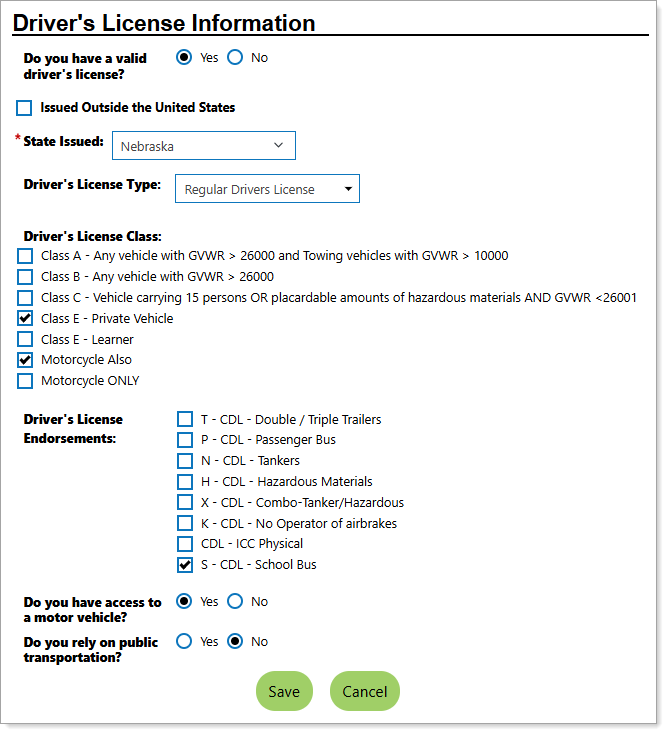
Personal Profile – Background Tab – Additional Employer Searchable Items – Adding Driver's License Information
Where to Find This Feature
-
Header bar > Profile icon > Background tab > Additional Employer Searchable Items > Driver's License Information section > Edit Driver's License Information link
-
Left navigation menu > Quick Menu > My Portfolio > My Individual Profiles > Personal Profile > Background tab > Additional Employer Searchable Items > Driver's License Information section > Edit Driver's License Information link
-
The [your name] link in the Welcome statement on the dashboard > Background tab > Additional Employer Searchable Items > Driver's License Information section > Edit Driver's License Information link
Steps to Manage Your Driver's License Information
Your site may display different options from those shown here.
-
Select the Yes/No option button to answer Do you have a valid driver's license? If No, skip to step 7.
-
To indicate that your license is not domestic, check the box for Issued Outside the United States.
-
Select the State Issued from the drop-down list.
-
Select your Driver's License Type from the drop-down list.
-
To indicate a Driver's License Class, check the appropriate boxes.
-
To indicate Driver's License Endorsements, check the appropriate boxes.
-
Use the option buttons to answer Do you have access to a motor vehicle?
-
Use the option buttons to answer Do you rely on public transportation?
-
Select the Save button to record your license information.