
 Left Navigation Menu












Specify Your Desired Job Location
Overview
Many organizations need employees who can work in specific geographies due to office requirements, client proximity, or even labor law. By stating your location preference, you signal alignment. Specifying your desired location ensures recruiters know exactly where you are looking, saves time, and makes your profile stand out in the right searches.
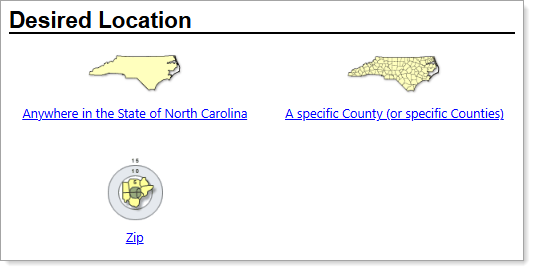
Personal Profile – Background Tab – Additional Employer Searchable Items – Desired Location Page
Where to Find This Feature
-
Header bar > Profile icon > Background tab > Additional Employer Searchable Items > Desired Location(s) section > Edit Desired Location link
-
Left navigation menu > Quick Menu > My Portfolio > My Individual Profiles > Personal Profile > Background tab > Additional Employer Searchable Items > Desired Location(s) section > Edit Desired Location link
-
The [your name] link in the Welcome statement on the dashboard > Background tab > Additional Employer Searchable Items > Desired Location(s) section > Edit Desired Location link
Steps to Specify Your Desired Location
Your site may display different options from those shown here.
-
To set your location to the entire state, simply select the Anywhere in the State of [your state] link.
-
To set your location by county, select the A specific County (or specific Counties) link. The Select by Map page displays in single selection mode.
-
To select a county, click on the map or select it from the Single Selection Mode drop-down list.
-
To select more than one county, select the Toggle to Select Multiple Areas link. A box displays under the Multiple Selection Mode drop-down list.
-
Select your counties from the list or click on the map to add them to the box.
-
To make corrections, use the Clear All and Clear Selected links under the box.
-
When satisfied with your selections, click the Continue button.
-
-
To set your location by ZIP code, select the Zip link.
-
Enter the desired Zip code, select a Mile Options button, and then select the Continue button. All the counties within the specified radius of your ZIP code are included.
-
-
Select the Save button to return to the Background tab or the Next button in the background wizard to save and proceed to the next page.