
 Left Navigation Menu












Desired Location
Overview
Recruiters often search by location or filter candidates based on where the role is based. If your desired location is clear, your profile is more likely to show up in searches for jobs that match where you actually want to work. Without a location preference, employers may assume you’re not serious about relocating or that you’re tied only to your current area. A specified desired location shows you’ve thought about where you want your career to grow.
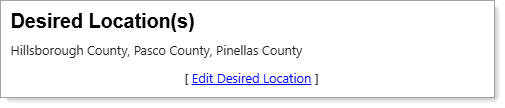
Personal Profile – Background Tab – Additional Employer Searchable Items – Desired Location(s)
Where to Find This Feature
-
Profile icon on the header bar > Background Tab > Additional Employer Searchable Items > Additional Information > Desired Location(s)
-
Left navigation menu > Quick Menu > My Portfolio > My Individual Profiles > Personal Profile > Background Tab > Additional Employer Searchable Items > Additional Information > Desired Location(s)
-
Your username link in the Welcome statement on the dashboard > Background Tab > Additional Employer Searchable Items > Additional Information > Desired Location(s)
Steps to Manage Your Desired Location
-
Select the Edit Desired Location link to display the Desired Location page, where you can specify where you want to work. See Specify Your Desired Job Location for details.