













Add or Edit Résumé Objective
Overview
Adding a well-crafted résumé objective highlights your career goals, demonstrates the value you bring to an employer, and shows how your skills align with the requirements of the position.
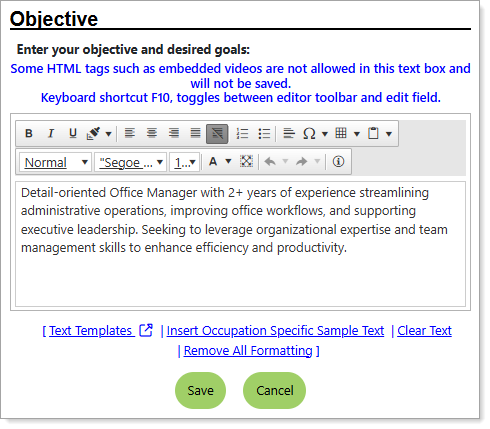
Résumé Objective Page
Where to Find This Feature
-
Header bar > Profile icon > Personal Profile > Background tab > Objective section > Edit Objective link
-
Left navigation menu > Quick Menu > My Portfolio > My Individual Profiles > Personal Profile > Background tab > Objective section > Edit Objective link
-
The [your name] link in the Welcome statement on the dashboard > Personal Profile > Background tab > Objective section > Edit Objective link
-
My Dashboard > Widgets > My Personal Profile widget > My Background link > Objective section > Edit Objective link
Steps to Manage Your Résumé Objective
Your site may display different options from those shown here.
-
Research your target occupation thoroughly to understand the job market, tailor your job search strategy, and provide meaningful information to a prospective employer.
-
Create a concise, one to two sentence statement that clearly outlines your career goals and how they align with the specific job you are applying for.
-
Enter your text in the field provided with the help of the system tools.
-
Enter your text using any of the following methods:
-
Type it in manually.
-
To display your text templates that you created, select the Text Templates link :
-
To view the contents of the template, select the magnifying glass icon in the Preview column.
-
Select the link in the Description column to apply the template to your text field.
-
Select the Manage Saved Text link to navigate to your Saved Text Template page, where you can create and manage your templates. See Manage Your Saved Text Templates for details.
-
To view a list of impactful terms that convey initiative and achievement, select the Action Words tab. A filterable list of verbs, divided by category, displays—select the words you like to add them to your text.
-
-
To enter system-generated text based on the context in which it is being created, select the Insert Sample Text link. Some text entry fields do not have this link (e.g., email messages).
-
To use template variables (if available)—these are placeholders that get replaced with actual data when the message is generated—select the Insert Variable link, and then select a variable from the list, such as name, address, etc.
-
-
To enhance your content, use the formatting tools at the top to bold, italicize, create bullet lists, adjust colors, include images, and more—adding clarity, emphasis, and visual appeal.
-
To remove the entry, select the Clear Text link.
-
To remove bold, italics, bullets, etc., but leave the content, select the Remove All Formatting link.
-
Select the Save button to return to the Background tab or the Next button in the background wizard to save and proceed to the next page.
 Customize your text