













Access Key Tools through Widgets
Overview
The Widgets section of the My Dashboard page displays a wide range of configurable widgets that provide quick access to groupings of your information.
The widgets often include a summary and links to pages for managing details. For example, the My Employment Plan widget shows the number of job applications, résumés, and Virtual Recruiter job alerts you have, as well as links to the related pages in your Employment Plan Profile.
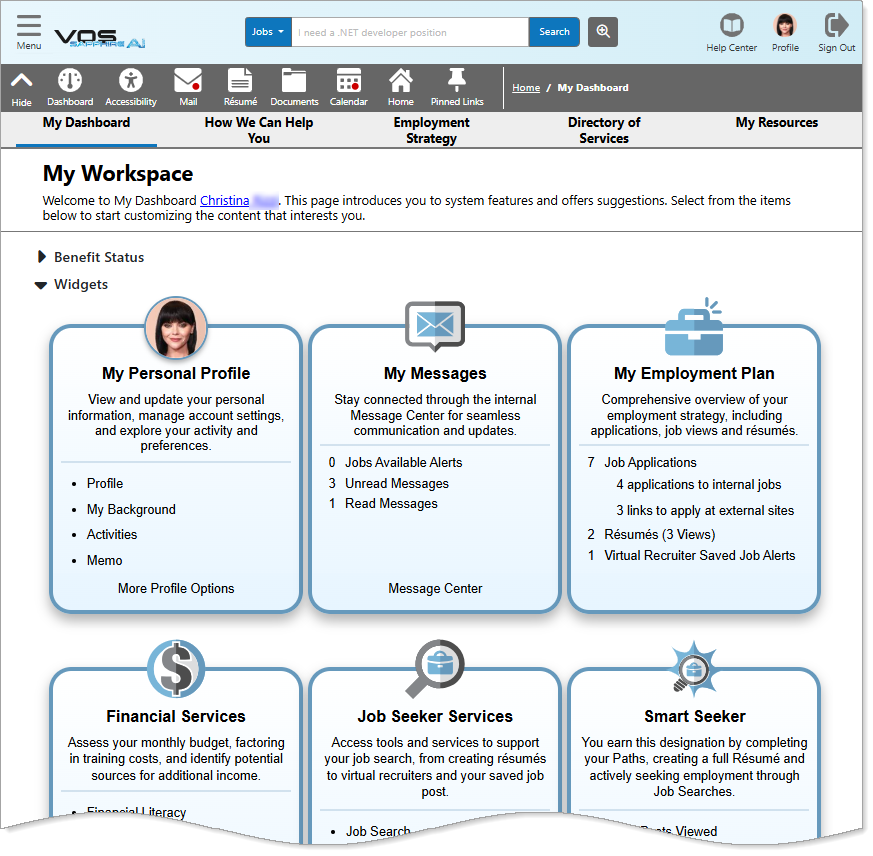
My Dashboard – Widgets Section
Where to Find This Feature
-
My Dashboard > Widgets section
-
Left navigation menu > My Dashboard > Widgets section
About the Widgets
Below is an alphabetical list of the widgets available in the Widgets section. The widgets that appear on your dashboard are determined by your site’s default settings and your personal widget configuration.
For instructions on how to move, hide, or rearrange widgets to suit your preferences, see Configure Your Dashboard Sections and Widgets.
Your site may display different options from those shown here.
 Career Services
The Career Services widget links to tools on the Career Explorer page, where you can explore occupations that align with your skills, interests, values, and abilities. It also includes a link to the Career Informer tool, which provides detailed labor market information for specific occupations—such as career tips and insights on how your background matches your desired career.
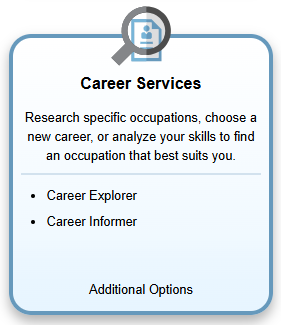
Career Services Widget
From this widget you can access the following options:
-
Career Explorer – View the Career Explorer page with several options to determine how to find a career or occupation that suits you. See Explore Careers and Occupations for details.
-
Career Informer – Search for and select an occupation to view information about wages, job demand, required skills and education, and more. See Occupation Profile for additional information.
-
Additional Options – View the Career Services menu page with additional options for Job Market Explorer, Your Career Match, and Career Tips. See Explore Careers and Occupations for details.
You can also access these options from Career Services in the Services for Individuals group on the left navigation menu.
Community Services and Benefits
The Community Services and Benefits widget provides quick links for Common Application, which is a way to start preliminary applications for federal programs you may qualify for, and for Programs and Services, which is a link to pages with information about the various community or social service programs that are available to you.
Both Common Application and the Community Services pages are optional features for a site; you may not see these options in your system.
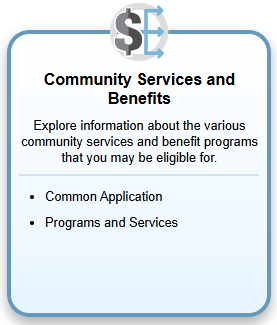
Community Services and Benefits Widget
-
Common Application – Pick from possible programs, answer a series of questions, and complete pre-application information to identify the federal programs you wish to apply for. It also helps staff finalize the information required for your program applications before you can move from an eligible applicant to a program participant. See Complete a Common Application for Eligibility Prospects for additional information.
-
Programs and Services – View the Community Services Options page with a list of quick links near the top that let you navigate to sources of information about community or social service programs, such as health, families and children, temporary assistance, legal issues, government benefits, etc. Each listing has a brief description of the services and a link to national or local websites with more information about the programs. See Find Community Support Services for additional information.
Current Events
The Current Events widget summarizes the Events Calendar page. This widget displays a quick breakdown of the number of available events for each event category for the current month and the office/region associated with your ZIP code.
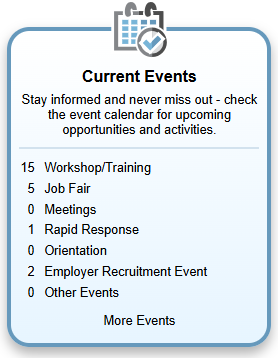
Current Events Widget
From this widget you can perform the following tasks:
-
See events for a category– Select a category link or its event count to open the Events Calendar filtered for that category in list view. From the list, select an event name to view its details. If online registration is available, you can register by selecting the Register button at the bottom of the event details page.
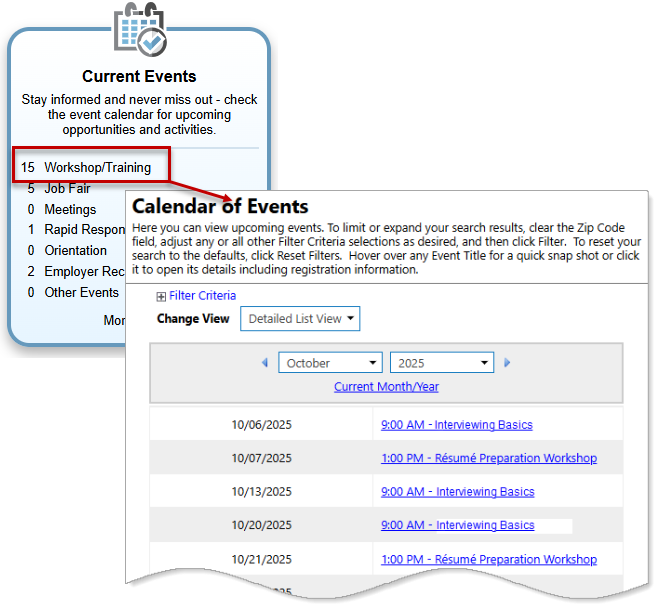
Events Calendar Filtered for Workshop/Training Category from Current Events Widget
Guest users must supply their ZIP code if they select the category links to see associated types of events from this widget.
-
See More Events – Select the More Events link to display the Events Calendar with no categories filtered. This displays all events in your area for which you may be able to register (these are events that require no registration or for which you can register online).
See View Upcoming Events and Register for Job Fairs and Other Events for additional information.
Education Services
The Education Services widget provides quick links to options that help you review training and education providers, or find and review specific education programs offered. You can search for education programs to attend in a specific geographic area or that are offered online.
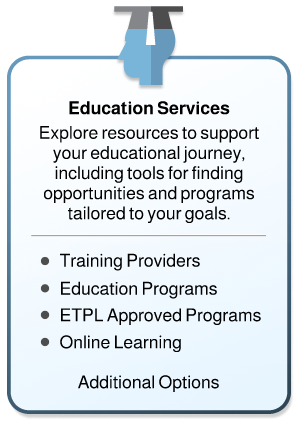
Education Services Widget
The widget includes links for:
-
Training Providers – Find specific institutions or schools that provide training.
-
Education Programs– Locate training or educational programs for a specific occupation or goal.
-
ETPL Approved Programs –See a list of training programs approved for financial assistance through WIOA (Workforce Innovation and Opportunity Act), which are part of a state-maintained list of approved ETPL programs.
-
The link for the Eligible Training Provider List may not display on the widget for all sites. If WIOA-eligible providers are maintained on this site, then your site includes this link.
-
Online Learning – Find links and information for a variety off useful online training programs including Alison and Metrix Learning.
-
Additional Options – View all education services options.
See Plan Your Education and Training for additional information.
You can also access these options by selecting them from Education Services in the Services for Individuals group on the left navigation menu.
Employer Services
The Employer Services widget lists the top trending companies based on the number of job applications they receive. Each company name and application count is a link that opens a list of all their posted jobs.
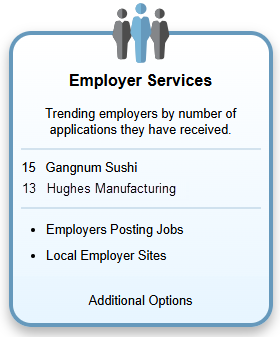
Employer Services Widget
Other links on this widget include:
-
Employers Posting Jobs – Search for employers with active job openings and select them to view the employer's listed jobs. See See Jobs from Employers with the Most Jobs for details.
-
Local Employer Sites – Perform a search for employers based on a variety of criteria on the Quick and Advanced Employer Search tabs to see details about that company, including a map of its location (if available). See Find Jobs by Employer or a Specific Job ID Number for details.
-
Additional Options– View the Job Seeker Services menu page to see additional resources.
You can also access these options by selecting them from View Employers and Jobs in the Services for Individuals group on the left navigation menu.
Financial Services
The Financial Services widget provides links to options that help you create or modify different types of budgets, explore possible additional income options and sources of financial aid, as well as a link to a page with other financial resources, such as a Cost of Living calculator.
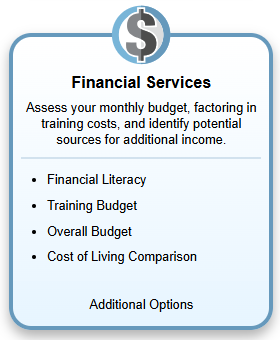
Financial Services Widget
Links on this widget include:
-
Financial Literacy – View the Financial Literacy tab of your Financial Plan Profile, which has links to websites that provide information and training for managing your financial resources.
-
Training Budget – Displays the Other Financial Assistance page, where you can draw up a training budget based on a desired training program.
-
Overall Budget – Displays the Overall Budget Analysis page, where you can draw up a monthly budget and explore options for other sources of income.
-
Cost of Living Comparison – Use the Cost of Living Comparison tool to compare the cost of living between two different locations.
-
Additional Options – View the Financial Services page with links to additional options.
See Explore Financial Resources for additional information.
Job Seeker Services
The Job Seeker Services widget provides quick links to the most common options available under Job Seeker Services.
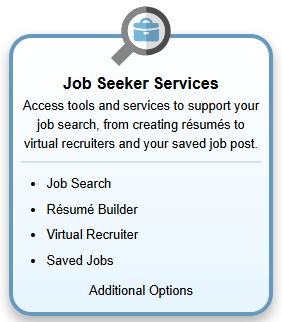
Job Seeker Services Widget
Links on this widget include:
-
Job Search – View the Job Search Options page, where you can search for and view available job openings in the area you select. See Find a Job for details.
-
Résumé Builder – View the Résumés tab of your Employment Plan Profile, where you can create and manage your résumés. See Manage Your Résumés for details.
-
Virtual Recruiter – View the Virtual Recruiter tab of your Employment Plan Profile, where you can create and manage your job alerts. See Save Search Criteria as an Automated Job Alert (Virtual Recruiter) for additional information.
-
Saved Jobs – View the Saved Jobs tab of your Employment Plan Profile, where you can view, apply to, remove, etc. jobs you have saved. See Save Jobs as Favorites for details.
-
Additional Options – View all available Job Seeker Services and helpful links to additional information.
Labor Market Services
The Labor Market Services widget includes quick links for accessing each of the major types of Labor Market Information (LMI) profiles. The widget includes a link to the Labor Market Facts page, which answers some of the most frequently asked questions about the labor market for your selected area, desired occupation, or the associated general industry data, as well as providing links to different profiles.
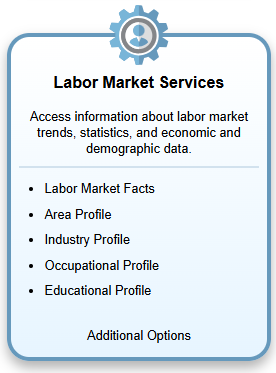
Labor Market Services Widget
Other links on this widget include:
-
Labor Market Facts – View the Labor Market Facts page with options for answers to commonly asked questions about the local labor market and links to profile data.
-
Area Profile – View the Select an Area page, where you can specify a geographic area you would like to see full labor market information for. See Search for an Area and Area Profile for additional information.
-
Industry Profile – View the Industry Quick Search page, where you can specify an industry and view information such as job demand, employment and wage statistics, number of employers, etc. See Search for an Industry and Industry Profile for additional information.
-
Occupational Profile – View the Occupation Quick Search page, where you can specify an occupation and view information such as supply and demand, required education and work experience, average wage statistics, top employers, etc. See Search for an Occupation and Occupation Profile for additional information.
-
Educational Profile – View the Education Program Quick Search page, where you can specify a program and view information such as job demand for the discipline, program providers, related occupations, and more. See Search for an Education and Training Program and Education Profile for additional information.
-
Additional Options – View all available Labor Market Services and helpful links to additional information.
See Investigate Labor Market Information for additional information on each of these options.
You can also access these options by selecting them from Labor Market Services in the Services for Individuals group on the left navigation menu.
My Assessments
The My Assessments widget provides access to a variety of skill assessments designed to help you understand and evaluate your professional strengths and preferences. From this widget, you can quickly navigate to different sections of your Self Assessment Profile, where you can view, update, and explore your skills, interests, and values.
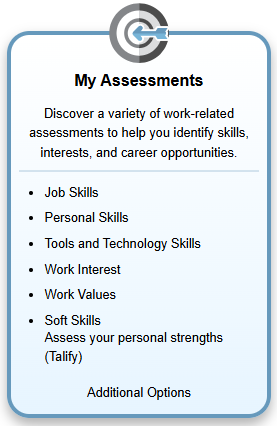
My Assessments Widget
Links on this widget include:
-
Job Skills – View the Job Skills tab of your Self Assessment Profile, where you can revise your skills and find matching occupations and jobs.
-
Personal Skills – View the Personal Skills tab of your Self Assessment Profile, where you can add or edit your personal skills.
-
Tools and Technology Skills– View the Tools and Technology tab of your Self Assessment Profile, where you can add or edit your tools and technology experience.
-
Work Interest – View the Work Interests tab of your Self Assessment Profile, where you can add or edit your work interests.
-
Work Values – View the Work Values tab of your Self Assessment Profile, where you can use a Work Values Analyzer tool to discover what is important to you in terms of achievement, independence, support, etc.
-
Soft Skills – View the Soft Skills tab of your Self Assessment Profile, where you can view your Talify scores on other skills such as managing others, empathy, confidence, and more.
Your site may not include this optional feature.
-
Additional Options – View all available Career Explorer options.
See Discover Roles That Match Your Skills, Interests, and Values for additional information on these options.
Some of these assessments (e.g., Job Skills or Tools and Technology) may be populated for you with skills related to occupations that you identified as part of your work experience. A Workplace Skills link only displays on the widget if your site is configured for WorkKeys® scores and assessments, or a similar skills system. For example, if your site includes a Talify soft skills assessment module, and has the related Soft Skills tab displayed in your Self Assessment Profile folder, this widget includes the Soft Skills link.
My Benefits Plan
The My Benefits Plan widget includes links to the different tabs in your Benefits Plan Profile, which contain general information about the benefits available from programs for which you may be eligible. The widget includes numbers to indicate if you are already are a participant in a WIOA or TAA (Trade Adjustment Assistance) program with an application, and courses/services in which you are currently enrolled. Each link on the widget opens the corresponding tab in your Benefits Plan Profile.
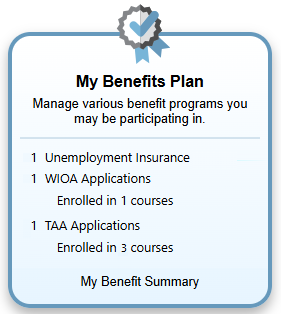
My Benefits Plan Widget
Links on this widget include:
-
Unemployment Insurance – If your state includes the GUS Unemployment Insurance module, this link accesses the Unemployment Benefits tab of your Benefits Plan Profile, where you can review the unemployment program and file or review an unemployment claim.
-
WIOA Applications – View the Workforce Innovation and Opportunity Act (WIOA) tab of your Benefits Plan Profile, where you can view WIOA information and access a link to start a Common Application.
-
TAA Applications – View the Trade Adjustment Assistance (TAA) tab of your Benefits Plan Profile, where you can view TAA information.
-
My Benefit Summary – View information and links to additional resources for the WIOA and TAA programs.
See Explore Federal Benefits Programs You May Qualify For for additional information.
If the Benefits Plan widget indicates that you already have applications or services, you should contact your one-stop office and work with your assigned case manager to determine any additional courses or services you need and are eligible for. If no applications are indicated, and you want to start a pre-application to determine your possible eligibility in WIOA or TAA programs, you can access a Common Application from your dashboard (if configured for your site). See Complete a Common Application for Eligibility Prospects for more information.
My Calendar
The My Calendar widget provides a combined view of your Events and Appointments calendars. It gives you a quick summary of the number of appointments scheduled for you and the available events for the current month. The information shown is based on the office or region linked to your ZIP code.
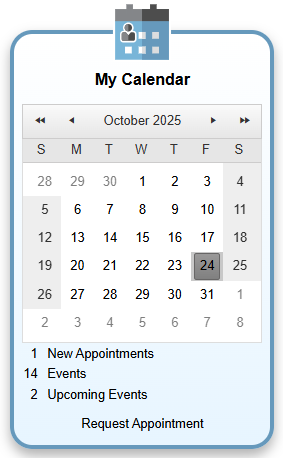
My Calendar Widget
From this widget you can perform the following tasks:
-
View and manage your appointments – Select the New Appointments link to display your Appointment Calendar for the current month. This page displays any appointments that you have scheduled. See Manage Your Appointment Calendar for additional information.
-
View all events – Select the Events link to display the Calendar of Events page for the current month and the office/region associated with your ZIP code. See View Upcoming Events for additional information.
-
View your events – Select the Upcoming Events link to display the Calendar of Events page showing only events for which you have registered. See Register for Job Fairs and Other Events for additional information.
My Correspondence
The My Correspondence widget lets you see how many letters and correspondence templates you have. Using the links, you can open the Letter Center page to view the saved letters you created, manage those letters, and create new ones, or you can open the Correspondence Template List page to view any saved letter templates or create new ones.
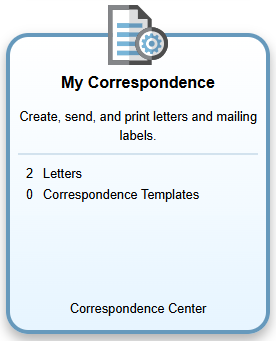
My Correspondence Widget
From this widget you can perform the following tasks:
-
Letters – Select to display the Letter Center page, where you can manage and create new letters to use in the system. See Manage Your Letters for details.
-
Correspondence Templates – Select to display your saved templates, where you can manage and create correspondence templates you can use in the system. See Manage Your Letter Templates for additional information.
-
Correspondence Center– Select to display the Communications - Correspondence page, where you can manage your list of letters and create new letters to use in the system. You can also view any System Letters created by administrative staff.
My Employment Plan
The My Employment Plan widget provides a quick way to view the number of job applications you have completed (including how many were to internal or external jobs), and the number of résumés and saved job alerts you have.
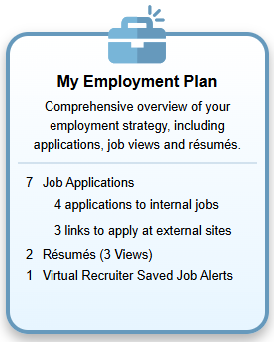
My Employment Plan Widget
Each number on this widget is a link to a corresponding tab in your Employment Plan Profile. From this widget you can access the following:
-
Job Applications– View the Job Contacts tab, listing jobs you applied to or contacted the employer.
-
Résumés – To view the Résumés tab, where you can create and manage your active résumés, select the Résumés [number] link.
To view a pop-up table showing the industries and geographic areas where your résumés have been viewed, select the Résumés (Views) link. This information provides insights into the reach and interest in your profile.
See Manage Your Résumés for details on creating and working with résumés.
-
Virtual Recruiter Saved Job Alerts – View the Virtual Recruiter tab, where you can create and manage your saved job alerts.
My Messages
The My Messages widget displays the number of unread and read messages in your Inbox on the Messages tab, as well as the number of job alerts. It also provides links to open the Messages tab in your Communications Profile. See Manage Your Internal Messages for details.
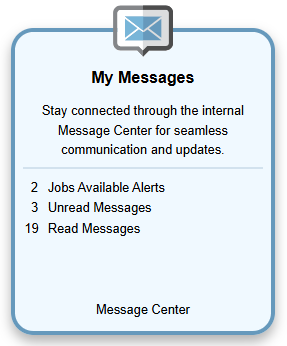
My Messages Widget
My Personal Profile
The My Personal Profile widget lets you view and update the information on the tabs in your Personal Profile folder. This is a quick way to see if important information used in your résumés, job searches, and program applications is up to date.
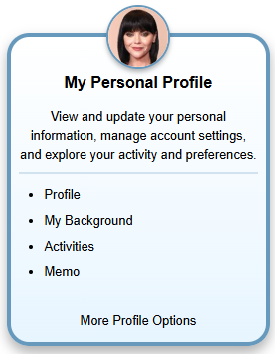
My Personal Profile Widget
From this widget you can access the following:
-
Profile – View the General Information tab, where you can manage your contact, login, education, current employment, demographic, military service, and other information. See Manage Your Registration Information for details.
-
My Background – View the Background tab, where you can manage your background information including education and employment history, skills, employer searchable items, and more. See Manage Your Background Information for details.
-
Activities – View the Activities tab, where you can answer questions and get a customized list of activities in the system.
-
Memo– View the Memo tab, where you can record memos to yourself, such as reminders, phone numbers, or to do items.
-
More Profile Options – Display your Personal Profile General Information tab, from which you can view and edit information on any of the profile tabs.
Need Help or More Information?
The Need Help or More Information widget is a quick way to open the Assistance Center for access to many site support options, like Quick Reference Cards, Site Map, how to contact site administrators, and the Learning Center, where you can find the user guide and view multiple training videos on using the system.
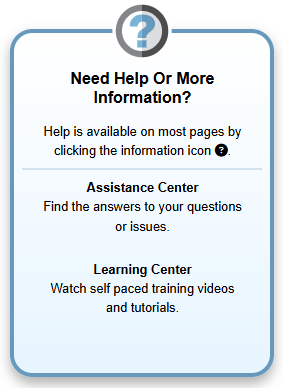
Need Help or More Information Widget
See Find Tutorials and Training Videos and Find Other Kinds of Assistance for additional information.
Smart Seeker
The Smart Seeker widget helps you keep track of your job search activities by displaying the number of job posts you viewed, saved, and applied to, as well as the number of résumé requests received from employers and recruiters. Complete your Paths and maintain key profile information to earn the Smart Seeker designation  on your profile. By providing your background details, résumé, and assessments (which earn badges), and by actively searching and applying for jobs, you can achieve this status.
Earning the Smart Seeker designation shows that your profile is complete and that you are actively pursuing employment. Staff and employers see your Smart Seeker icon in searches, signaling that you are engaged and making full use of the system’s tools.
Not all sites are configured with this Smart Seeker feature, so you may not have the Smart Seeker widget or Paths tab.
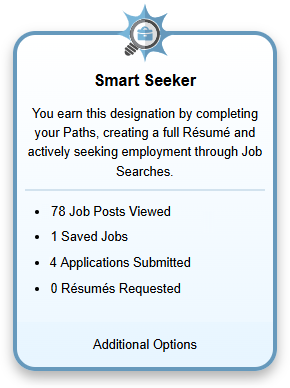
Smart Seeker Widget
Links on this widget include:
-
Job Posts Viewed – View the Jobs tab of your Search History Profile, where you can view and manage the list of jobs you have viewed.
-
Saved Jobs – View the Saved Jobs tab of your Employment Plan Profile, where you can view and manage the list of jobs you have saved.
-
Applications Submitted – View the Job Contacts tab of your Employment Plan Profile, where you can view and manage the list of jobs to which you have submitted an application.
-
Résumés Requested – See the number of employers who selected a link to view one of your résumés.
-
Additional Options – Displays the Résumés tab of your Employment Plan Profile, from which you can access other profile tabs to complete requirements for Smart Seeker designation.
See Advance Your Career with Paths for details on managing your job search activities.
Surveys
The Surveys widget allows you to share feedback about various topics, the system, and workforce staff. Links within the widget take you directly to available surveys, which change over time as new feedback is requested. Your responses help improve services and enhance your overall experience.
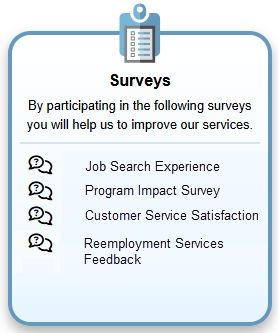
Surveys Widget
Unemployment Services
The Unemployment Services widget provides fast access to the main functions required to manage your unemployment claim.
Your site may not include this optional feature.
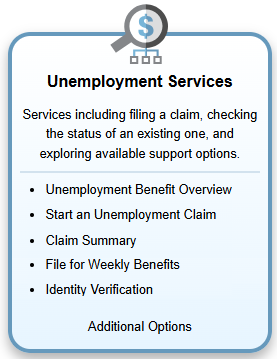
Unemployment Services Widget
Your site may display different options from those shown here.
From this widget you can access the following options:
-
Unemployment Benefit Overview – Review information on the unemployment insurance program, including how to qualify for benefits.
-
Start an Unemployment Claim – File a new claim for unemployment insurance benefits or re-open an existing claim.
-
Claim Summary – View an overview of your current claim for unemployment insurance benefits.
-
File for Weekly Benefits – View a list of your weekly certifications and file a claim for a new week.
-
Identity Verification – Upload documents for verifying your identity, such as a driver's license, passport, or birth certificate, etc. Once a verification document is uploaded this link disappears from the widget.
-
Additional Options – View the Unemployment Services page with the full range of unemployment services available.
See File for Unemployment for additional details.
Tips
Set up the widgets on your dashboard in terms of importance to you with the most frequently used at the top, and only include those you need. See Configure Your Dashboard Sections and Widgets for details.