
 Left Navigation Menu












Advance Your Career with Paths
Overview
The Paths section allows you to see at-a-glance areas in the system that you can complete to become designated as a savvy job seeker in the eyes of hiring employers. These areas, or “paths,” include things like your background information, a résumé, and several types of self-assessments. As you complete each path, its badge icon changes from gray to colored. Once you complete all seven paths, you earn a ‘Smart Seeker’ designation icon  , which employers can see.
Your site may not include this optional feature.
Paths Section with Two Completed Items
Where to Find This Feature
-
My Dashboard > Paths section
Understanding the Paths Panel
The following table describes the options available in this section.
|
Option... |
Description: |
|---|---|
| Register | Opens the General Information tab in your Personal Profile if you need to complete any registration information. For most sites, you automatically complete this badge when you register. See Manage Your Registration Information for additional information. |
| Enhanced Profile | Opens your Background tab where you can improve your Profile by adding details about your education, work history, skills, and goals. Use a step-by-step wizard or fill out each section on your own so employers can see what you can do. Registering and creating a résumé may populate much of this information; however, you need to enter information in each area before this badge is completed. See Manage Your Background Information for details. |
| Build a Résumé | Opens the Résumés tab in your Employment Plan Profile, where you can create a strong résumé by either uploading one you already have or Build a Résumé Automatically from Your Profile using our simple résumé builder that uses your profile details. You complete this badge once you have created an active résumé. |
| Job Readiness | Provides access to a job searching course offered on the Alison site. The course presents key skills needed to find the right position, structure your résumés, and master the application and interview process. It is not required for earning the ‘Smart Seeker’ designation, but is a recommended course if the badge shows on your site. See Alison Courses for additional information. |
| Automated Matching | Opens the Virtual Recruiter®, tab of your Employment Plan Profile, where you can set up personal job finders that look for jobs matching your search criteria. You can set your preferences and get daily alerts about job openings that fit your skills and employment goals. See Save Search Criteria as an Automated Job Alert (Virtual Recruiter) for details. |
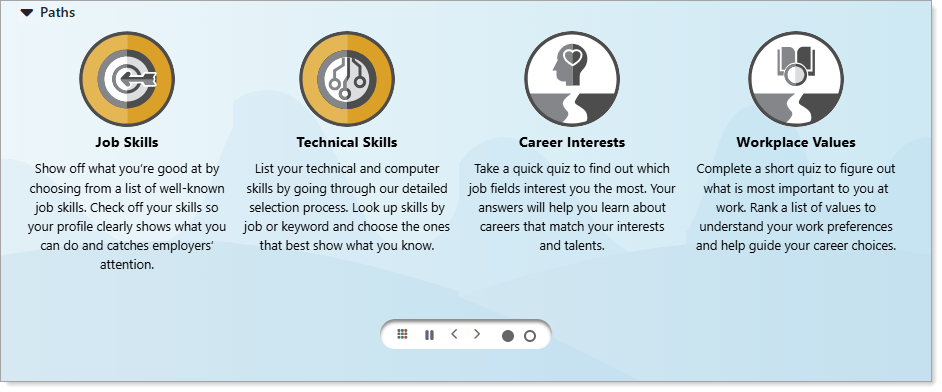
| Job Skills |
Opens the Job Skills tab of your Self Assessment Profile where you can start a Job Skills Assessment. You may have already completed the Job Skills assessment if you included the Job Skills for an Occupation when you completed an employment history record for a résumé or the Background tab. |
| Technical Skills | Opens the Tools and Technology tab of your Self Assessment Profile, where you can start a Tools and Technology Assessment. |
| Career Interests | Opens the Work Interests tab of your Profile to start an assessment using the Work Interests Ranking tool. |
| Workplace Values | Opens the Work Values tab of your Profile to start an assessment using the Work Values Ranking tool. |
| Use the carousel controls | You can use the carousel control icons to pause the rotation, page left and right, change the view, and select a panel directly. |
| Collapse the section | Select the arrow next to the section title to collapse or expand the Paths section as needed. |
Tips
Take advantage of the options available to complete your profile, maximizing the probability of success in achieving your career goals. For example, improve your profile by adding details about your education, work history, skills, and goals. Use the step-by-step Background Wizard or fill out each section on your own so employers can see what you can do. See Manage Your Background Information for additional information.