
 Left Navigation Menu












Build a Résumé Automatically from Your Profile
Overview
The Résumé Builder lets you easily create résumés from your Personal Profile information, including your contact information, employment history, education and certification or licensing credentials, skills, and other essential information. You can also determine how it looks to employers and recruiters. This tool streamlines the process, automatically producing a well-written résumé, so you don’t have to start from scratch or worry about formatting.
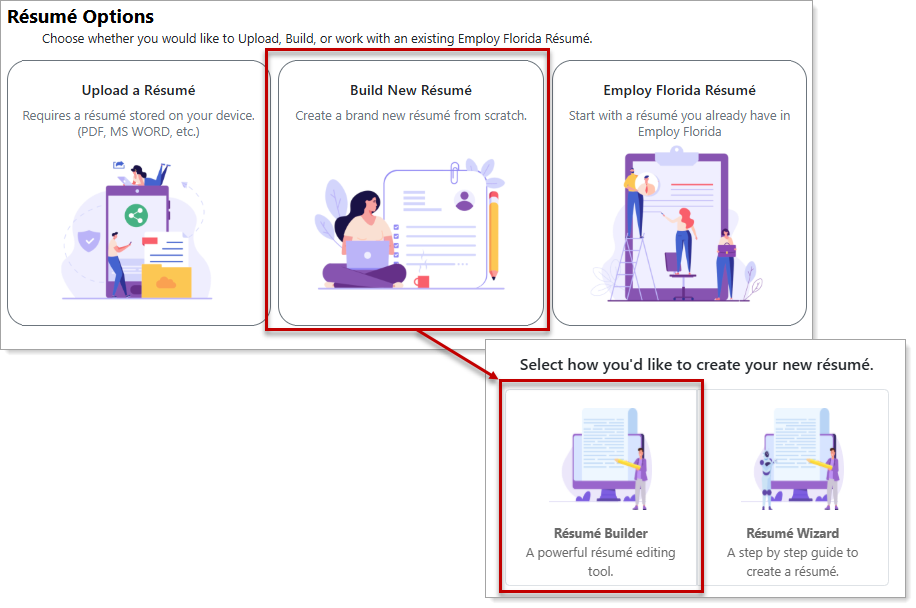
Résumé Options — Résumé Builder
Where to Find This Feature
-
Top menu bar > Résumé icon > Résumé Manager button or Create, Edit, or Upload a Résumé thumbnail icon > Add Résumé thumbnail icon
-
Left navigation menu > Quick Menu > Résumé Builder > Add Résumé thumbnail icon
-
My Dashboard > Widgets > Job Seeker Services widget > Résumé Builder link > Add Résumé thumbnail icon
-
Directory of Services tab > Services for Individuals > Job Seeker Services icon > Résumé Builder icon > Add Résumé thumbnail icon
Steps to Automatically Build Your Résumé
Your site may display different options from those shown here.
-
Choose the Build New Résumé option.
-
Select Résumé Builder as the method to create your new résumé. A pop-up may display, asking "Do you want to save your résumé nationwide?"
-
To save your résumé nationwide, select the authorization check box and then the Yes button. The system generates your résumé based on the information in your Personal Profile General Information and Background tabs.
-
If your information is complete, select the Offline button and set the Résumé Accessibility to 'Online.' See Make a Résumé Visible to Employers for additional information.
-
If your information is incomplete, you must complete the required items by selecting the sections displaying a yellow triangle. You must fill out education or employment history on the System Résumé tab, and your desired occupation, salary, and job location on the Searchable Items tab. See Improve a Résumé's Score for additional information.
-
-
Tips for Success
Complete the Background wizard in your Personal Profile first before creating a new résumé using this method, as much of that information automatically transfers to the Résumé Builder and includes information for the required sections. You still need to check each section of the résumé, complete any required sections, and set its status to ‘Online’ so employers can find you. See Manage Your Background Information for details.
You can still use offline résumés to apply for jobs; however, prospective employers and recruiters cannot search for you. You can set it to ‘Online’ whenever you are ready for employers to see it.