
 Left Navigation Menu












Work Interests Ranking
Overview
The Work Interest Analyzer helps you decide what kinds of careers you might want to explore. Answer questions about workplace activities to help you determine what your interests are and how they fit into the workplace. There are no right or wrong answers in this assessment; the purpose is to learn about your interests in order to find work that you might enjoy and find rewarding.
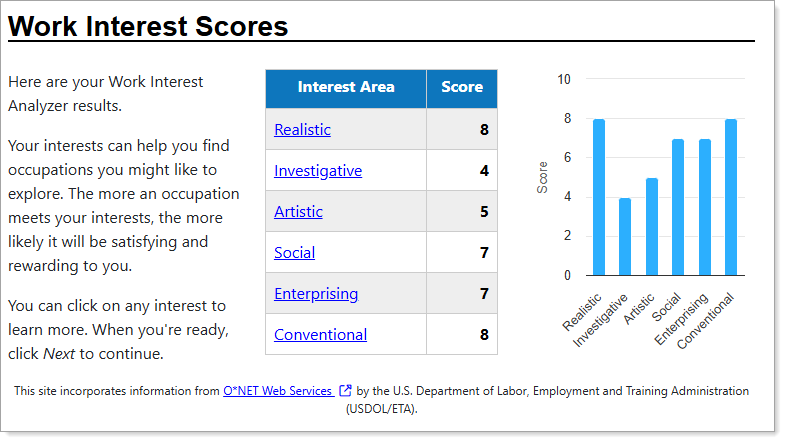
Work Interest Analyzer Scores
Where to Find This Feature
-
Left Navigation > Services for Individuals > Career Services > Career Explorer > Match Your Work Interests
-
My Dashboard > Widgets > My Assessments widget > Work Interest link > Work Interests tab > Create Work Interests link
-
Header bar > Profile icon > My Individual Profiles folder > Self Assessment Profile folder > Work Interests link > Create Work Interests link
Steps to Completing the Work Interest Analyzer
Because it is the most comprehensive of the two assessments, the Short Form is recommended. The Mini Form is offered to users on a mobile device or who are under a time constraint. The Short Form is a web-based vocational interest assessment instrument and contains 60 questions. The Mini Form contains 30 questions, each one about a work activity.
When answering the questions in the analyzer, limit your response to how much you like or dislike doing the work. Avoid responses based on whether you have enough education or training to do the work, or how much money you can make doing it.
-
Select the Short Form button or the Mini Form button to start the analyzer.
-
Answer the questions by selecting a preference that describes your level of enjoyment for the activity in the question. When you select a preference, the background changes behind your selection.
-
Continue answering questions. There are three pages for the Short Form and two for the Mini Form. You can use the Back button to return to a previous question page.
-
When you have completed all of the questions, select the Next button.
-
Once you have completed the final question page, select the View Score button to review your Work Interest Scores. Your Interest Areas are scored up to 10, with 10 being the highest level of interest.
-
Select any of the links under the Interest Area column to view the definition for an area of interest.
-
Select the Next button to view the Occupations that Match Your Work Interest table, which displays occupations closely aligned with your assessment results.
Key Concepts
What is the difference between Work Interests and Work Values?
Work interests are the types of tasks, subjects, or activities you enjoy doing at work, while work values are fundamental principles about what is important and meaningful in a job, like autonomy, security, or social responsibility.