
 Left Navigation Menu












Personal Skills Assessment
Overview
The Personal Skills assessment lets you create or edit a list of your personal skills. Skills are grouped by category and include a brief description for each. You can use your saved skills to find matching jobs and occupations.
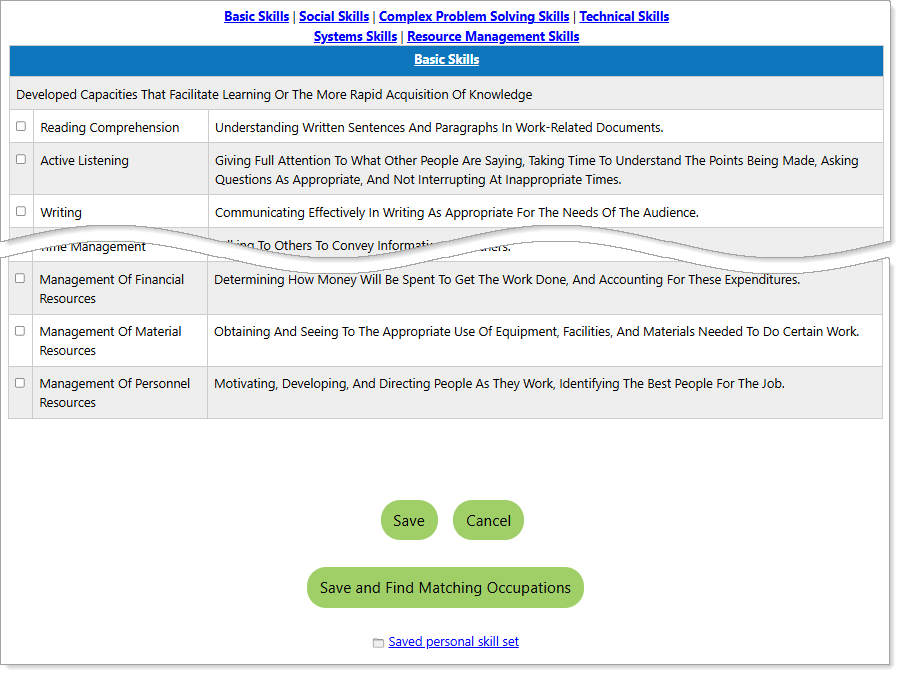
Select Your Skills Page
Where to Find This Feature
-
Header bar > Profile icon > My Individual Profiles folder > Self Assessment Profile folder > Personal Skills tab
-
Left navigation menu > Services for Individuals > Career Services > Career Explorer > Match Your Skills icon > Your Personal Skills icon
-
My Dashboard > Widgets > Career Services widget > Career Explorer link > Match Your Skills icon > Your Personal Skills icon
-
Directory of Services tab > Services for Individuals > Career Services icon > Career Explorer icon > Your Personal Skills icon
Steps to Complete the Personal Skills Assessment
Use the links at the top of the page to navigate to a specific skill category.
-
Review the list of skills under each category. Each skill includes a short description for easy reference.
-
Select the checkboxes next to the personal skills that apply to you.
-
Choose one of the following options:
-
Select the Save button to save your checked skills to the Personal Skills tab of your Self Assessment Profile.
-
Select the Save and Find Matching Occupations button to save your skills and view occupations that match them.
-
Choose a match level for how closely occupations should match your personal skills: Closely, Moderately, Loosely, or Show all occupations, and select the Continue button.
Your matching occupations display in a table that includes links to:
-
Occupation Profiles (in the Occupation Title column)
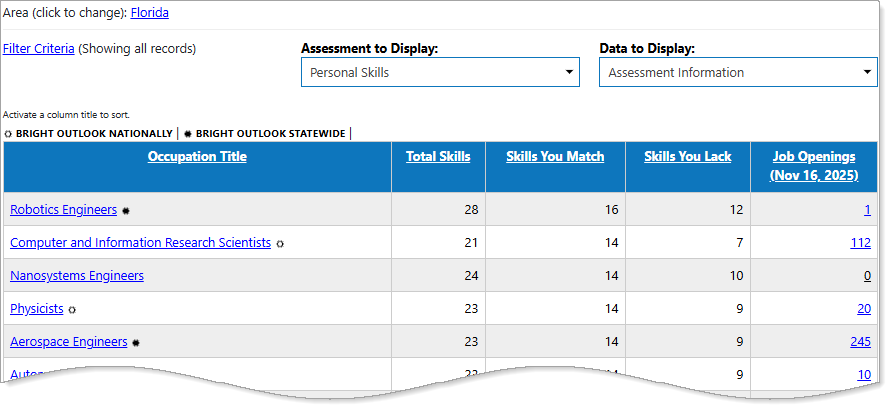
Personal Skills Assessment Results
Key Terms
Some occupations display an icon next to the Occupation Title indicating that it belongs to one of the categories listed below. You can find the icon key above the table grid, or hover over an icon for the tooltip description.
-
Bright Outlook — Bright Outlook occupations are expected to grow rapidly in the next several years and have large numbers of job openings, or are new and emerging occupations. Bright Outlook has two icons, one for Bright Outlook Nationally (represented by a sun icon), and another for Bright Outlook Statewide (also a sun icon, but solid dark).
-
Green Occupations — Green occupations increase the conservation and sustainability of natural resources, including jobs that reduce energy usage or lower carbon emissions. Green jobs provide worker-friendly conditions, pay sustainable wages, and offer opportunities for continued skill training and career growth. A leaf icon is used to indicate a green occupation.