
 Left Navigation Menu












View Occupations That Match Your Assessment Outcome
Overview
After completing an assessment, you can view occupations that align with your results. This topic explains how to use the Occupation Match table, adjust filters, and switch between assessment results. You’ll also learn how the table content varies depending on the selected assessment.
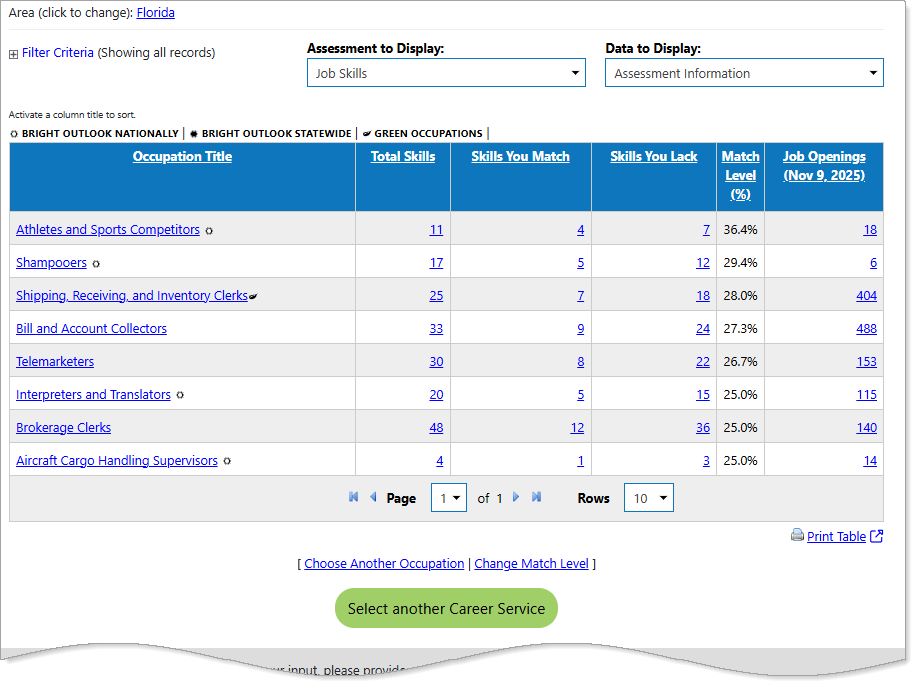
The Occupations Match table for the Job Skills Assessment.
Where to Find This Feature
The Occupation Match table is a final step for the following assessments: Knowledge Assessor, Match Your Knowledge of Tools and Technology, Match Your Work Interests, Match Your Work Values, and Match Your Job Skills. Here are the primary paths to get to the Occupations that Match page, by assessment:
-
Left navigation > Career Explorer > Knowledge Assessor > Complete the assessment > Select the Explore Occupations button
-
Left navigation menu > Career Explorer > Match Your Knowledge of Tools and Technology > Select the Find Matching Occupations and Jobs button
-
Left navigation menu > Career Explorer > Match Your Work Interests > Complete the assessment > Select the View Score button > Select the Next button
-
Left navigation menu > Career Explorer > Match Your Work Values > Complete the assessment > Select the View Score Report button > Select the Next button
-
Left navigation menu > Career Explorer > Match Your Skills > Select an Option > Select a Match Level > Select the Continue button
About the Occupation Match Table
You can perform the following actions from Occupation Match table, regardless of the assessment:
-
Select the Filter Criteria link to open filters that narrow your results by criteria such as Occupation Group, Education, or Wage Requirements. Filter types vary by assessment. The table refreshes automatically after you select a filter.
-
Select a link in the Occupation Title column to open the Occupation Profile page for more detailed information about that job in your area.
-
The Job Openings column shows the number of available positions for each occupation in your selected area. Select a [number] link to view current listings.
-
Bright Outlook and Green Occupations — You can find the icon key above the table grid, or hover over an icon with your mouse for the tooltip description. Occupations displaying one of these icons next to the Occupation Title link indicates the following:
-
Bright Outlook — Bright Outlook occupations are expected to grow rapidly in the next several years and have large numbers of job openings, or are new and emerging occupations. Bright Outlook has two icons, one for Bright Outlook Nationally (represented by a sun icon), and another for Bright Outlook Statewide (also a sun icon, but solid dark).
-
Green Occupations — Green occupations increase the conservation and sustainability of natural resources, including jobs that reduce energy usage or lower carbon emissions. Green jobs provide worker-friendly conditions, pay sustainable wages, and offer opportunities for continued skill training and career growth. A leaf icon is used to indicate a green occupation.
-
Assessment to Display Options
You must have saved at least two assessments before you can use the Assessment to Display drop-down list to switch between them.
You can change the results to display those from another assessment by selecting from the Assessment to Display drop-down list:
|
Assessment to Display Selection |
Displays: |
|---|---|
|
Knowledge Assessor |
The Preparation Needed column shows the required experience and training level. Select a link to view details about the occupation’s Job Zone, which groups jobs by typical education and training levels. For more information on Job Zones, see the Resources section of this topic. |
|
Job Skills |
Total Skills, Skills You Match, Skills You Lack columns show how your abilities compare. Select any link to view the related skill list. For example, if you selecting a link under Skills You Match for Air Traffic Controllers displays skills you already possess for that occupation. |
| Tools and Technology |
Displays how many technology skills and tools are used in the occupation, how many you match, and how many you lack. These figures determine your Tech Skills Match Level percentage. |
|
Work Interests |
These columns correspond to the six personality types from John Holland's "Theory of Career Choice"— Realistic, Investigative, Artistic, Social, Enterprising, and Conventional. The table shows how your interests align with each type. |
| Work Importance |
Work Importance highlights what matters most to you in a job, such as achievement, autonomy, and working conditions. Each column shows how your preferences compare, with scores based on a 30-point scale. |
Data to Display Options
You can view additional information using the Data to Display drop-down list.
|
If you select... |
You can view: |
|---|---|
| Labor Market Information |
|
| Education Information |
|
Resources
To learn more about Job Zones, which categorize occupations by required preparation, visit O*NET Online.