
 Left Navigation Menu












About Unemployment Benefits
Overview
Your site may display different options from those shown here.
The Unemployment Benefits tab of your profile helps you learn about or access unemployment benefits. Not every state’s workforce website includes this tab, and what you see here may vary depending on your state.
In some states, this tab provides information only—for example, explaining how unemployment benefits work and linking you to your state’s official Unemployment Insurance (UI) website to file or manage a claim.
In other states, the tab is part of an integrated system that connects workforce and unemployment services in one place. If your state offers this option, you may be able to apply for benefits, check claim status, submit weekly certifications, or update your information directly from this tab.
Because each state manages its unemployment program differently, the links, tools, and instructions you see here may not be the same as in your state.
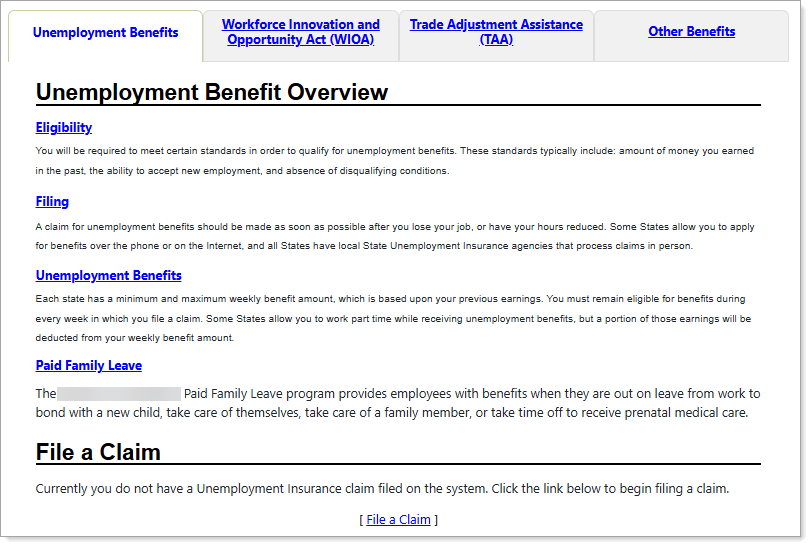
Sample Unemployment Benefits Tab
Where to Find This Feature
-
Header bar > Profile icon > My Individual Plans folder > Benefits Plan Profile folder > Unemployment Insurance tab
-
Left navigation menu > Quick Menu > My Portfolio > My Individual Plans > Benefits Plan Profile folder > Unemployment Insurance tab
-
My Dashboard > [your name] link > My Individual Plans folder > Benefits Plan Profile folder > Unemployment Insurance tab
About the Unemployment Benefits Tab
Depending on your state’s setup, the Unemployment Benefits tab may include one or two main sections:
-
Information Section – Available in most states that offer this page.
-
Claim Section – Available only in states where unemployment insurance (UI) services are integrated into the workforce system.
Information Section
If your state’s site includes an informational section, you can review basic details about unemployment benefits. In this section, you’ll find links and explanations for topics such as:
-
Eligibility – Who can receive unemployment benefits and what requirements must be met. You’ll also find a link to your state’s detailed eligibility rules.
-
Filing – How to file a claim, with a link to your state’s official site for more information.
-
Unemployment Benefits – General information about benefits and who qualifies.
Claim Section (Integrated Sites Only)
If your state’s workforce site connects directly to the UI system, this section lets you manage your unemployment claim without leaving the site.
From here, you can:
-
View your claim details, including your current status, employment history, and payment information.
-
Update or edit your claim information when needed.
-
Submit weekly certifications to report your work and earnings.
-
Select a previous claim to review by using the Select claim to view drop-down list.
To start a new claim, select the File a Claim link and follow the prompts. You’ll review and confirm your personal details and update any information needed to establish or maintain your eligibility for benefits.