













Use a Résumé as Criteria to Find Jobs
Overview
The Résumé tab lets you choose one of your saved résumés and refine your search with extra criteria. The system then returns job results that best match the résumé you selected, making it easier to find roles suited to your qualifications.
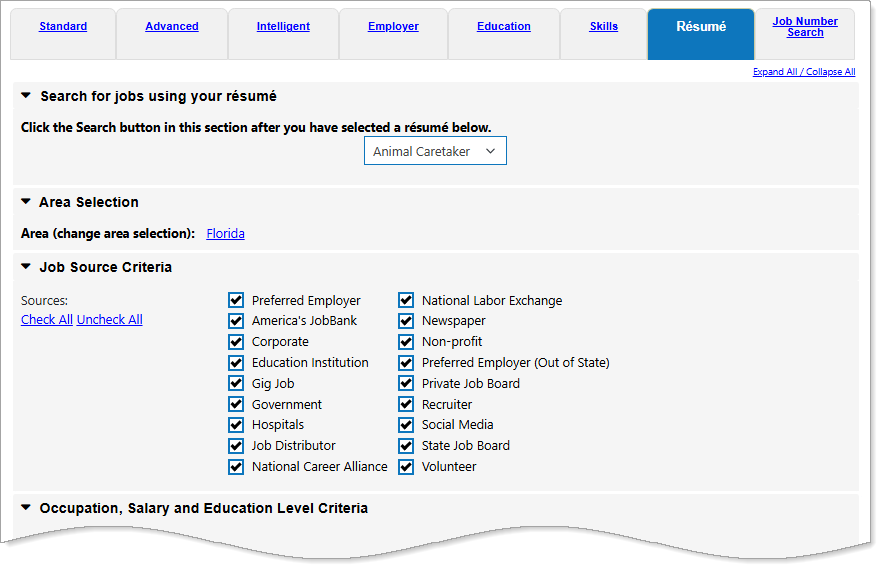
Resume Job Search Tab
Where to Find This Feature
-
Left navigation menu > Quick Menu > Job Search > Résumé tab
-
My Dashboard > Widgets > Job Seeker Services widget > Job Search link > Résumé tab
-
Directory of Services > Services for Individuals > Job Seeker Services > Find Job Openings > Résumé tab
Résumé Job Search Tab
If you created at least one résumé in the system, you can use the Résumé tab on the Job Search Criteria page to perform a job search based on the information in your résumé, such as your desired occupation, salary requirements, and preferred location. This feature uses your résumé details to find jobs that closely match your experience and preferences, saving you time and helping you focus on the most relevant opportunities.
To use this search option, you must have at least one résumé saved in the system. If you have not created a résumé yet, see for instructions on how to build one.
To search for jobs using your résumé as search criteria:
-
From the Job Search Options page, select the Résumé tab.
You can also access the Résumé search tab from a résumé thumbnail on your Résumés tab; select the gear icon and then select the Job Search link on the pop-up menu. Relevant information from your résumé is prefilled in the criteria fields of the Résumé tab.
-
Select the desired active résumé from the drop-down list. Additional search criteria sections display automatically for Area, Job Source, Desired Occupation, Salary, and Education Level.
 Area Selection
Area Selection Search Criteria Fields Filter by
Description
Area (change area selection)
Select to change the geographic area to search within.
Select New Area
To select areas visually using map icons, choose the Select by Map link to display the Select an Area by Map page.
-
If you are searching by County, you can select more than one by holding the Ctrl key on your keyboard, while selecting them with your mouse.
State Displays the currently selected state.
Area Type To select an area by type, select it from the drop-down list.
-
If you have chosen a ZIP code or city as your area, you must select the Set Area button to save your selection.
Job Source Criteria
This section allows you to search based on the type of source where the job opening is posted. Websites that contain job listings can be categorized into general groups or sources.
Always be sure the Preferred Employer checkbox is checked, since only Preferred Employers can identify customized Skills Criteria for the job. The spidered jobs are using general criteria associated with the matching O*NET occupation, and may be less reliable for accurately matching your skill levels.
-
You can choose as many job listing sources as desired by selecting the checkbox beside each source type. You can search for jobs in all sources by selecting the Check All link to select all of the boxes.
-
Preferred Employer - verified internal employers who are registered and post jobs within this system. Jobs from Preferred Employers offer a wider range of search options and provide better tracking on the Job Contacts tab when you apply for a job.
-
Corporate - public or private businesses
-
Education Institution - colleges and school systems
-
Government - federal, state and local
-
Hospitals - hospitals, clinics, health-care organizations
-
Newspaper - classified advertisements
-
Private Job Board - HotJobs, CareerBuilder, etc.
-
Recruiter - a company that matches job seekers with employers for a fee
-
Social Media - social media platforms hosting job listings, e.g. LinkedIn
-
State Job Board - the official job board for your state
-
Volunteer - typically do not include pay
-
National Labor Exchange - collects and distributes job openings found on over 25,000 corporate career and state websites. There are more than 2 million job openings on the National Labor Exchange at any given time.
-
Occupation, Salary, and Education Level Criteria
Selecting criteria from this section allows you to search for jobs based upon how closely you match any of the following skill sets: Job Skills, Tools and Technology, Personal Skills, Interests, or Work Values.
You must have skills saved to your profile to use this feature. The system displays a message if you don't already have these skill sets entered, and provides a link to add them to your profile.
Occupation, Salary, and Education Level Search Criteria Fields Filter by
Description
Include jobs with no education listed
To include jobs with no educational requirements, select the checkbox. Include jobs with no salary listed
To include jobs with no salary listed, select the checkbox.
-
-
Select the Search button. A page displays the jobs that match your résumé search criteria. See Job Search Results Page Overview for details.