













How Well Do You Match Up to a Job Listing?
Overview
The How I Match Up page shows how your experience, skills, and preferences align with a specific job listing. It evaluates key factors such as skills, desired location, and salary expectations, then combines these into an easy-to-read graph. This visual summary helps you quickly see where you’re a strong match and where you might want to improve, so you can make more informed decisions about which opportunities best fit your employment goals.
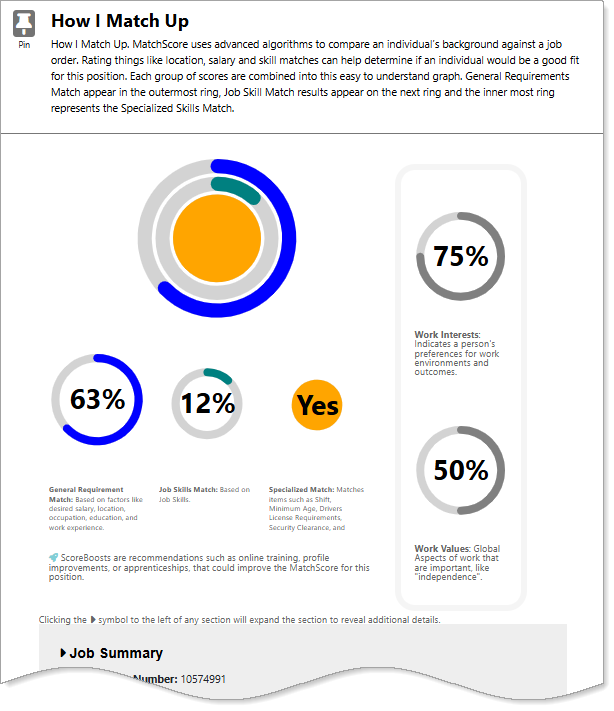
How I Match Up Page
Where to Find This Feature
-
Header bar > Search field > Job Search Results page > Match Score icon > Learn more about MatchScores link
-
Header bar > Search field > Job Search Results page > Job Title link > Job Details page > Match Scores section > How I Match Up link
-
Left navigation menu > Quick Menu > Job Search Job Search Results page > Job Title link > Job Details page > Match Scores section > How I Match Up link
-
My Dashboard > Widgets > Job Seeker Services widget > Job Search link > Job Search Results page > Match Score icon > Learn more about MatchScores link
-
My Dashboard > Widgets > Job Seeker Services widget > Saved Jobs link > Job Title link > Job Details page > Match Scores section > How I Match Up link
Viewing Your Match Scores
Your site may display different options from those shown here.
The rings in this graph show how closely you match different job requirements. The outer ring shows your General Requirements Match, the next ring shows your Job Skills Match, and the center circle shows your Specialized Skills Match. If you don’t match anything in a category, that ring or circle appears grayed out. Below the icons, your scores are grouped into four color-coded sections, which are explained below.
In order to see meaningful matching scores, you must have previously completed self assessments and saved key background information in your Personal Profile. See Manage Your Background Information and Discover Roles That Match Your Skills, Interests, and Values for details on completing those areas.
In the system, select the arrow next to each section name to see more details.
 Job Summary
This section gives you a summary of the job order you are viewing such as job order number, job title, employer, and responsibilities and duties.
General Match
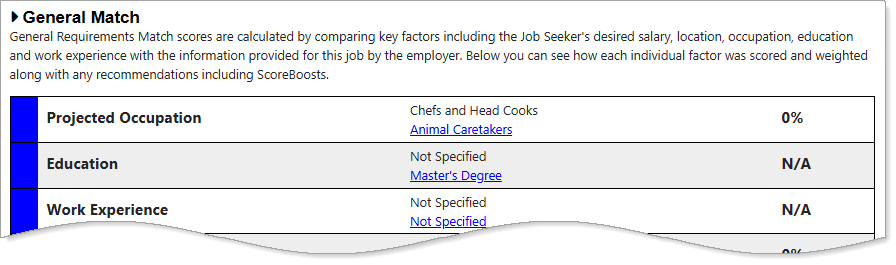
General Match Section
Your overall General Requirements Match score displays as a circled percentage on Intelligent or Skills job search results pages, or as the outer ring on a job card or Job Details page. This score compares your desired salary, location, occupation, education, and work experience with the employer’s job information and requirements.
Selecting any of the links takes you to the corresponding section on the Background or General Information tab, where you can update your information. See How I Match Up – Personal Skills Match for details.
Skills Match
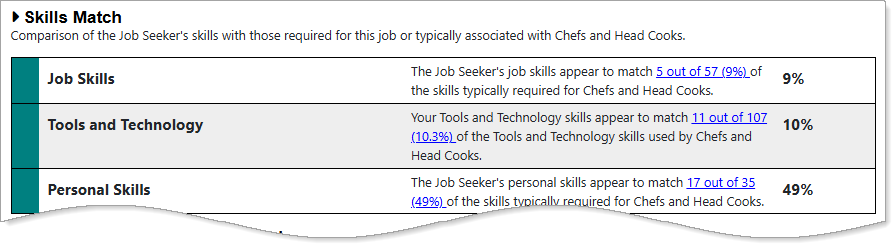
Skills Match Section
Your Job Skills Match score displays as a circled percentage on Intelligent or Skills job search results pages, or as the middle ring on a job card or Job Details page. The full set of Skills Match scores compares your job-related, personal, and tools-and-technology skills with those required for the position.
Use the link in each description to compare your skills to the job's requirements. This will help you see any areas where you might need more training or practice. See How I Match Up – Job Skills Match for details.
Specialized Requirements Match
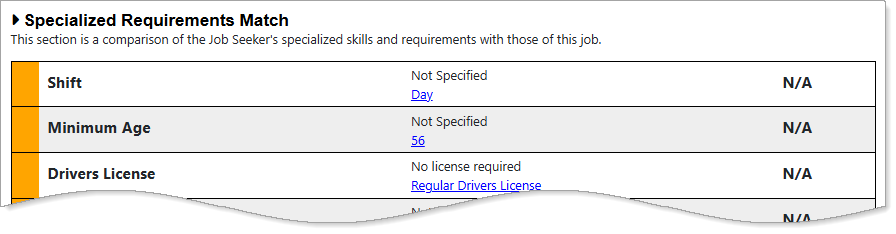
Specialized Requirements Match Section
Your overall Specialized Requirements Match score appears as a circled Yes, No, or N/A on Intelligent or Skills job search results pages, or as the inner circle on a job card or Job Details page. This score compares your specialized qualifications, such as preferred shift, minimum age, or language proficiency, with the job’s requirements. If any individual requirement is marked No, your overall Specialized Requirements Match score also displays as No.
Selecting any of the links takes you to the corresponding section of your General Information or Background tabs, where you can update your details. See How I Match Up – Tools and Technologies Match for details.
Interest and Values Match
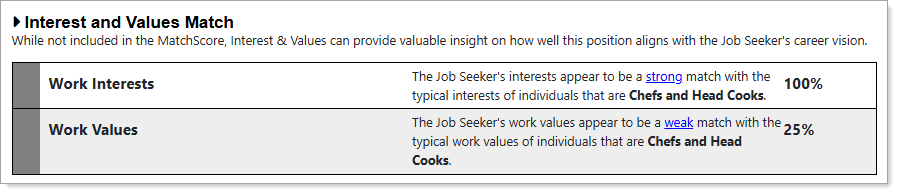
Interest and Values Match Section
The Interest and Values Match table displays your Work Interests and Work Values as percentage matches showing how closely they align with those of individuals who typically hold the position. Although these scores are not included in the How I Match Up calculations, they offer valuable insight on how well the position aligns with your career vision.
Each description includes a link to view the specific ranking score against the score you have. You can edit your Work Interest score by selecting the link at the bottom of the page or from your Self Assessment Profile. See How I Match Up – Work Values Match for details.