
 Left Navigation Menu












Use Your Background Information as Job Search Criteria
Overview
The Intelligent tab on the Job Search Options page lets you search for jobs based on your background information, using patterns from other individuals’ job searches to suggest opportunities that closely match your skills and experience. You can choose from three intelligent search methods: Crowd Search, Match Search, and Pathfinder. Each method is designed to help you discover opportunities you might not have thought to search for on your own.
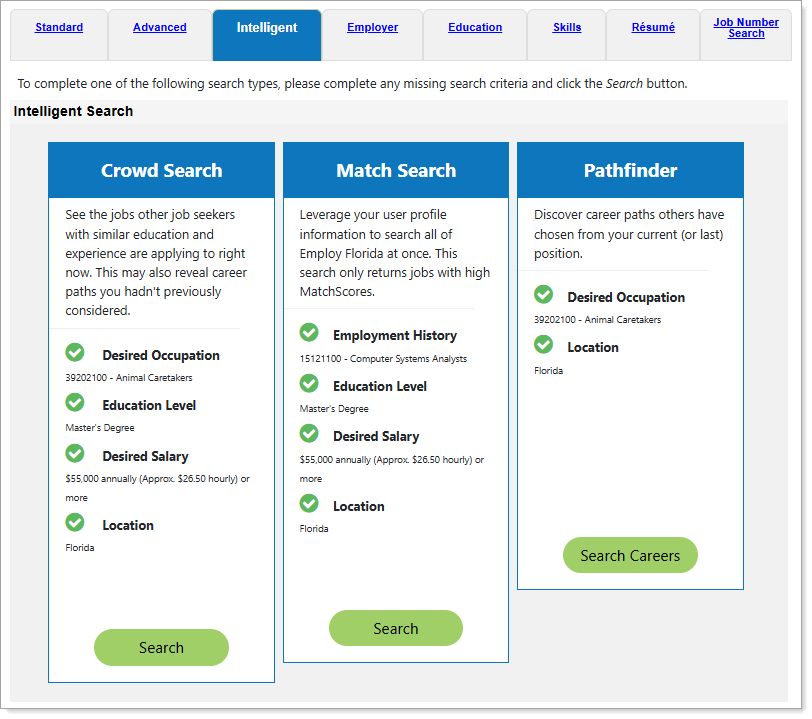
Job Search Options Page – Intelligent Tab
Where to Find This Feature
-
Left navigation menu > Quick Menu > Job Search > Intelligent, Skills, or Résumé tabs
-
Left navigation menu > Services for Individuals > Job Seeker Services > Find Job Openings > Intelligent, Skills, or Résumé tabs
-
My Dashboard > Widgets > Job Seeker Services widget > Job Search link > Intelligent, Skills, or Résumé tabs
-
Top menu bar > Directory of Services > Services for Individuals > Job Seeker Services > Find Job Openings > Intelligent, Skills, or Résumé tabs
Steps to Perform Different Types of Job Searches
Your site may display different options from those shown here.
To search for jobs based on your background as compared to other users’ job searches:
-
From the Job Search Options page, select the Intelligent tab.
-
Select the Search button in the desired search panel.
To use these search options, you must have provided the required background information, including job skills. Missing background items are indicated on the panels along with Add links and Add Missing Data buttons to access pages where you can add the information. See Manage Your Background Information for details.
-
Crowd Search - This search allows you to view jobs that other job seekers with similar education and experience backgrounds are applying to. This uses your desired occupation, education level, desired salary, and location from your Background tab’s Employer Searchable Items.
-
Match Search - This search allows you to view jobs for which you have high match scores to the required job skills, general requirements, and specialized requirements. This uses your desired salary and location from your Background tab’s Employer Searchable Items, and your employment history and education level from your Background tab.
-
Pathfinder Search - This search allows you to view jobs that match career paths that other job seekers have chosen, based on a similar desired occupation and location. This uses your desired occupation and location from your Background tab’s Employer Searchable Items. This search returns more results than the other two as it has less criteria to match and a wider range of occupations.
-
-
A results page displays all jobs that match the specified criteria (by the indicated percentage, where identified). See Intelligent Search Results Page for details.