
 Left Navigation Menu












Apply for Suppressed Jobs
Overview
Suppressed jobs are those where the employer requests the pre-screening of applicants by staff. Workforce staff can eliminate applicants who do not meet basic criteria (like education, certification, or experience), leaving the employer with a short list of strong prospects. The employer name and address are not displayed to the job seeker, and there is no way to contact them directly to apply. Prospective applicants must go through staff to complete the application process, usually by visiting their local one-stop office.
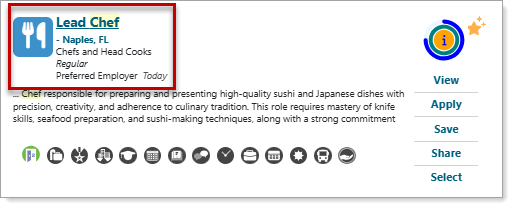
Suppressed Job Listing — Job Title Only; No Company Identification
Where to Find This Feature
-
Top menu bar > Résumé icon > Résumé thumbnail icon > Suggested Jobs Based on Your Résumé (at the bottom) > Apply option
-
Left navigation menu > Quick Menu > Job Search > Apply
-
Left navigation menu > Quick Menu > Job Search > Job Details > Apply
-
My Dashboard > Personalized Job Matches > Apply option
-
My Dashboard > Widgets > Job Seeker Services widget > Job Search link > Apply option
-
Directory of Services tab > Quick Menu > Job Search > Apply option
Steps to Apply to a Suppressed Job
Your site may display different options from those shown here.
-
Search for and identify the position you would like to apply to. See Find a Job for details.
-
Select the Apply button.
-
If the job application includes Applicant Screening Questions, answer them and select the Next button. The How to Apply page displays with all application options accepted by the employer listed.
-
On the How to Apply page, select the desired résumé from the drop-down list:
-
To preview or change information on your selected résumé before sending it to the employer, click the Edit a Résumé link. See Edit a Résumé for details.
-
If you do not have a résumé in the system, click the Create a Résumé link to begin the process of creating a résumé. See Manage Your Résumés for additional information.
-
-
Select the Please have a staff person contact me button. You are referred to your local one-stop office for immediate information or staff contacts you within 72 hours.
Your qualifications are first evaluated by Workforce staff. If you meet the requirements, your information is forwarded to the employer. The employer then reviews your résumé and, if interested in moving forward, contacts you through system messaging, by email, phone, or another available method.
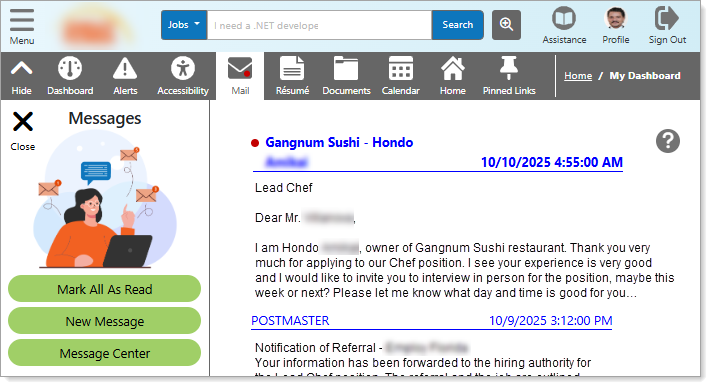
Interested Employer Response — System Message Example
Tips for Success
Because staff members screen applications first, your résumé needs to clearly demonstrate that you meet the minimum qualifications listed in the job posting:
-
Highlight education, certifications, and required experience at the top.
-
Use the same keywords that appear in the job description — this helps staff quickly confirm your eligibility.
-
Keep your résumé neat, factual, and error-free, as staff may reject unclear or incomplete applications.