













Other Ways to Apply for Jobs
Overview
Not all employers accept applications directly through online job postings. Depending on their preferences, you may need to apply using other methods. These can include completing an online form on the employer’s website, sending your résumé by email or mail, calling by phone, applying in person, or visiting a local one-stop office. Using the method requested by the employer helps ensure your application is received and reviewed promptly.
Information in this topic applies to preferred (internal) jobs, created by employers registered in the system.
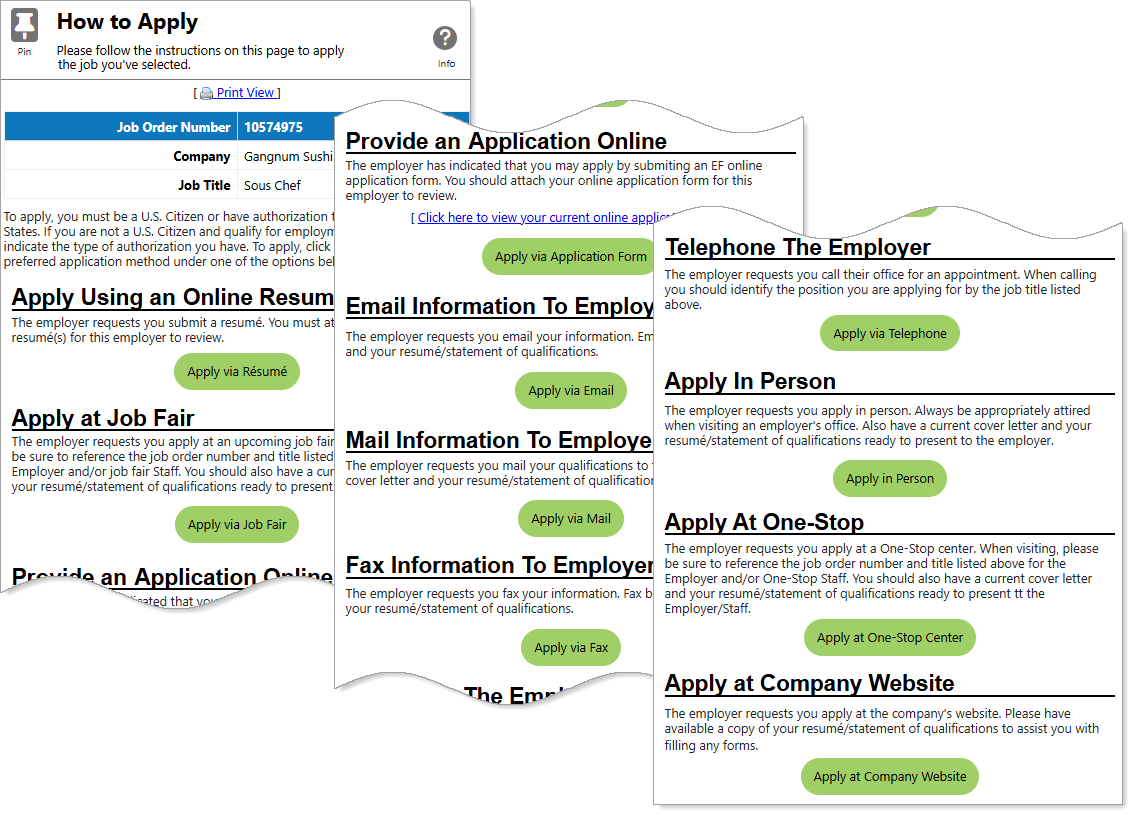
How to Apply Page — Alternative Application Methods
Where to Find This Feature
-
Top menu bar > Résumé icon > Résumé thumbnail icon > Suggested Jobs Based on Your Résumé (at the bottom) > Apply option
-
Left navigation menu > Quick Menu > Job Search > Apply
-
Left navigation menu > Quick Menu > Job Search > Job Details > Apply
-
My Dashboard > Personalized Job Matches > Apply option
-
My Dashboard > Widgets > Job Seeker Services widget > Job Search > Apply option
-
Directory of Services tab > Quick Menu > Job Search icon > Apply option
Steps to Use Other Application Methods
Some employers may request that you apply using a specific method other than the standard online application. Each option below includes detailed steps and helpful tips for submitting your application successfully. Select a method to expand and view instructions.
Application options listed on the How to Apply page are limited to those accepted by the employer; for example, you may see only Online Résumé and Company Website selections. Your site may display different options from those shown here.
 Apply at Job Fair
-
Search for and identify the position you would like to apply to. See Find a Job for details.
-
Select the Apply button.
-
If the job application includes Applicant Screening Questions, answer them and select the Next button. The How to Apply page displays with all application options accepted by the employer listed.
-
Select the Apply via Job Fair button. The How to Apply page redisplays with different fields.
You must be registered for the job fair in order to use this application method. See Attend Job Fairs for additional information.
-
Review any job applicant information items the employer may have specified in the Job Applicant Information Needed section, such as education and employment history, contact information, certifications, etc.
If the employer did not specify application requirements, this section does not display.
-
Select the Edit link for any items needing attention (marked with a red X) to display a page for adding or editing the item as required. Only when all requirements are complete and display a green checkmark can the application proceed.
-
-
To include a personal introduction, select a cover letter from the drop-down list in the Attachment Options section.
To include a cover letter:
-
To create a cover letter if none are available, select the Create Cover Letter link. The Letter Builder page displays.
-
Employer contact information prefills from the job order in the Letter Recipient section. Modify the information, if required.
-
In the Letter section, enter a Letter Name for the cover letter.
-
Enter the text of your letter in the Letter Body text box. You can use the formatting tools at the top to bold, italicize, create bullet lists, adjust colors, include images, and more—adding clarity, emphasis, and visual appeal.
-
To use cover letter templates that you created, select the Text Templates link and select one from the list on the Templates tab.
-
The templates are filtered for cover letters by default. To use a different kind of template, expand Show Filter Options, change the Letter Type in the drop-down list, and select the Filter link to display other template options.
-
Text Templates Window Functions To...
Do This:
View the contents of the template
Select the magnifying glass icon in the Preview column.
Apply the template to the text field
Select the link in the Description column on the Saved Text tab. See Manage Your Saved Text Templates for details.
Use a variable to automatically enter specific text Select a link in the Description column on the Variables tab. The finished letter replaces the code you see with the specified information from the job order.
View a list of impactful terms that convey initiative and achievement Select the Action Words tab. A filterable list of verbs, divided by category, displays—select the words you want to add to your text.
-
-
To customize your cover letter or save as a new one, select the Edit Cover Letter link and repeat the above steps.
-
-
To include any additional documents you saved to the system, select the link in the Additional Documents section to attach or upload it.
-
Check the box to acknowledge that you are providing your contact information to the employer posting the job in addition to any other information you specified in your résumé.
-
Select the Submit Application button to send your application to the employer. The Job Application Successful page confirms your application. Good luck!
With an Online Application and Cover Letter
Applying via online application submits all of your background information to the employer. See Manage Your Background Information for details.
-
Search for and identify the position you would like to apply to. See Find a Job for details.
-
Select the Apply button.
-
If the job application includes Applicant Screening Questions, answer them and select the Next button. The How to Apply page displays with all application options accepted by the employer listed.
-
Select the Apply via Application Form button. The How to Apply page redisplays with different fields.
-
To see the information you are providing to the employer, select the Click here to view your current online application form link.
-
To change the information you are providing to the employer, select the Background Wizard link. See Manage Your Background Information for details.
-
Review any job applicant information items the employer may have specified in the Job Applicant Information Needed section, such as education and employment history, contact information, certifications, etc.
If the employer did not specify application requirements, this section does not display.
-
Select the Edit link for any items needing attention (marked with a red X) to display a page for adding or editing the item as required. Only when all requirements are complete and display a green checkmark can the application proceed.
-
-
To include a personal introduction, select a cover letter from the drop-down list in the Attachment Options section.
To include a cover letter:
-
To create a cover letter if none are available, select the Create Cover Letter link. The Letter Builder page displays.
-
Employer contact information prefills from the job order in the Letter Recipient section. Modify the information, if required.
-
In the Letter section, enter a Letter Name for the cover letter.
-
Enter the text of your letter in the Letter Body text box. You can use the formatting tools at the top to bold, italicize, create bullet lists, adjust colors, include images, and more—adding clarity, emphasis, and visual appeal.
-
To use cover letter templates that you created, select the Text Templates link and select one from the list on the Templates tab.
-
The templates are filtered for cover letters by default. To use a different kind of template, expand Show Filter Options, change the Letter Type in the drop-down list, and select the Filter link to display other template options.
-
Text Templates Window Functions To...
Do This:
View the contents of the template
Select the magnifying glass icon in the Preview column.
Apply the template to the text field
Select the link in the Description column on the Saved Text tab. See Manage Your Saved Text Templates for details.
Use a variable to automatically enter specific text Select a link in the Description column on the Variables tab. The finished letter replaces the code you see with the specified information from the job order.
View a list of impactful terms that convey initiative and achievement Select the Action Words tab. A filterable list of verbs, divided by category, displays—select the words you want to add to your text.
-
-
To customize your cover letter or save as a new one, select the Edit Cover Letter link and repeat the above steps.
-
-
To include any additional documents you saved to the system, select the link in the Additional Documents section to attach or upload it.
-
Check the box to acknowledge that you are providing your contact information to the employer posting the job in addition to any other information you specified in your résumé.
-
Select the Submit Application button to send your application to the employer. The Job Application Successful page confirms your application. Good luck!
Through Email
-
Search for and identify the position you would like to apply to. See Find a Job for details.
-
Select the Apply button.
-
If the job application includes Applicant Screening Questions, answer them and select the Next button. The How to Apply page displays with all application options accepted by the employer listed.
-
Select the Apply via Email button. The How to Apply page redisplays with different fields.
-
Review any job applicant information items the employer may have specified in the Job Applicant Information Needed section, such as education and employment history, contact information, certifications, etc.
If the employer did not specify application requirements, this section does not display.
-
Select the Edit link for any items needing attention (marked with a red X) to display a page for adding or editing the item as required. Only when all requirements are complete and display a green checkmark can the application proceed.
-
-
To include a personal introduction, select a cover letter from the drop-down list in the Attachment Options section.
To include a cover letter:
-
To create a cover letter if none are available, select the Create Cover Letter link. The Letter Builder page displays.
-
Employer contact information prefills from the job order in the Letter Recipient section. Modify the information, if required.
-
In the Letter section, enter a Letter Name for the cover letter.
-
Enter the text of your letter in the Letter Body text box. You can use the formatting tools at the top to bold, italicize, create bullet lists, adjust colors, include images, and more—adding clarity, emphasis, and visual appeal.
-
To use cover letter templates that you created, select the Text Templates link and select one from the list on the Templates tab.
-
The templates are filtered for cover letters by default. To use a different kind of template, expand Show Filter Options, change the Letter Type in the drop-down list, and select the Filter link to display other template options.
-
Text Templates Window Functions To...
Do This:
View the contents of the template
Select the magnifying glass icon in the Preview column.
Apply the template to the text field
Select the link in the Description column on the Saved Text tab. See Manage Your Saved Text Templates for details.
Use a variable to automatically enter specific text Select a link in the Description column on the Variables tab. The finished letter replaces the code you see with the specified information from the job order.
View a list of impactful terms that convey initiative and achievement Select the Action Words tab. A filterable list of verbs, divided by category, displays—select the words you want to add to your text.
-
-
To customize your cover letter or save as a new one, select the Edit Cover Letter link and repeat the above steps.
-
-
To include any additional documents you saved to the system, select the link in the Additional Documents section to attach or upload it.
-
Select your résumé from the drop-down list in the Online Résumé section.
-
If you do not have a résumé in the system, click the Create a Résumé link to begin the process of creating a résumé. See Manage Your Résumés for additional information.
-
To preview or change information on your selected résumé before sending it to the employer, click the Edit a Résumé link. See Edit a Résumé for details.
-
-
Indicate whether to include your résumé as an Attachment or In Email Body using the Send as option buttons.
-
To include your online application as an attachment, check the box in the Online Application section.
-
Check the box to acknowledge that you are providing your contact information to the employer posting the job in addition to any other information you specified in your résumé.
-
Select the Continue button. The Send Email page displays with email address information prefilled by the system, and your selected attachments in place.
-
Enter the text of your email in the Message Body.
-
To enhance your content, use the formatting tools at the top to bold, italicize, create bullet lists, adjust colors, include images, and more—adding clarity, emphasis, and visual appeal.
-
To remove the entry, select the Clear Text link.
-
To remove bold, italics, bullets, etc., but leave the content, select the Remove All Formatting link.
-
-
Select the Send Email button to send your application to the employer. The Job Application Successful page confirms your application. Good luck!
Tips
-
Don’t copy and paste a generic message. Personalize each email for the employer.
-
Keep your email concise and purposeful. In a few short paragraphs:
-
Introduce yourself and mention the position you are applying for.
-
Highlight one or two key qualifications that match the job.
-
Express enthusiasm for the opportunity.
-
Mention your attached documents (résumé, cover letter).
-
End with a polite thank-you and your contact information.
-
-
Proofread for grammar, spelling, and tone—one small mistake can make a big difference.
-
Emails sent Monday–Thursday mornings (8–11 AM) have the highest open rates. Avoid late nights or weekends if possible.
By Mail
-
Search for and identify the position you would like to apply to. See Find a Job for details.
-
Select the Apply button.
-
If the job application includes Applicant Screening Questions, answer them and select the Next button. The How to Apply page displays with all application options accepted by the employer listed.
-
Select the Apply via Mail button. The How to Apply page redisplays with different fields.
-
Review any job applicant information items the employer may have specified in the Job Applicant Information Needed section, such as education and employment history, contact information, certifications, etc.
If the employer did not specify application requirements, this section does not display.
-
Select the Edit link for any items needing attention (marked with a red X) to display a page for adding or editing the item as required. Only when all requirements are complete and display a green checkmark can the application proceed.
-
-
Check the box to acknowledge that you are providing your contact information to the employer posting the job in addition to any other information you specified in your résumé.
-
Select the Continue button. The Employer notification successful page displays. Take note of the employer's mailing address.
-
Create hard copies of your résumé and cover letter, and mail them to the employer's mailing address.
The employer receives a system notification that you are applying for the job. The notification includes your name and phone number, and a link to view your applicant information, including skills, employment history and education, your answers to the application questions (if any), and more. Good luck!
Tips
-
Do not wait to get your hard copies in the mail; do so as soon as possible—even the same day. Use First-Class with tracking (USPS tracking or certificate of mailing). This shows that you are both interested and responsible.
-
Use clean white 24 lb paper; print single-sided; no staples.
-
Indicate the job title, job order number, and employer name exactly as listed on the How to Apply page.
-
Three to five business days after mailing, call or email the contact listed (or your workforce staff contact) to confirm receipt and reiterate your interest. Reference the tracking number and job order number.
By Fax
-
Search for and identify the position you would like to apply to. See Find a Job for details.
-
Select the Apply button.
-
If the job application includes Applicant Screening Questions, answer them and select the Next button. The How to Apply page displays with all application options accepted by the employer listed.
-
Select the Apply via Fax button. The How to Apply page redisplays with different fields.
-
Review any job applicant information items the employer may have specified in the Job Applicant Information Needed section, such as education and employment history, contact information, certifications, etc.
If the employer did not specify application requirements, this section does not display.
-
Select the Edit link for any items needing attention (marked with a red X) to display a page for adding or editing the item as required. Only when all requirements are complete and display a green checkmark can the application proceed.
-
-
Check the box to acknowledge that you are providing your contact information to the employer posting the job in addition to any other information you specified in your résumé.
-
Select the Continue button. The Employer Notification Successful page displays. Take note of the employer's fax number.
-
Create hard copies of your résumé and cover letter, and fax them to the employer's fax number.
The employer receives a system notification that you are applying for the job. The notification includes your name and phone number, and a link to view your applicant information, including skills, employment history and education, your answers to the application questions (if any), and more. Good luck!
Tips
-
Do not wait to fax your hard copies—do it preferably the same day. This shows that you are both interested and responsible.
-
Use a Fax Cover Sheet and include your name, phone number, and email address, the employer’s name, company, and fax number, date and number of pages (including the cover sheet), and a subject line (e.g., Application for Chef Position – [Your Name]).
-
Indicate the job title, job order number, and employer name exactly as listed on the How to Apply page.
-
Use high-contrast black text on plain white paper; avoid colors, logos with shading, or fancy borders.
-
Make sure fonts are clear and standard (Arial, Calibri, or Times New Roman, 11–12 pt).
-
Three to five business days after faxing, call or email the contact listed (or your workforce staff contact) to confirm receipt and reiterate your interest.
Over the Phone
-
Search for and identify the position you would like to apply to. See Find a Job for details.
-
Select the Apply button.
-
If the job application includes Applicant Screening Questions, answer them and select the Next button. The How to Apply page displays with all application options accepted by the employer listed.
-
Select the Apply via Telephone button. The How to Apply page redisplays with different fields.
-
Review any job applicant information items the employer may have specified in the Job Applicant Information Needed section, such as education and employment history, contact information, certifications, etc.
If the employer did not specify application requirements, this section does not display.
-
Select the Edit link for any items needing attention (marked with a red X) to display a page for adding or editing the item as required. Only when all requirements are complete and display a green checkmark can the application proceed.
-
-
Check the box to acknowledge that you are providing your contact information to the employer posting the job in addition to any other information you specified in your résumé.
-
Select the Continue button. The Employer Notification Successful page displays. Take note of the employer's telephone number.
-
Call the employer to apply for the job.
The employer receives a system notification that you are applying for the job. The notification includes your name and phone number, and a link to view your applicant information, including skills, employment history and education, your answers to the application questions (if any), and more. Good luck!
Tips
-
Do not dial until you are fully ready. Have your résumé in front of you so you can reference exact dates, positions, and certifications, and prepare a short self-introduction (30 seconds max); for example “Hello, my name is [your name]. I’m a professional chef with over ten years of experience in sushi and Japanese cuisine. I am calling regarding the Chef position you posted on the workforce site.”
-
Practice a polite, confident tone. Speak slowly and clearly; smile while speaking—it makes your voice sound more pleasant.
-
Keep a notepad and pen nearby to write down the name of the person you speak to, date and time of the call, and any instructions (e.g., “Bring résumé on Tuesday,” “Ask for Manager Kim”). This helps you follow up properly later.
-
Avoid peak business hours or meal times. The best times are usually 10:00–11:30 a.m. or 2:30–4:30 p.m. on weekdays.
-
If no one answers, leave a professional voicemail; for example, “Hello, this is [your name] calling about the Chef position you have posted. I wanted to introduce myself and confirm that my application was received. You can reach me at [phone number]. Thank you very much for your time.” Keep it under 30 seconds and speak clearly.
In Person
-
Search for and identify the position you would like to apply to. See Find a Job for details.
-
Select the Apply button.
-
If the job application includes Applicant Screening Questions, answer them and select the Next button. The How to Apply page displays with all application options accepted by the employer listed.
-
Select the Apply in Person button. The How to Apply page redisplays with different fields.
-
Review any job applicant information items the employer may have specified in the Job Applicant Information Needed section, such as education and employment history, contact information, certifications, etc.
If the employer did not specify application requirements, this section does not display.
-
Select the Edit link for any items needing attention (marked with a red X) to display a page for adding or editing the item as required. Only when all requirements are complete and display a green checkmark can the application proceed.
-
-
Check the box to acknowledge that you are providing your contact information to the employer posting the job in addition to any other information you specified in your résumé.
-
Select the Continue button. The Employer notification successful page displays. Take note of the employer's address.
-
To display the employer's location in Google Maps in a new browser tab, select the Map Location link.
-
To see how to get there, select the Driving Directions link.
-
Visit the employer to apply for the job.
The employer receives a system notification that you are applying for the job. The notification includes your name and phone number, and a link to view your applicant information, including skills, employment history and education, your answers to the application questions (if any), and more. Good luck!
Tips
-
Do your homework. Research the business: learn its products, market, company culture, clientele, etc.
-
Write down the position title and employer name exactly as listed in the job posting.
-
Bring multiple clean copies of your résumé and cover letter—printed on white paper, unstapled, and easy to hand over.
-
First impressions are instant. Dress one level more formal than the job requires. Even if you are just “dropping off a résumé,” assume the manager might step out and interview you on the spot.
-
Visit mid-morning (10–11:30 a.m.) or mid-afternoon (2–4 p.m.), when managers are least busy.
-
Wait two or three business days, then call or visit again politely. Persistence (without being pushy) shows genuine interest.
At a One-Stop Office
-
Search for and identify the position you would like to apply to. See Find a Job for details.
-
Select the Apply button.
-
If the job application includes Applicant Screening Questions, answer them and select the Next button. The How to Apply page displays with all application options accepted by the employer listed.
-
Select the Apply at One-Stop Center button. The How to Apply page redisplays with different fields.
-
Review any job applicant information items the employer may have specified in the Job Applicant Information Needed section, such as education and employment history, contact information, certifications, etc.
If the employer did not specify application requirements, this section does not display.
-
Select the Edit link for any items needing attention (marked with a red X) to display a page for adding or editing the item as required. Only when all requirements are complete and display a green checkmark can the application proceed.
-
-
Check the box to acknowledge that you are providing your contact information to the employer posting the job in addition to any other information you specified in your résumé.
-
Select the Continue button. The Employer notification successful page displays. Take note of the closest one-stop office location and other locations in your area.
-
To display the office location in Google Maps in a new browser tab, select the Map Location link.
-
To see all available locations for your state listed by county, select the View all locations link at the bottom of the page.
-
To contact a one-stop office, you can telephone them or select their email link to send a message.
-
Visit the one-stop office to apply for the job.
The employer receives a system notification that you are applying for the job. The notification includes your name and phone number, and a link to view your applicant information, including skills, employment history and education, your answers to the application questions (if any), and more. Good luck!
Tips
-
Even though it’s not a job interview, treat your visit like one. Dress neatly (business casual at minimum), be polite to everyone, and avoid using your phone while waiting or talking to staff.
-
Bring required identification and documents, such as your photo ID (driver’s license, state ID, or passport), Social Security card, copies of your résumé (2–3 copies), and a list of professional references. Having everything ready speeds up your application and shows professionalism.
-
If you have not heard back after about a week, politely call or email the office for a status update.
On a Company Website
-
Search for and identify the position you would like to apply to. See Find a Job for details.
-
Select the Apply button.
-
If the job application includes Applicant Screening Questions, answer them and select the Next button. The How to Apply page displays with all application options accepted by the employer listed.
-
Select the Apply at Company Website button. The How to Apply page redisplays with different fields.
-
Review any job applicant information items the employer may have specified in the Job Applicant Information Needed section, such as education and employment history, contact information, certifications, etc.
If the employer did not specify application requirements, this section does not display.
-
Select the Edit link for any items needing attention (marked with a red X) to display a page for adding or editing the item as required. Only when all requirements are complete and display a green checkmark can the application proceed.
-
-
Check the box to acknowledge that you are providing your contact information to the employer posting the job in addition to any other information you specified in your résumé.
-
Select the Continue button. The employer's website opens in a new tab for you to complete your application submission. In addition, on the Employer notification successful page that displays there is a link to navigate to the employer's website.
Tips
-
Bookmark the employer's website in case you need to log back in or update your application later.
-
Tailor your résumé for the employer’s website. Use simple formatting (no tables, columns, or graphics), save your résumé as a PDF or Word document, depending on the instructions, and include the exact words from the job posting (e.g., “Financial Analyst,” not just “Accountant”).
-
Even if the website says the cover letter is optional, include one—it shows initiative.
-
If the system lets you upload multiple documents, include certificates, reference letters, or portfolios when relevant.
-
After about a week, follow up politely with HR or the hiring manager if contact information is listed.