
 Left Navigation Menu












Résumé Detailed References
Overview
References act as social proof of your skills, work ethic, and professional character. When a recruiter or hiring manager sees endorsements from colleagues, supervisors, or clients, it reassures them that your accomplishments are genuine. Hiring managers often verify references late in the hiring process. If you already include them, you save them a step and demonstrate transparency, which can accelerate trust and possibly the hiring timeline.
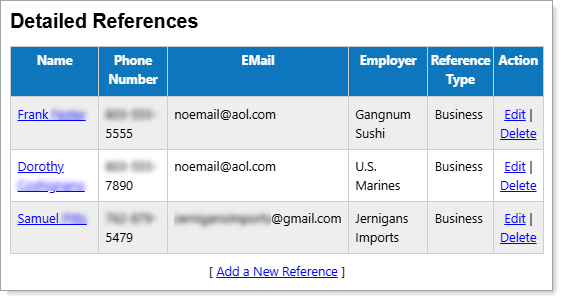
Personal Profile – Background Tab – Résumé Detailed References Section
Where to Find This Feature
-
Profile icon on the header bar > Background Tab > Résumé Items > Detailed References
-
Left navigation menu > Quick Menu > My Portfolio > My Individual Profiles > Personal Profile > Background Tab > Résumé Items > Detailed References
-
Your Username link in the Welcome statement on the dashboard > Background Tab > Résumé Items > Detailed References
Steps to Manage Your Detailed References
-
To view or modify reference details, select the [Reference] link in the Name column or the Edit link in the Action column.
-
To remove a reference, select the Delete link in the Action column and select the OK button on the confirmation pop-up.
-
To add or modify a record, select the Add a New Reference link to display the Detailed References page. See Add or Edit Résumé Detailed References for details.
Best Practices
-
Ask Permission First – Always get consent before listing someone as a reference online.
-
Choose Wisely – Prioritize managers, mentors, or colleagues who can speak specifically about your contributions.
-
Keep It Professional – Stick to references that reinforce your career goals, not personal contacts.
-
Quality Over Quantity – A few strong endorsements carry more weight than a long list of vague references.