
 Left Navigation Menu












Explore Your Personalized Job Matches
Overview
The Personalized Job Matches section on My Dashboard provides quick access to current jobs based on a selected category, such as your recent searches or your desired occupation. Job matches are presented in a rotating carousel that displays the job summary and links to indicate interest.
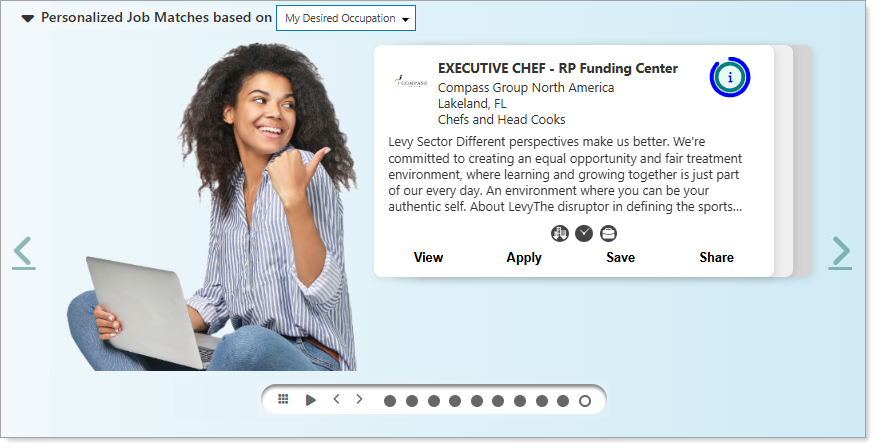
Personalized Job Matches Section on Dashboard
Where to Find This Feature
-
My Dashboard > Personalized Job Matches section
About Personalized Job Matches
Your site may display different options from those shown here.
The following table describes the options available in this section.
|
To... |
Do This: |
|---|---|
| See how well you match | Hover over the match icon to view your match percentages for general requirements, skills, and specialized requirements. |
| View job characteristics | Hover over the icons under the summary description to display the job characteristics. |
| View or apply for a job | Select the [job title], View or Apply links to open the Job Details page, where you can see all the information about the job and apply for it if you wish. See Apply for Jobs for details. |
| Save a job | Select the Save link to save the job to the Saved Jobs tab in your Employment Plan Profile. The link in the Carousel changes to Remove to remove the job from your Saved Jobs list, if desired. See Save Jobs as Favorites for additional information. |
| Share a job | Select the Share link to open the Job Details page with a pop-up displayed to Share Jobs on Social Media and Email. |
| Use the carousel controls | You can use the carousel control icons to pause the rotation, change the view, page left and right, and select a panel directly. |
| Collapse/expand the Personalized Job Matches section | Select the arrow to the left of the section title. |