
 Left Navigation Menu












Occupational Licenses, Certifications, and Training
Overview
The Occupational Licenses, Certifications, and Training page allows you to document important professional credentials that enhance your qualifications. The process is designed to be intuitive and efficient, supporting a complete and well-organized presentation of professional achievements. Following a simple set of steps, you can easily add new entries, complete required information, and ensure your credentials are accurately reflected in your profile.
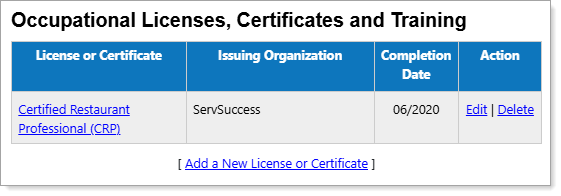
Personal Profile – Background Tab – Occupational Licenses, Certificates and Training Section
Where to Find This Feature
-
Profile icon on the header bar > Background Tab > Occupational Licenses, Certificates and Training
-
Left navigation menu > Quick Menu > My Portfolio > My Individual Profiles > Personal Profile > Background Tab > Occupational Licenses, Certificates and Training
-
[username] link in the Welcome statement on the dashboard > Background Tab > Occupational Licenses, Certificates and Training
-
Steps to Manage Occupational Licenses, Certificates and Training
-
To view occupational licenses, certificates and training record details, select the link in the License or Certificate column.
-
To remove a record, select the Delete link in the Action column.
-
To add or modify a record, select the Add a New License or Certificate or Edit link to display the Occupational Licenses, Certificates and Training Details page. See Add or Edit Occupational Licenses, Certifications, and Training for details.