
 Left Navigation Menu












Access Key Features from the Dashboard Assistant
Overview
One of the most powerful tools available to job seekers is My Dashboard Assistant, which presents helpful features to both guest and registered users.
Guests and registered users can select the Not Sure Where to Start? option to answer a few quick questions about their situation. Based on their responses, they receive personalized suggestions for services and programs that can help them succeed.
Registered individuals receive intelligent suggestions based on their daily activity of things they need to do or routinely do, such as check their messages, perform job searches, manage their résumés and Virtual Recruiters, or contact their local office.
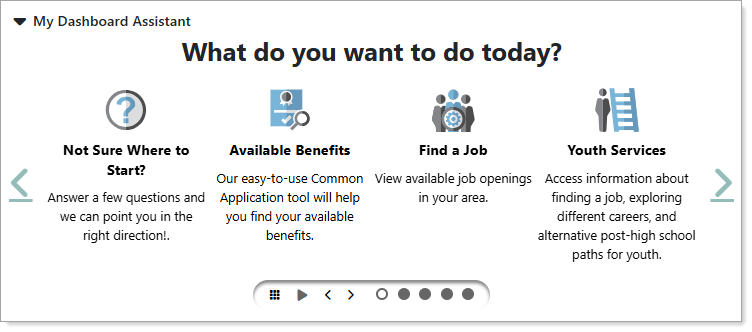
My Dashboard Assistant Section
Where to Find This Feature
-
My Dashboard > My Dashboard Assistant section
About My Dashboard Assistant
From My Dashboard Assistant, you can perform the following:
-
Select an option – Select any of the options to navigate to the information resource; for example, selecting Job Seeker Services displays a menu of options to assist you in securing employment, such as Résumé Builder, Interview Training, Employers Posting Jobs, and more.
-
Change the view – Select the grid icon in the carousel controls to display all of the options at one time on the page. Select the button at the bottom of the section to return to the carousel view.
-
Use the carousel controls – You can use the carousel control icons to pause the rotation, page left and right, and select a panel directly.
-
Collapse the section – Select the arrow next to the section title to collapse or expand the Dashboard Assistant section as needed.
Not Sure Where to Start?
The system is a robust platform offering a wide range of services to meet the needs of many different users. With so many features, links, widgets, and resources available, it’s easy to feel overwhelmed at first. The Not Sure Where to Start? tool gets you pointed in the right direction by assessing your needs and goals with a short questionnaire and providing personalized recommendations for services, programs, and benefits based on your responses.
Steps to Complete the Questionnaire:
-
Select the Not Sure Where to Start? option. The first page introduces the questionnaire and explains it's purpose. Select the Next button to continue to the first question.
-
Answer questions about your age, education level, employment status, income, job hunting challenges, etc. using the option buttons and selecting the Next button after each answer.
-
On the last page, select the View Suggestions button. A personalized carousel similar to the Dashboard Assistant appears, showing service options tailored just for you.
-
Select any of the options to learn more about relevant programs, services, and benefits designed to meet your specific needs.