
 Left Navigation Menu












Monitor Your Progress with Your Statistics
Overview
The Your Statistics section provides you with summary information about your activities in the system.
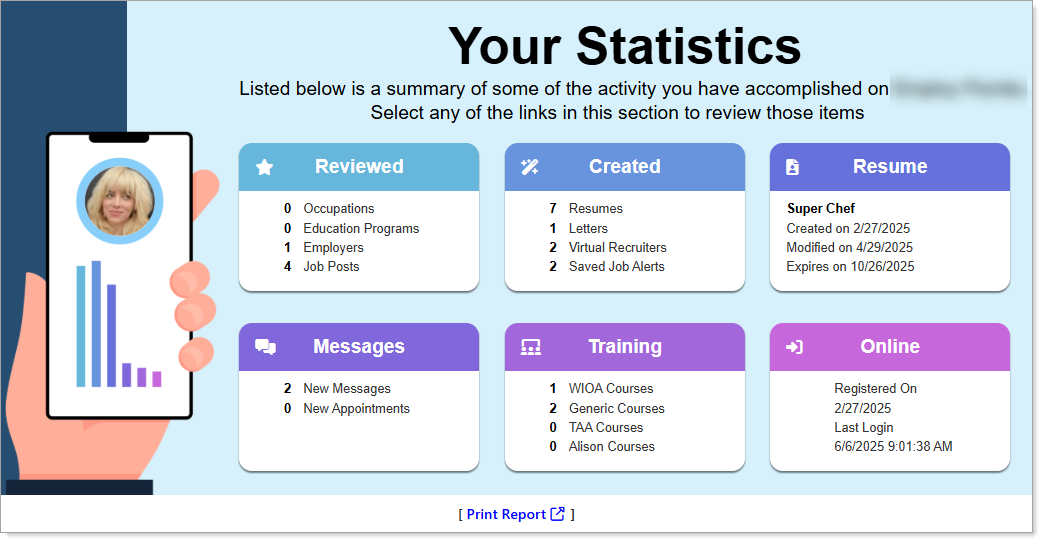
Your Statistics
Where to Find This Feature
-
My Dashboard > Your Statistics section
-
Left navigation menu > My Dashboard > Your Statistics section
About Your Statistics
Your Statistics tracks key education, training, and job hunting activities. You can view detailed information about the corresponding activity by selecting links in the cards; for example, selecting the Résumés number link on the Created card opens the Résumés tab of your Employment Plan Profile.
In the Your Statistics section, you can view information about:
-
Reviewed – Select a [number] link to display details for Occupations, Education Programs, Employers, or Job Posts you have viewed.
-
Created – Select a [number] link to display your résumés, letters, Virtual Recruiter job alerts, and saved jobs.
-
Résumé – Select the résumé title link to display the Résumés tab of your Employment Plan Profile, where you can create and manage your résumés.
-
Messages – Select a New Messages [number] link to display your Inbox on the Messages tab of your Communications Profile, or select a New Appointments [number] link to display your Appointment Calendar.
-
Training – Select a [number] link to display details for WIOA Courses, Generic Courses, TAA Courses, or Alison Courses in your Training Plan Profile.
-
Online– Shows your registration date and the last time you logged in to the system.